
Using Exubee
Exubee is Stayantra's AI assistant. It watches your bookings, prices, tasks, reviews and campaigns, and suggests what to do next: raise a rate, charge a guest who did not arrive, send a cleaner, hold back a low rating. You decide. By default nothing Exubee proposes happens until a person approves it. This way of working is called Co-Pilot.
Once Exubee has proved itself in one area — for example, its price suggestions have matched your decisions for months — the owner can let that area act on its own. That is Auto-Pilot. The owner can stop it at any time with the kill switch.
Where to find it:
| Page | In the sidebar | Who can use it |
|---|---|---|
| Exubee — the suggestions queue | Exubee (near the top) | Owners and managers |
| The chat panel | The EXUBEE strip on the right of every page | Everyone, when the hotel has the Co-Pilot add-on |
| Approvals — discounts, refunds and other money requests | Front Desk → Approvals | Owners and managers |
| Autonomy — Co-Pilot and Auto-Pilot per area | Insights & AI → Autonomy | Owners (managers can look) |
| Policies — rules Exubee must follow | Insights & AI → Policies | Owners and managers |
| House knowledge — facts about your hotel | Insights & AI → House knowledge | Owners and managers |
Co-Pilot and Auto-Pilot
Exubee's work is split into areas (the product also calls them streams): Pricing, Marketing, Staff (payroll), Operations (tasks and rooms), Triage (complaints), Events, Reviews and Finance. Each area is on its own setting.
| Setting | What happens to a suggestion | If nobody acts |
|---|---|---|
| Co-Pilot (shown as Exubee) | Waits in the queue until a person approves, edits or rejects it. | It lapses and is cancelled, usually after 24 hours. |
| Auto-Pilot | Waits for a short hold (at least one hour, longer if the owner sets it), then runs itself. | It runs. Rejecting it during the hold is the only way to stop it. |
Every area starts on Co-Pilot. An area can move to Auto-Pilot only when it has earned it and the owner signs it on — see Autonomy.
The Exubee page
The Exubee page lists everything waiting on you: suggestions Exubee made, actions queued on Auto-Pilot, and anything a fresh price scan turns up. The same queue appears on the owner and manager overview, under Waiting on you.
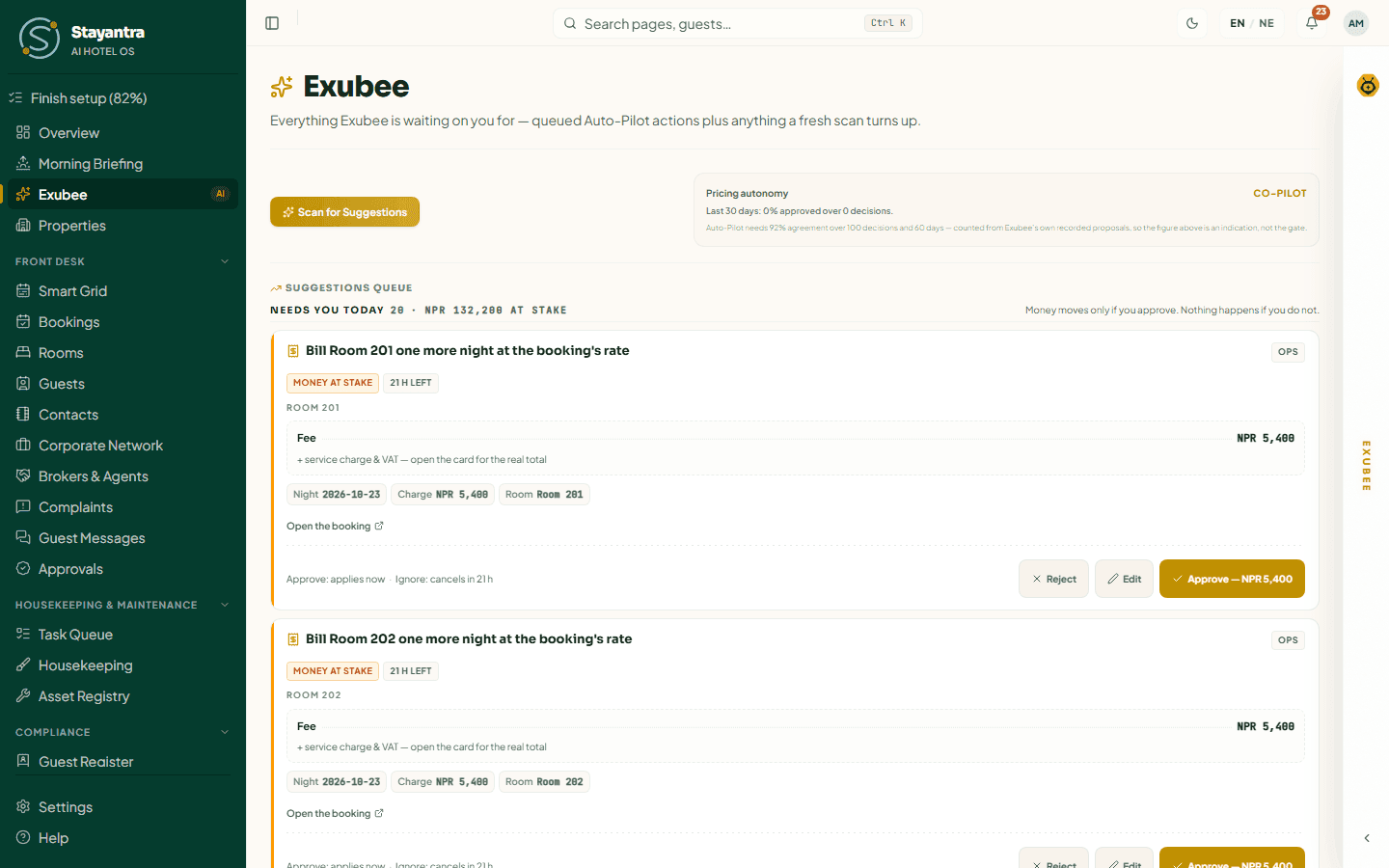
The queue
Suggestions are grouped by how urgent they are:
| Group | What it means |
|---|---|
| Runs itself | On Auto-Pilot. "Exubee acts when the window closes. Rejecting is the only thing that stops it." |
| Needs you today | "Money moves only if you approve. Nothing happens if you do not." |
| Waiting on you | A decision is owed; nothing runs on its own. |
| For your information | Things the nightly check noticed. Nothing acts on them. |
Use the chips above the queue to show one area at a time (All streams, Pricing, Ops and so on), or only Queued by Auto-Pilot or From this scan. The queue refreshes itself every 30 seconds.
Read a suggestion card
Each card says in plain words what approving does, for example "Raise the Deluxe rate", "Charge Liam Carter for not arriving" or "Send the room cleaning to Rosa Alvarez". It shows:
- the area it belongs to (for example pricing) and a chip such as Money at stake and the time left (24 h left);
- the change itself — for a price, the old price, the new price and the percentage;
- up to three facts behind it, and a link to where it lives (Rate plans, Open the booking);
- a footer line, for example "Approve: applies now · Ignore: cancels in 24 h".
Owners and managers also get a morning email listing what is still waiting here, when anything is.
Click the card's title to open the full detail: What approving does, Why now, Impact, If you do nothing, This hotel's history with proposals like this, and Exubee's reasoning.
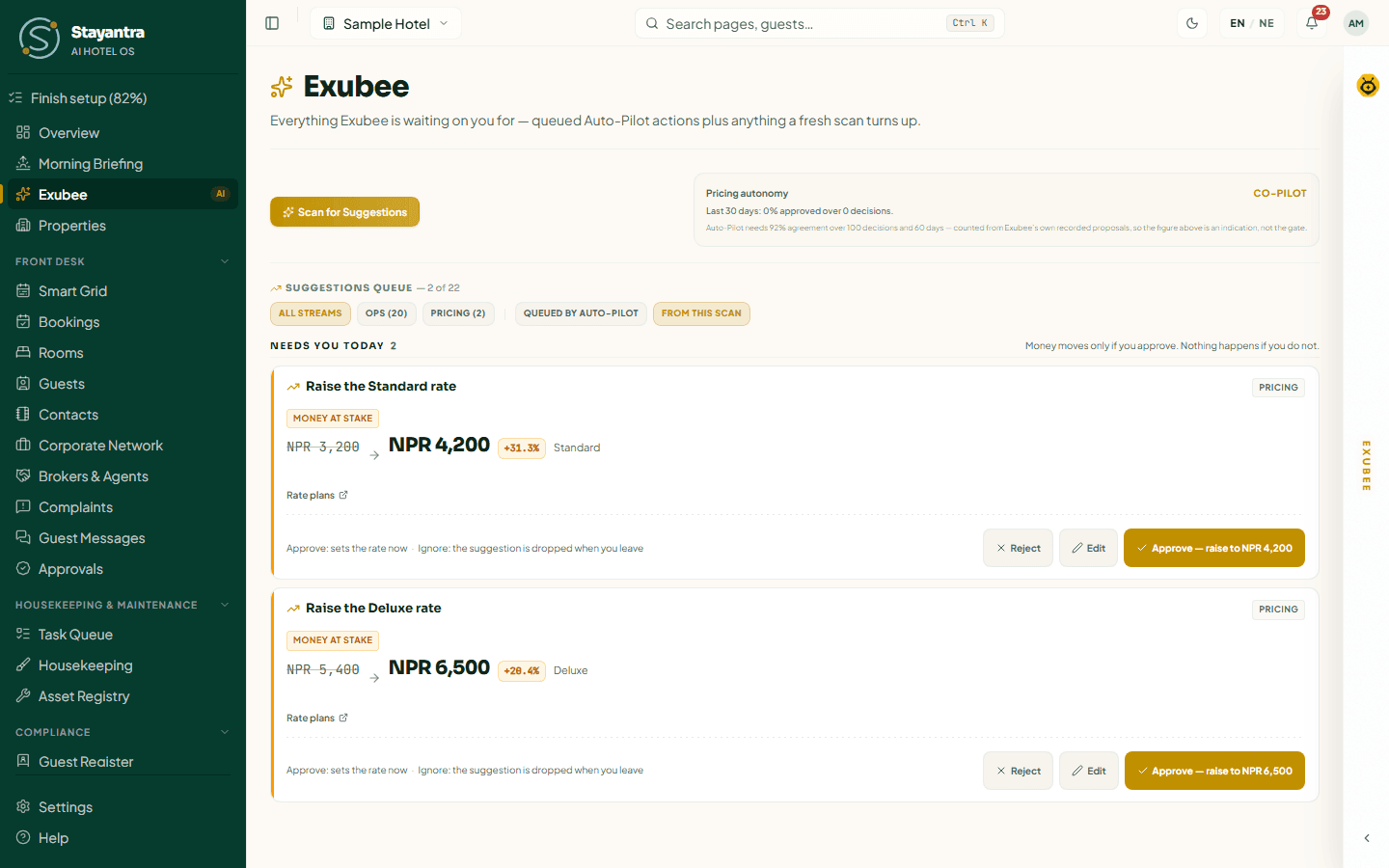
Decide
| Button | What it does |
|---|---|
| Approve — … | The button names the result, for example Approve — raise to NPR 4,200. It asks "Approve this suggestion?"; add a note if you like and confirm. The change happens straight away. |
| Edit | Opens Change this before approving. Change the value (a price, a fee, a priority, the campaign text) and say Why are you changing this?, then Save & Approve. Fees can only be lowered. |
| Reject | Asks Why are you rejecting this?: Too Aggressive, Wrong Timing, Wrong Target, Factually Wrong or Other (Other needs a note). Then Confirm Reject. |
| Acknowledge | For For your information items: clears it from the queue. |
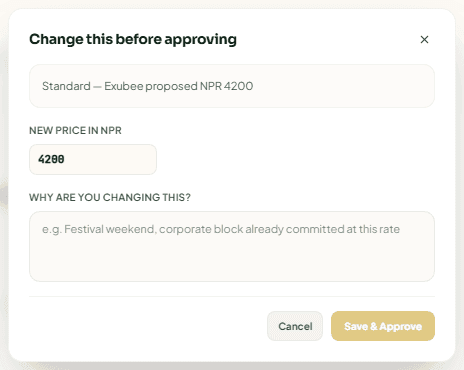
Your reasons and edits are how Exubee learns: they become policies. An edit never counts as agreement when Exubee's record is measured.
[!NOTE] Approving a marketing campaign here signs off the words only. Nothing is sent until someone publishes it on Marketing.
Scan for price suggestions
Press Scan for Suggestions to ask Exubee to price the next 30 nights for each room type, using occupancy, market events and competitor prices. While it works you see "Exubee is scanning occupancy velocity and proposing optimizations...". Each room type it would change becomes a card.
Cards from a scan live only in your browser: if you leave the page without deciding, they are dropped. If the scan finds nothing, it says so: "Scan finished: Exubee suggested no new price changes."
The Pricing autonomy box beside the button shows whether pricing is on Co-Pilot, Eligible or Auto-Pilot, and how often you approved Exubee's price suggestions in the last 30 days. Only the owner sees the figures. What happens after a price is approved, and the limits every price must stay within, are in Dynamic pricing with Exubee.
When the queue is empty
"Nothing waiting for your approval — The Auto-Pilot queue is empty. Run a scan to ask Exubee for new pricing ideas."
Chat with Exubee
The chat panel, Exubee Cockpit, is on the right of every dashboard page. Click the EXUBEE strip to open it. The panel remembers whether you left it open.

The tabs at the top are separate conversations. You see only the ones your role allows:
| Tab | Who sees it | What to ask |
|---|---|---|
| Assistant | Everyone | Day-to-day questions: "Who is free to clean rooms?", "Show occupancy rate trend", "Dispatch housekeeping for room 101". |
| Pricing | Owners and managers | Price analysis: "Recommend standard room price". |
| Marketing | Owners and managers | Posts and OTA listing text: "Generate a Dashain social media post". |
| Events | Staff who take bookings | Banquet quotes and enquiry follow-ups. |
Type in Ask Exubee... and press send. You can also:
- press the microphone to speak (up to 60 seconds) — your words are typed into the box for you to check before sending;
- press the paperclip to attach a document (PDF, DOCX, CSV, XLSX, TXT, JSON, MD) or up to three photos (JPEG, PNG, WebP), up to 25 MB each — for example a supplier's price list.
What Exubee can change from the chat. Answers and reports change nothing. When you ask it to do something — reassign a task, change a shift, set a room's status, post a charge to a folio, add a contact, request a purchase — it prepares the change as a suggestion. Price, task and booking suggestions appear as a card in the chat with Approve, Edit and Reject; others go to the queue on the Exubee page. Nothing changes until someone with the right permission approves it.
Each tab keeps its own history, on this device and on the server. The bin icon clears the current tab's conversation for good ("Clear this conversation?" → Clear conversation). Exubee reads the most recent 20 messages of a conversation.
[!IMPORTANT] The chat panel is part of the Co-Pilot add-on. Without it the panel is not shown, but suggestions, the Exubee page and approvals keep working. Add it in Finance → Plan & Billing.
If you send messages very quickly you may see "Too many messages too quickly — Exubee is rate-limited. Wait about a minute, then try again."
Approvals
Approvals is for requests from your own team that need a senior person: a discount above a clerk's limit, a refund above the cashier's limit, a supplier bill or purchase above the owner's limit, a stock adjustment, or a change an outside AI assistant asked to make. Exubee's own suggestions are on the Exubee page, not here.

You see only the requests your role may decide. Each card shows the type of request, who asked and when, the folio or order, the amount (Proposed Discount, Proposed Refund, Payment Amount), why it needs approval (for example "Above the cashier's limit per refund"), the requester's note, and "Expires … if nobody decides it".
Read the request
Check the amount, the reason and the note. Open the booking from its folio if you need more.
Decide
Press Approve or Reject. Approve request confirms. To reject, choose a reason (Too Aggressive, Wrong Timing, Wrong Target, Factually Wrong, Other) and press Reject request.
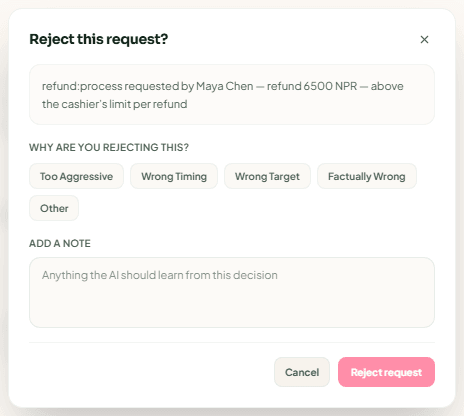
- The person who made the request is told the outcome, and the discount, refund or payment goes through when approved.
- A purchase with a price or duplicate warning needs a note when you approve it anyway: Why approve anyway, then Approve anyway.
- An expired request disappears from the list and can no longer be decided. The requester is told it expired and that nothing was carried out.
"Queue Clear — No approval requests are waiting on you right now." means there is nothing to do. If the list cannot load, the page says so plainly — it never shows an empty queue by mistake.
The limits that decide what needs approval (for example, how large a discount a front-desk clerk may give) are set in Settings.
Autonomy
Autonomy shows, for each area, what Exubee has earned and what it may do on its own. Managers can read it; only the owner can change anything.
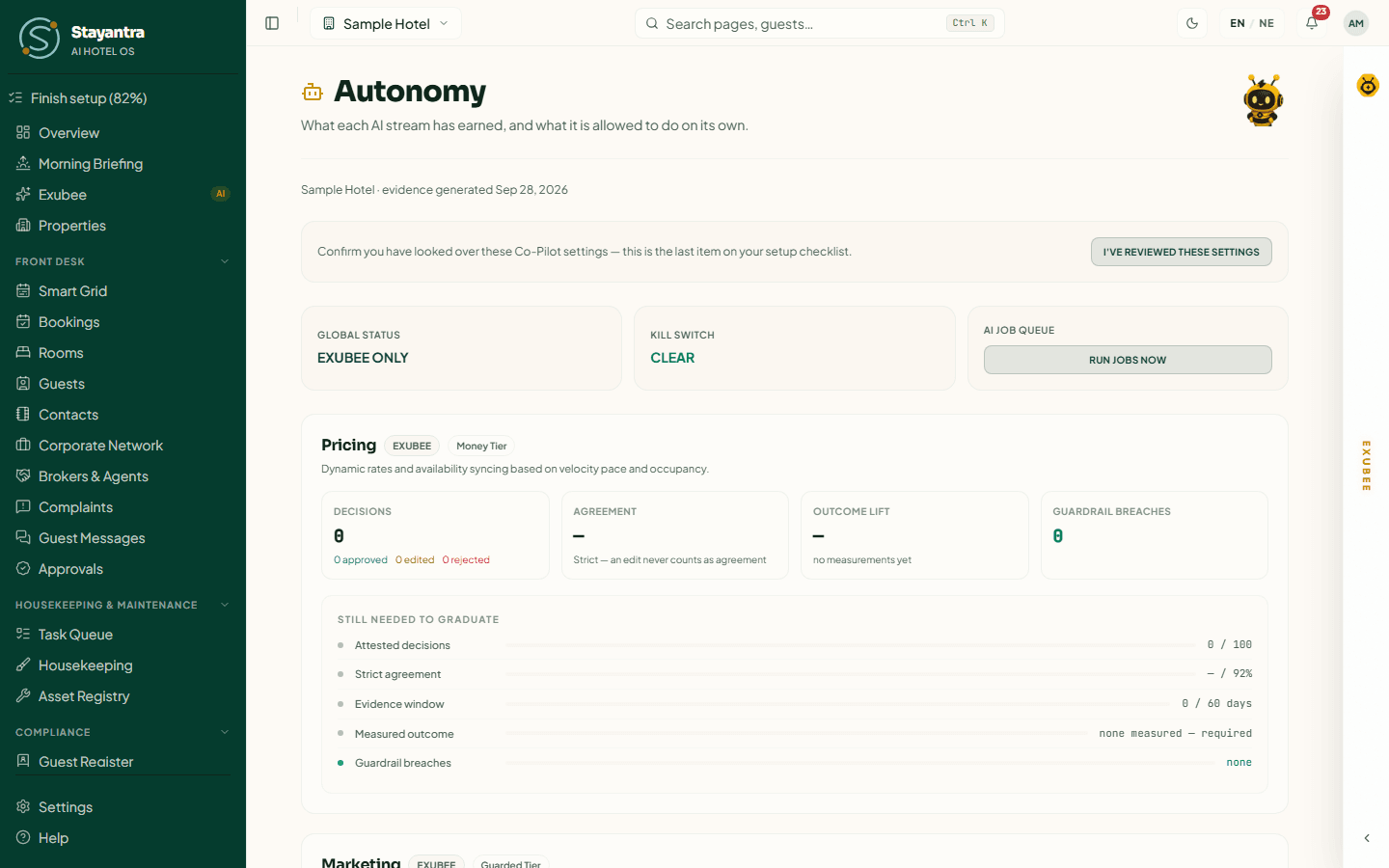
The top of the page
| Tile | What it shows |
|---|---|
| Global status | Auto-Pilot active if any area is on Auto-Pilot, otherwise Exubee only. |
| Kill switch | Clear, or Halted when the kill switch is on. |
| AI job queue | Run jobs now runs waiting background work straight away. |
Each area's card
- The state: Exubee (Co-Pilot), Ready to graduate, or Auto-Pilot, and the tier: routine, guarded or money.
- Decisions (approved, edited, rejected), Agreement ("Strict — an edit never counts as agreement"), Outcome lift (whether results improved) and Guardrail breaches.
- Still needed to graduate: how far it is from each threshold.
| Tier | Areas | To graduate |
|---|---|---|
| Routine | Operations, Triage, Reviews | 85% agreement over 30 decisions and 30 days, and no negative outcome |
| Guarded | Marketing, Events | 90% agreement over 20 decisions and 45 days, with a measured good outcome |
| Money | Pricing, Finance | 92% agreement over 100 decisions (Finance 60) and 60 days, with a measured good outcome |
| Money | Staff (payroll) | 92% agreement over 45 decisions and 90 days, with a measured good outcome |
Every tier also needs zero guardrail breaches. Holding back a low review rating never runs on Auto-Pilot.
Move an area to Auto-Pilot (owner)
Wait for "Ready to graduate"
A daily check measures each area. When every threshold is met, the card shows Ready to graduate.
Activate
Press Activate Auto-Pilot. Read the Concept form & legal sign-off, tick the box — you accept responsibility for the area's actions, and it is billed each month at the Auto-Pilot price while it is on (no activation fee) — and type your full name under Authorized digital signature.
Sign
Press Sign & activate. The page shows "Autonomy successfully activated".
Press Reject instead to turn the recommendation down (Reject recommendation).
Take an area off Auto-Pilot
- Revert to Exubee moves it back to Co-Pilot.
- Flag Agent Error is for a specific mistake: pick Which action was wrong?, describe it under What was wrong with it?, and press Flag and return to Exubee. The area must earn Auto-Pilot again from a fresh start.
- An area also returns to Co-Pilot on its own if its Autonomy quality (30d) falls below 80%, or if a guardrail is breached.
Your Auto-Pilot limits (owner)
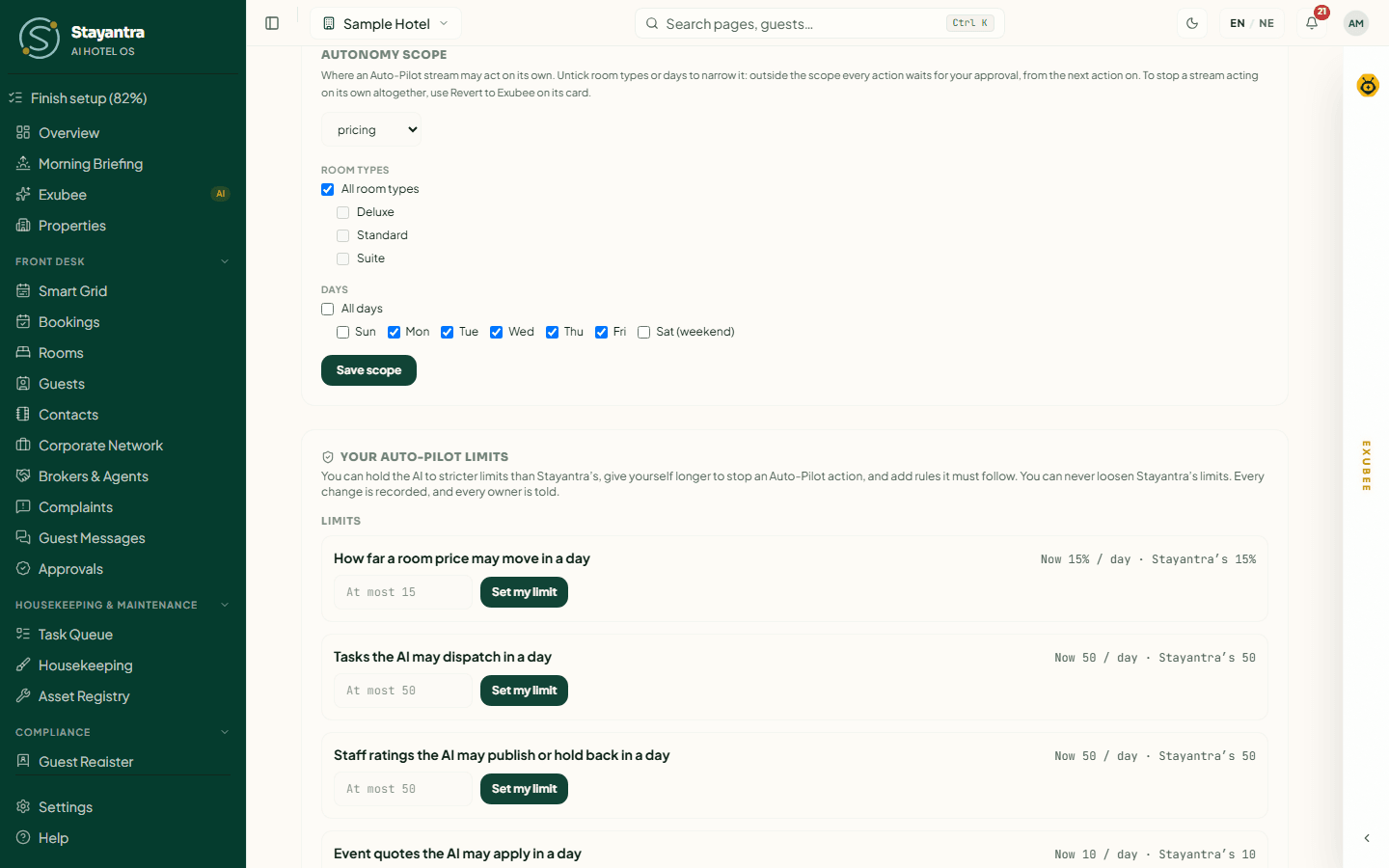
Lower on the page, the owner can hold Exubee to tighter limits than Stayantra's:
- Money This Hotel Can Approve — the most the hotel can approve in each period. Once a period's total would pass the figure, an approval is refused and whoever approved it is told why. Press Save limit.
- Autonomy Scope — the room types and weekdays where an area may act on its own. Outside the scope, every action waits for approval. Press Save scope.
- Your Auto-Pilot Limits — for example How far a room price may move in a day (15% unless you lower it) or Tasks the AI may dispatch in a day. Enter a number and press Set my limit. You can tighten these, never loosen them beyond Stayantra's.
- Time to stop an action — how long Auto-Pilot actions wait before running: 1, 2, 3, 4, 6, 8, 12 or 24 hours.
- Your rules — Add rule for a plain rule Exubee must follow.
Every change is recorded and every owner is told. History lists what changed and when.
The kill switch
The kill switch stops all Auto-Pilot at once. Exubee keeps analysing and keeps suggesting, but every action waits for a person. Only the owner can use it.
Open the control
On the Overview page, in Operations Actions Console, press Activate Kill Switch.
Confirm
The panel AI Auto-Pilot Kill Switch Confirmation asks "Halt AI Agent Autonomy?" and explains that all Auto-Pilot operations stop and every future action needs manual approval. Press Click to scan fingerprint to confirm. (It is a confirm button; no fingerprint is actually read.)
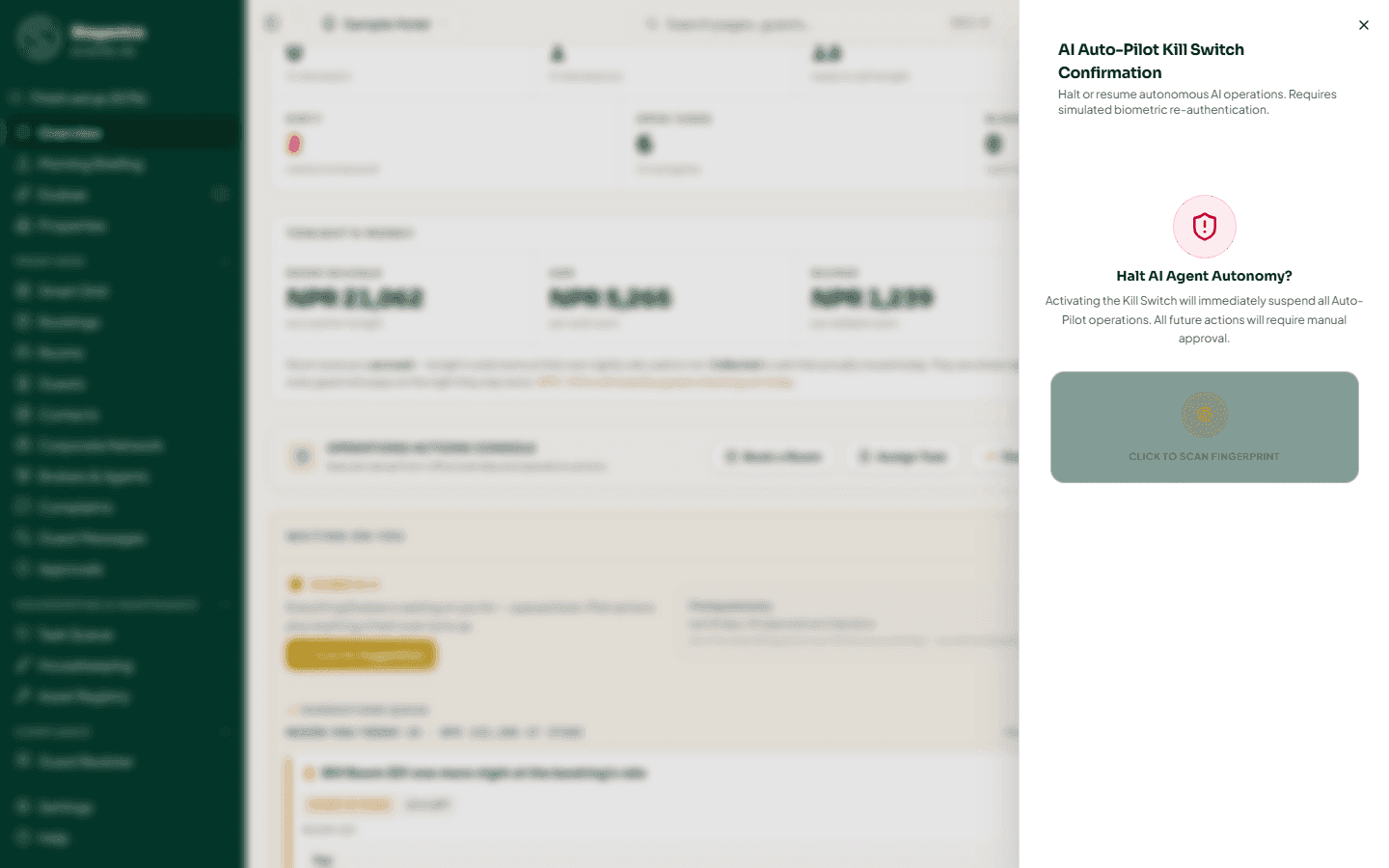
- To stop one area only, open the arrow next to the button (Halt one area) and switch that area from Live to Halted. Anything already queued in that area waits for you instead of running.
- To resume, press Deactivate Kill Switch and confirm "Resume AI Agent Autonomy?".
- While the switch is on, the daily check returns every Auto-Pilot area to Co-Pilot, and background tasks that wait more than about a day are stopped and shown on Ops Health as Paused by kill switch.
- The pill at the top of the overview shows the state: Co-Pilot · every action approved, Auto-Pilot · x of y, N areas halted or Auto-Pilot paused.
Policies
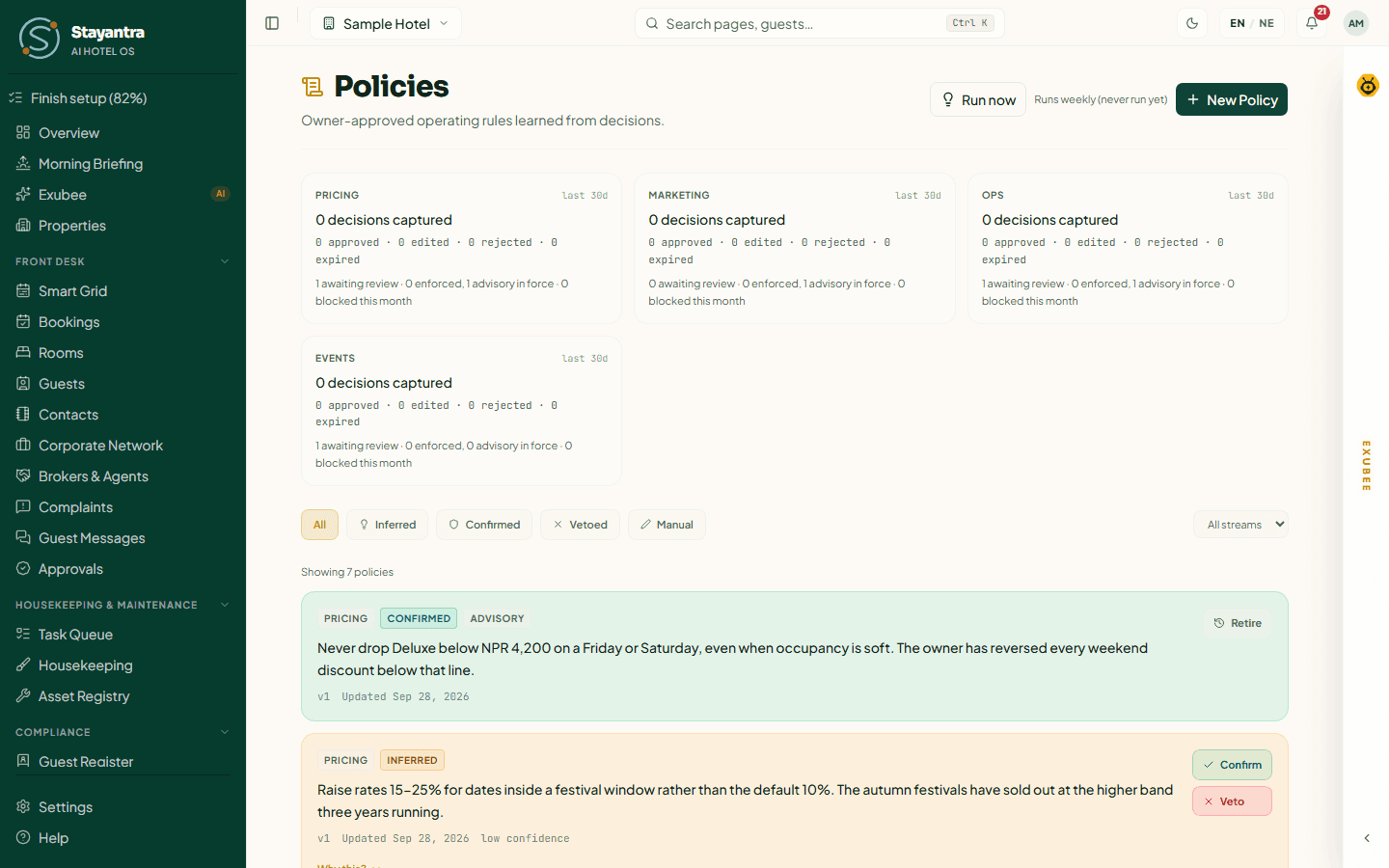
A policy is a rule Exubee must follow. Most are learned: each week Exubee looks at the suggestions your team edited or rejected, and proposes a rule that would have avoided them — for example "Never drop Deluxe below NPR 4,200 on a Friday or Saturday". You can also write one yourself.
Read the page
- The cards at the top show, for each area, how many decisions were captured in the last 30 days and how many policies are awaiting review, enforced or advisory.
- Filter by All, Needs review, Inferred (learned, not yet confirmed), Confirmed, Vetoed and Manual, and by area.
- Each policy shows its area, its status, and whether it is Enforced (checked before any action runs — for example a price floor) or Advisory (given to Exubee as an instruction). Why this? shows the decisions it was learned from.
Decide on a learned policy
- Confirm makes it active.
- Veto turns it down ("Veto this policy?" → Veto policy).
- Retire switches off a confirmed policy ("Retire this policy?" → Retire policy).
Learning runs every week on its own. Run now runs it immediately.
Write your own
Press New Policy, choose the area (Pricing, Operations, Marketing, Reviews, Staff / Payroll, Triage, Events, Procurement or Finance), write the rule in plain language, and press Create.
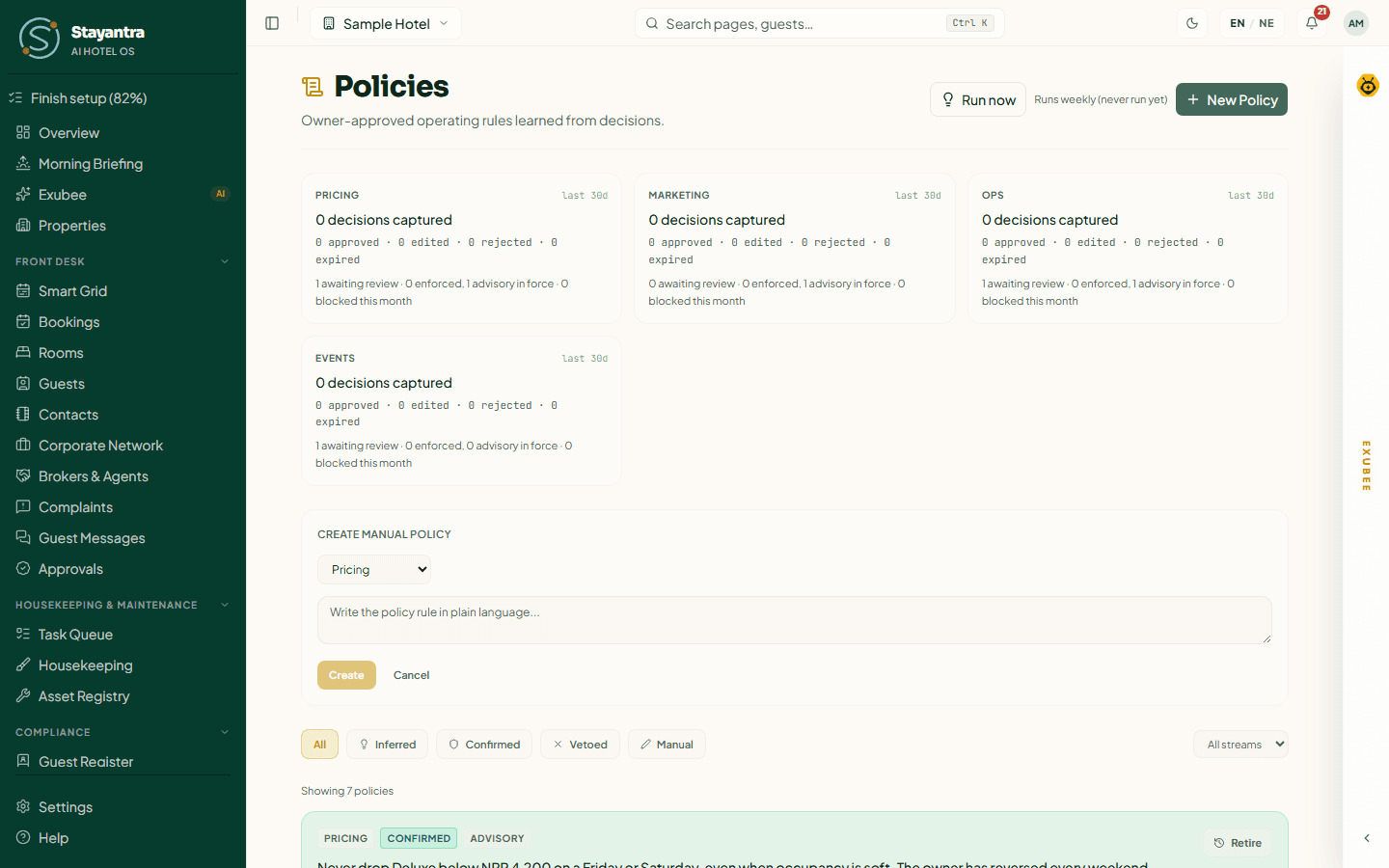
[!NOTE] A policy you write yourself is Advisory: Exubee is told to follow it, but it is not checked automatically. Hard limits — a price floor or ceiling, a maximum number of posts a day, a maximum expense — are enforced when they are learned and confirmed, or when you set them on What You Sell and in Your Auto-Pilot Limits.
House knowledge
House knowledge holds short notes about your property that are not in the data — the things a new manager would have to be told on their first day. Exubee reads them at the start of every piece of work: in chat, in price scans and in background jobs.

Write the note
Type it in the box, for example "The Grand Hall generator runs loud during events — warn guests in Deluxe rooms 210–214 at check-in." Write about the property, never about a guest.
Choose who reads it
Under Applies to, pick Every bee or one area: pricing, ops, triage, marketing, staff or events.
Add it
Press Add note.
Rules for notes:
- 10 to 280 characters. No email addresses, phone numbers or ID numbers — they are refused.
- Up to 5 active notes per area. A note for Every bee uses a place in every area. The chips at the top show how many are used ("1 of 5 for ops").
- Order matters: use Move up and Move down to put the most important first.
- Edit saves a new version and keeps the old wording (shown as "edited N× — see previous wording").
- Retire switches a note off straight away. Notes are never deleted.
AI tokens
Exubee's work is counted in tokens. See Finance → Plan & Billing → AI tokens this month:
- Suggestions & background AI — suggestions, scans, the queue and work that runs on its own.
- Exubee chat — your conversations in the chat panel (needs the Co-Pilot add-on).
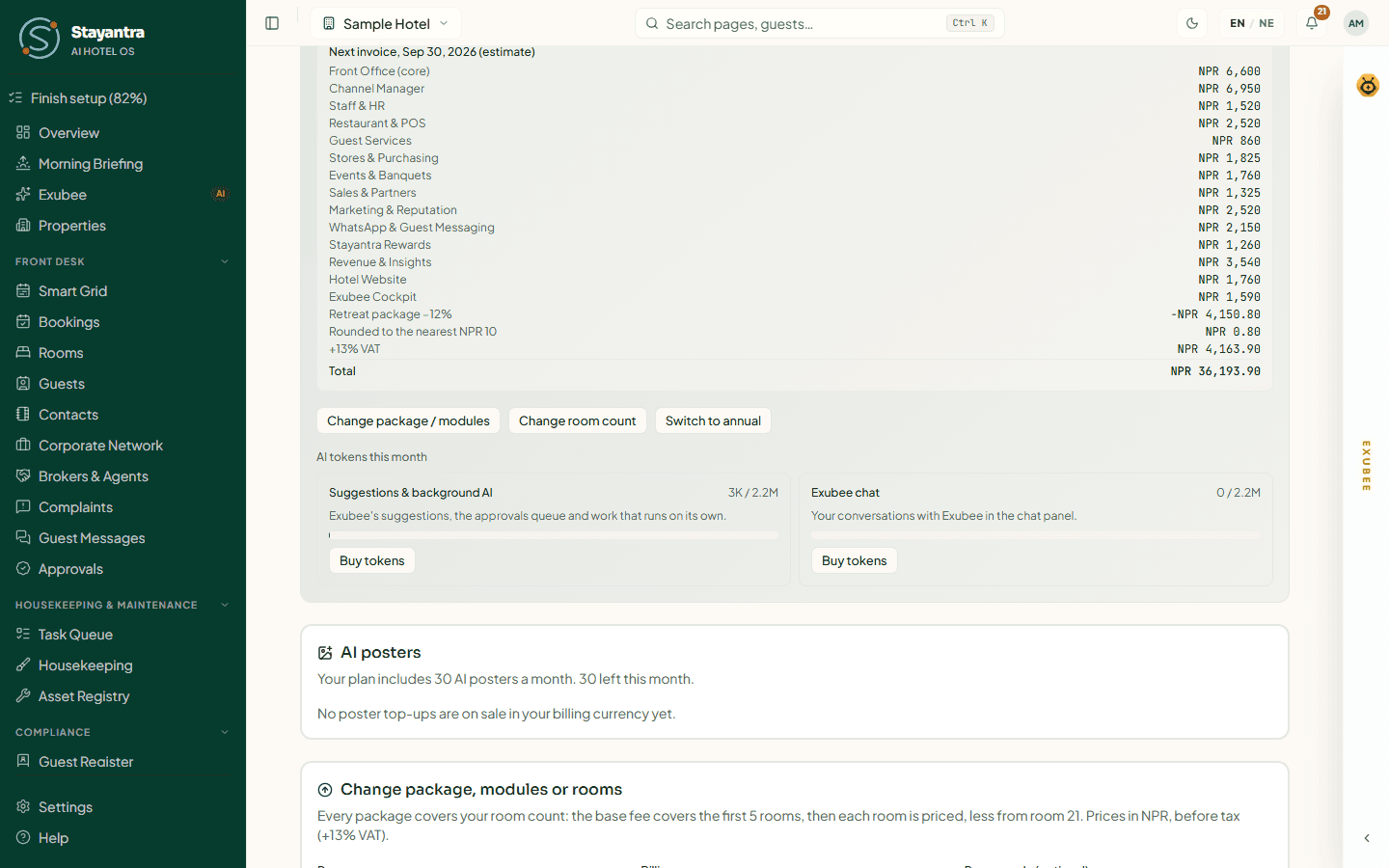
Plan tokens reset on the 1st of each month; top-ups the owner buys (Buy tokens) roll over until used. The two meters cannot borrow from each other. The owner is told at 90% and when a meter runs out. When suggestions run out, scans stop until a top-up or the new month; approvals already in the queue keep working. See Plans and billing.
Troubleshooting
| What you see | What to do |
|---|---|
| No EXUBEE strip on the right | The hotel does not have the Co-Pilot add-on. Suggestions and approvals still work. |
| "This month's AI tokens for suggestions are used up" | The owner buys a top-up in Plan & Billing, or wait for the 1st. |
| "The scan could not be completed. Nothing was changed" | Try again in a moment. |
| A suggestion disappeared | It lapsed after its window (usually 24 hours) with no decision, or someone else decided it. |
| "Pricing autonomy status is not available to this account" | Only the owner sees the pricing figures. |
| Activate Auto-Pilot is missing | The area has not met its thresholds yet, or you are not the owner. |
| "All 5 … notes are in use" | Retire a note in that area first. |
| "Remove what looks like a phone or ID number" | House notes cannot contain personal details. |
Related
- Revenue management — prices, market events, competitors
- Marketing — campaigns Exubee drafts
- Guest reviews — replies Exubee drafts and Review Quarantine
- Reports and analytics — the Health score and Ops Health
- Teach Exubee about your hotel
Complaints
Guest complaints in one queue — how serious each one is, Exubee's triage recommendation, who follows up, and how to resolve it.
Reports and analytics
Occupancy, ADR, RevPAR and revenue reports you can download, the Analytics tabs, the Health score, and Ops Health for scheduled jobs and stuck automations.