
Smart Grid
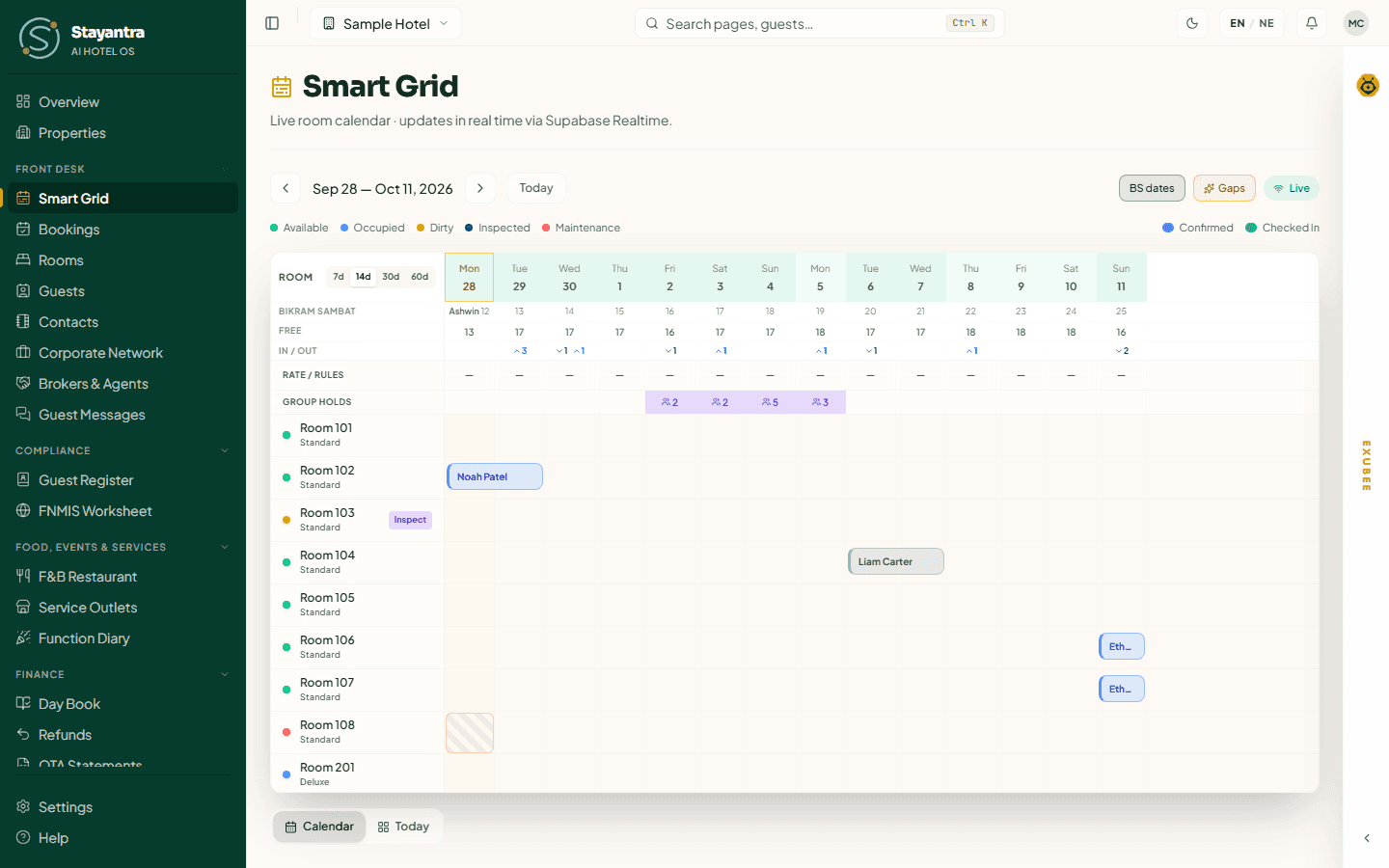
The Smart Grid is the front desk's main screen: every room down the side, every night across the top, and each booking drawn as a bar from check-in to check-out. Use it to answer "can I sell the 14th?", to take a booking straight into a free room, to move a guest, and to take a room out of service. A second view, Today, shows what is happening in the building right now.
Where to find it: Front Desk → Smart Grid. Who can use it: owners, managers and front desk staff. What you can change depends on your role — see Who can do what.
Read the grid
The toolbar
| Control | What it does |
|---|---|
| ‹ and › | Move the calendar back or forward by the number of days on screen. |
| Date range | The first and last night shown, for example "Sep 28 — Oct 11, 2026". |
| Today | Jumps back so the calendar starts today. |
| BS dates | Shows or hides the Bikram Sambat (Nepali calendar) row under the dates. On by default. |
| Gaps (n) | Shows or hides unsold gaps between bookings (see Fill empty gaps). The number is how many gaps are on screen. On by default. |
| Live / Reconnecting | Live means the grid updates itself the moment a booking changes anywhere — another desk, the website, an OTA. It flashes when an update arrives. Reconnecting means the live link dropped; the grid still reloads itself every few minutes, and whenever you come back to the tab. |
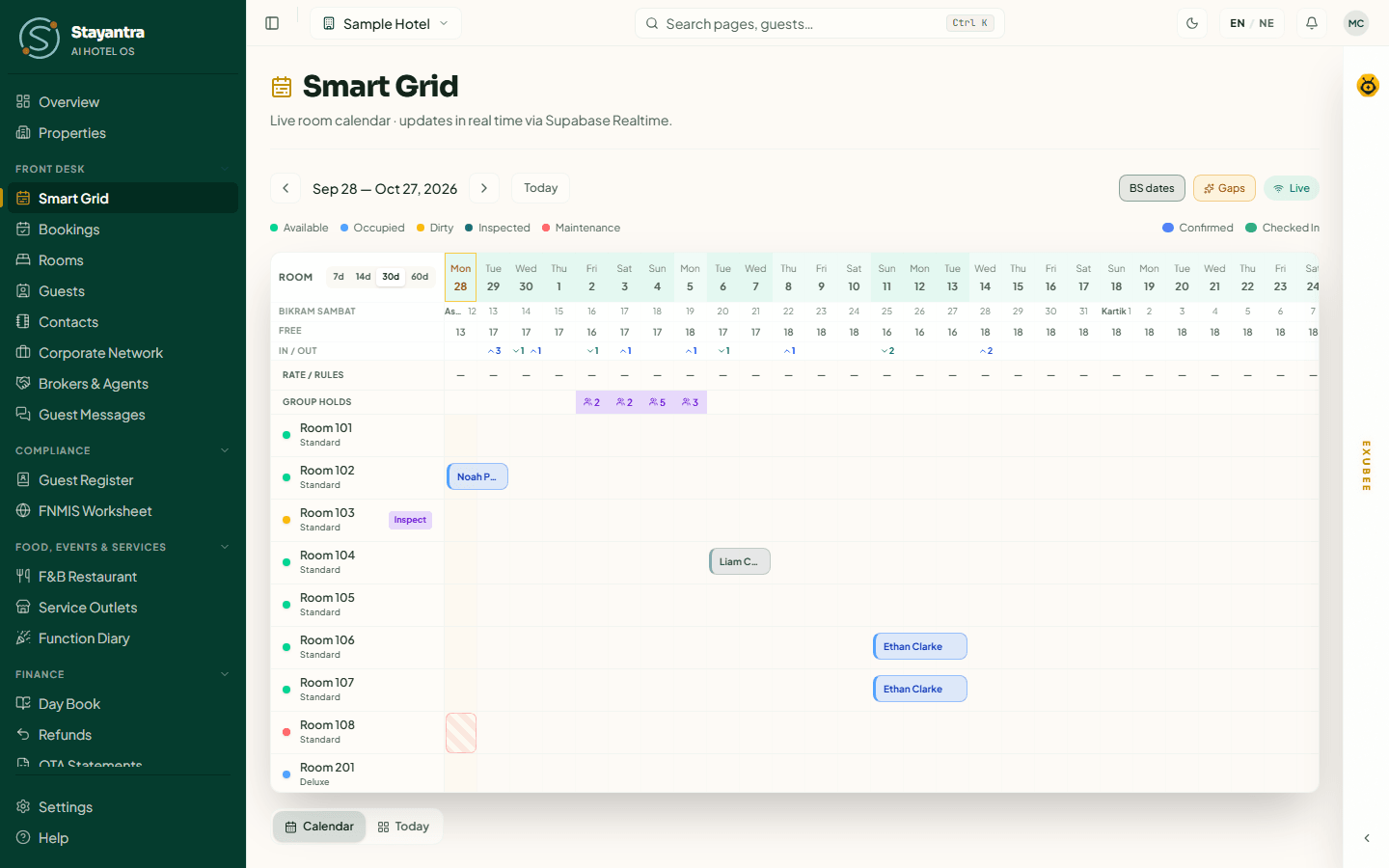
Next to Room in the corner, 7d, 14d, 30d and 60d set how many nights the grid shows. The grid opens at 14 days. At 60 days the columns are narrow, so weekday names and the Bikram Sambat row are hidden.
The rows at the top
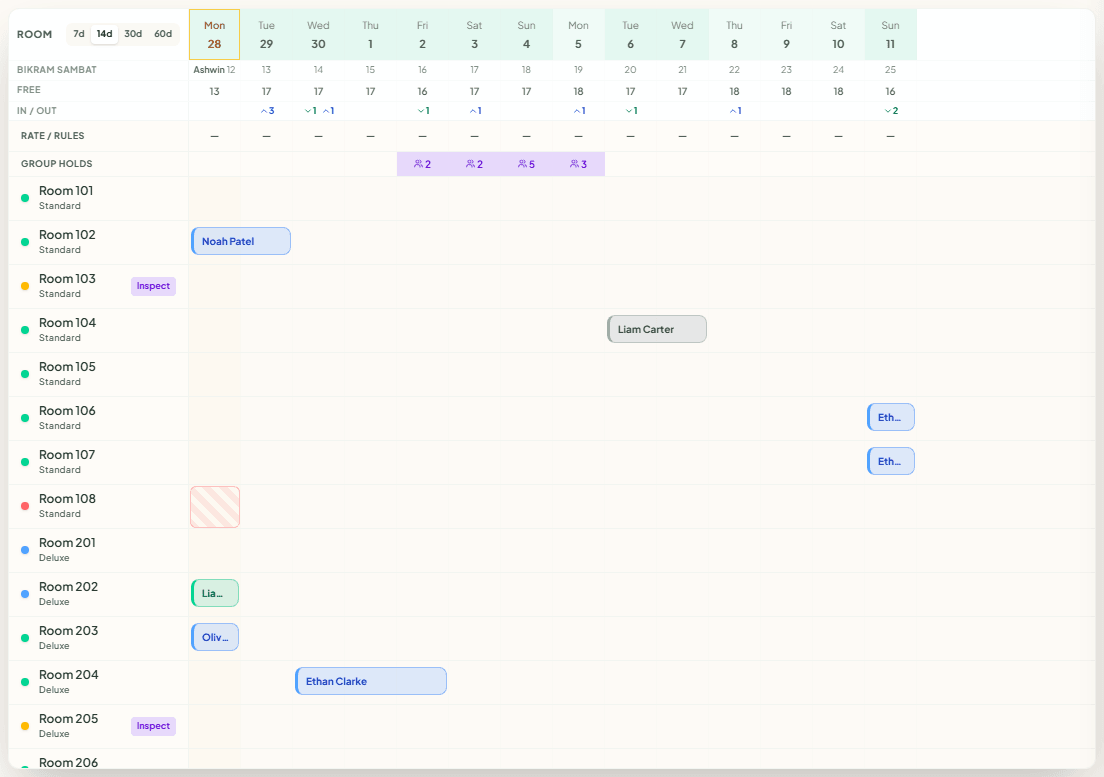
| Row | What it means |
|---|---|
| Dates | Weekday and day of the month. Today has an amber outline. The shading is how full that night is — darker is fuller. |
| Bikram Sambat | The same night in the Nepali calendar. The month name appears where the month changes. |
| Free | Rooms still free that night. 0 in red means sold out. |
| In / Out | Arrivals (green, down arrow) and departures (blue, up arrow) that day. A quiet day is left blank. |
| Rate / rules | Per night: a price if you set a special base rate for that date, otherwise a dash, and the restrictions in force — STOP (stop sell: closed to all bookings), CTA (closed to arrival), CTD (closed to departure), min 3 (minimum stay of 3 nights). Point at a cell to read it in full. Set these in Revenue management. |
| Group holds | How many rooms are held for group blocks that night. This row only appears when you have a group block. Point at a cell to see which group. See Multi-room bookings and groups. |
[!NOTE] The figure in Rate / rules is the night's base rate before length-of-stay and season rules, not always what a guest pays. The grid never guesses a price: a date with no special rate shows a dash.
The legend
The coloured dots at the top show each room's status right now:
| Dot | Status | Meaning |
|---|---|---|
| Green | Available | Clean and free. |
| Blue | Occupied | A guest is checked in. |
| Amber | Dirty | Needs cleaning before the next guest. |
| Teal | Clean — awaiting inspection | Cleaned, waiting for a manager to inspect it. Not ready to sell yet. |
| Red | Maintenance | Out of order today. |
The bars show bookings: blue for Confirmed (not yet arrived), green for Checked In, and grey for any other status — a Pending booking waiting for payment, or a stay that has checked out. A room out of service shows red stripes over the blocked nights. A room with two bookings that overlap is drawn with two lanes, so nothing is hidden.
See a booking
Click a booking bar. A panel opens under the grid with the Guest, Room, Check-in, Check-out, Status, Total and Source (walk-in, phone, Booking.com and so on).
The panel is read-only. To check the guest in, take a payment, print the bill or add a service, click Open booking. See Bookings and folios.
[!TIP] If a click on a bar does not open the panel, open the guest from the Today view below the grid, or from Front Desk → Bookings.
Make a booking from the grid
Drag across the free nights
In the room's row, press on the first night and drag to the last night the guest will sleep. The selection turns blue when those nights are free and red when they are not.
Choose Create booking
A small menu opens with Create booking, Block for maintenance and Cancel. Click Create booking. (You can also use the arrow keys and Enter, or Esc to close.)
Finish the booking form
The New Booking form opens with the room and dates already filled in. Pick the room if you want a different one, then enter the guest and confirm. The steps are the same as in Make a booking.
The new bar appears on the grid as soon as the booking is saved.
Move, extend or shorten a stay
You can change a booking by dragging it.
- Move to another room: drag the bar up or down to another room's row.
- Change the dates: drag the whole bar left or right.
- Extend or shorten: drag the bar's left edge (check-in) or right edge (check-out).
While you drag, a green outline shows where the stay will land; a red outline means those nights are taken. When you let go, nothing has changed yet — a dialog shows the change first:
| Dialog title | When |
|---|---|
| Confirm room move | Same dates, another room of the same type. |
| Confirm room upgrade or downgrade | Another room of a different type. |
| Confirm booking change | The dates changed. |
The dialog lists each change as before → after (Room, Room type, Check-in, Check-out, Nights). Enter a Reason — it is required when the dates or the room type change, and optional for a simple move — then click Apply change.
[!IMPORTANT] Moving a guest to a different room type, or changing the dates, re-prices the stay. The dialog says whether the new room is dearer or cheaper per night, and the difference is posted to the guest's bill automatically.
If someone else booked the room while you were dragging, the dialog says the room is already booked and lists the conflicting booking. Choose another room.
A short tap on a bar opens it; only a real drag proposes a move, so a shaky finger on a touch screen does not move anyone.
Take a room out of service
Use this when a room cannot be sold for some nights — a repair, renovation, deep clean, or the owner staying in it.
Select the nights
Drag across the nights in the room's row and choose Block for maintenance.
Fill in the block
The Block Room 104 dialog opens with your dates filled in.
| Field | What to enter |
|---|---|
| From | The first night that cannot be sold. |
| Until (exclusive) | The day the room is back in use. This day itself is not blocked — a guest may check in that day. |
| Reason | Maintenance, Renovation, Deep clean, Owner use or Other. |
| Notes | Optional details for the team. |
Click Block room.
Deal with guests already booked
If guests are booked in the room for those nights, Stayantra lists them before blocking:
- For a guest who has not arrived, it offers a free room to move them to — "same category, no rate change", or a better room that is "complimentary, hotel absorbs the difference". Click the move, and once every guest is moved, All guests moved — create the block.
- A guest who is already in the room ("in residence") cannot be moved from here. Check them out or shorten the block.
- A manager or owner can choose Block anyway. The booking stays where it is and is flagged as needing someone to handle it.
The block appears across those nights on the grid with its reason, and those nights can no longer be booked. The same dialog lists the room's Scheduled blocks; click the release button next to one to put the room back on sale early.
A room set to Maintenance status with no dated block is off sale for tonight only. The grid shows "Maintenance · tonight" in today's cell. To keep later nights off sale, give the job an expected return date or add a dated block. Room status is explained in Housekeeping and operations.
Mark a room clean
A room's row has a small button when its status can move on:
- Clean on a Dirty room records that it has been cleaned. If your hotel does not inspect rooms after cleaning, the room becomes Available straight away.
- If your hotel inspects rooms after cleaning, the room becomes Clean — awaiting inspection instead, and a manager or owner clicks Pass once they have checked it. Only then is it Available.
Switch inspection on or off with Inspect rooms after cleaning in Settings → Hotel profile → Stay rules. It is off unless you turn it on.
Marking a room clean needs room-status permission: owners, managers, and staff with the housekeeping or maintenance skill. A room becomes Occupied only by checking a guest in, never by a button.
Fill empty gaps
A gap is one or a few free nights stuck between two bookings — too short for most guests, so they usually stay empty. With Gaps switched on, each one shows as a dashed amber box with its length, for example "2N".
Owners and managers can click a gap. Promote this empty gap opens with the room and the nights. Click Draft campaign: Exubee writes a short offer aimed at filling those nights and puts it in Approvals. No advert goes live until a manager approves it. Other staff see the gaps but cannot click them.
The Today view
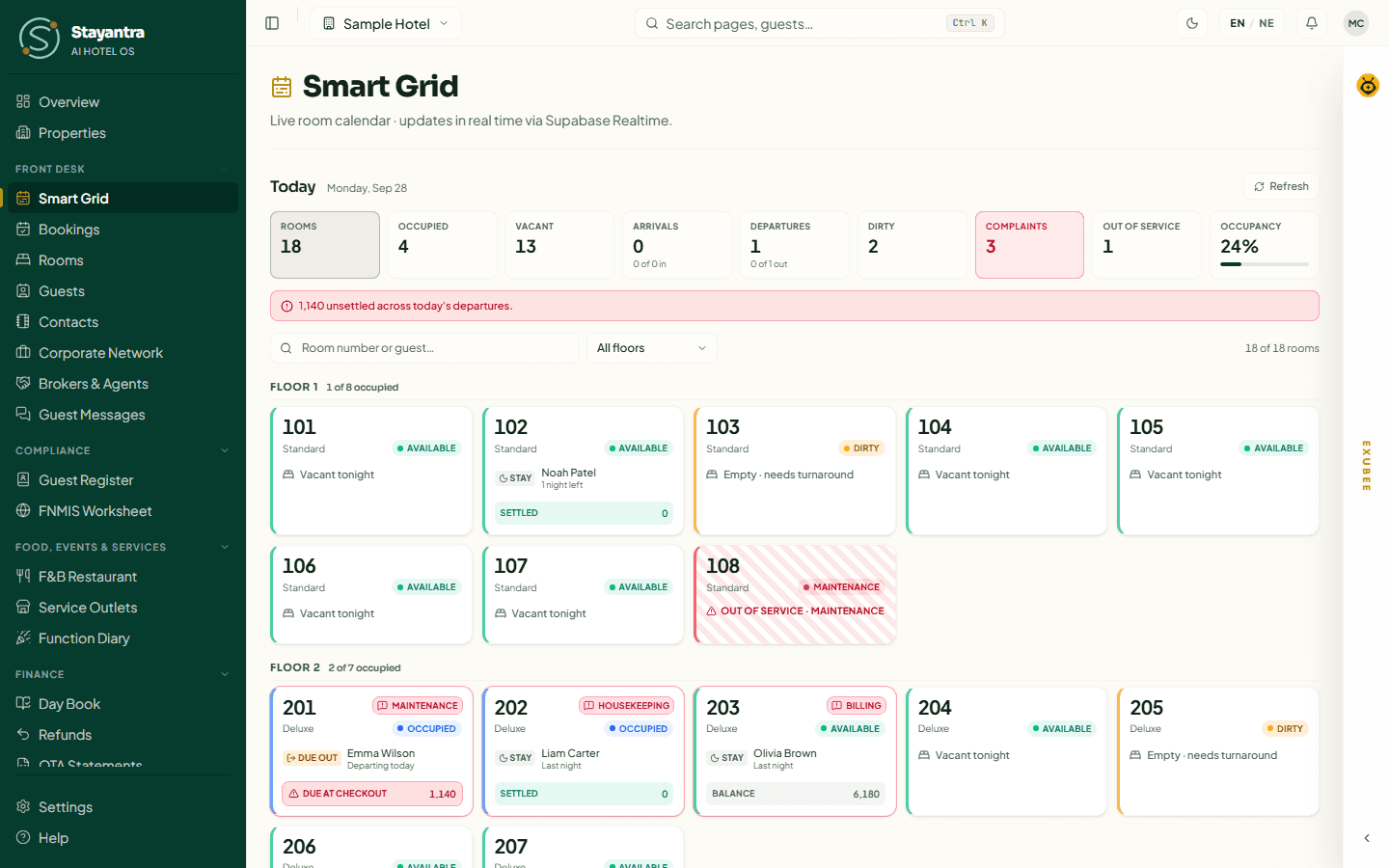
Below the grid, switch between Calendar and Today. Today is a board of every room as it stands now — the view to keep open at reception in the morning.
-
The heading shows today's date and a Refresh button.
-
The count chips — Rooms, Occupied, Vacant, Arrivals, Departures, Dirty, Complaints, Out of service — also work as filters: click one to show only those rooms. Occupancy shows the percentage.
-
Search by room number or guest, and Filter by floor. Clear filter shows everything again.
-
Each room tile shows the room's status and who is in it:
Label on the tile Meaning Due in / In A guest arrives today / has arrived. Due out / Out A guest leaves today / has left. Stay · Last night An in-house guest, and how many nights are left. Overstay (red) The guest is still checked in after their check-out date. Vacant tonight / Empty · needs turnaround No one tonight; the second means it needs cleaning. Balance / Settled / Credit / Due at checkout The state of the guest's bill. Click a guest to open their booking. Click a complaint to open it in Complaints. Housekeeping buttons appear on the tile when that change is allowed — for example Mark clean, and Pass or Send back on a room awaiting inspection.
If the hotel is in Stayantra Rewards, a panel above the board lists member perks that are still to be handed over.
Who can do what
| Action | Owner | Manager | Front desk | Housekeeping / maintenance |
|---|---|---|---|---|
| See the grid and the Today board | Yes | Yes | Yes | By link only |
| Create a booking from the grid | Yes | Yes | Yes | No |
| Drag to move, extend or shorten | Yes | Yes | Yes | No |
| Block a room for maintenance | Yes | Yes | No | Yes |
| Block anyway over existing bookings | Yes | Yes | No | No |
| Mark a room clean | Yes | Yes | No | Yes |
| Pass a room's inspection | Yes | Yes | No | No |
| Draft a promo for a gap | Yes | Yes | No | No |
When something goes wrong
| What you see | Why, and what to do |
|---|---|
| "Add rooms in the Rooms section to see the occupancy grid." | The hotel has no rooms yet. Add them in Rooms and rates. |
| "Failed to load bookings" | The bookings could not be read. Check your connection, dismiss the message and press Today to reload. |
| The drag does nothing | Your role cannot change bookings, or the nights are not free (red outline). |
| "Room 204 is already booked for those dates" | Someone else took the room first. Pick another room. |
| "Could not update the room status." | Your role cannot change room status, or that change is not allowed — for example passing an inspection, which only a manager or owner can do. |
| The indicator says Reconnecting | The live link is down. The grid still reloads every few minutes; reload the page if it stays that way. |