
Plan and billing
Plan & Billing is where you manage your hotel's own Stayantra subscription: which package and modules you have, how many rooms it covers, what the next invoice will be, and how you pay. (Guest money is elsewhere — see Finance.)
Where to find it: in the sidebar, Finance → Plan & Billing.
Who can use it: only the owner and any co-owners. Managers do not see it.

The free trial
Every new hotel starts on a free trial with every module switched on. The trial is 30 days as advertised; Stayantra can extend it up to 90 days. While your business verification is being reviewed, the trial clock pauses.
During the trial the page shows Free trial, "Every module is on during your free trial. Choose your package below before it ends.", and Next invoice: "None during your free trial (ends …)". Nothing is charged.
When the trial ends without a paid plan, the account is frozen: the owner is told "Your free trial has ended" and must choose a plan to restore access. Choose your package before the end date to avoid any gap.
[!IMPORTANT] A paid plan needs verified business documents. You cannot choose a paid plan until Stayantra has approved your business verification (KYC). The package picker shows Open Business verification until then. See Business verification.
Packages and modules
Every plan includes Front Office (core) — bookings, the Smart Grid, rooms, guests, folios and the front desk. On top of it you add modules, either as a package or one by one.
| Package | For | Modules included |
|---|---|---|
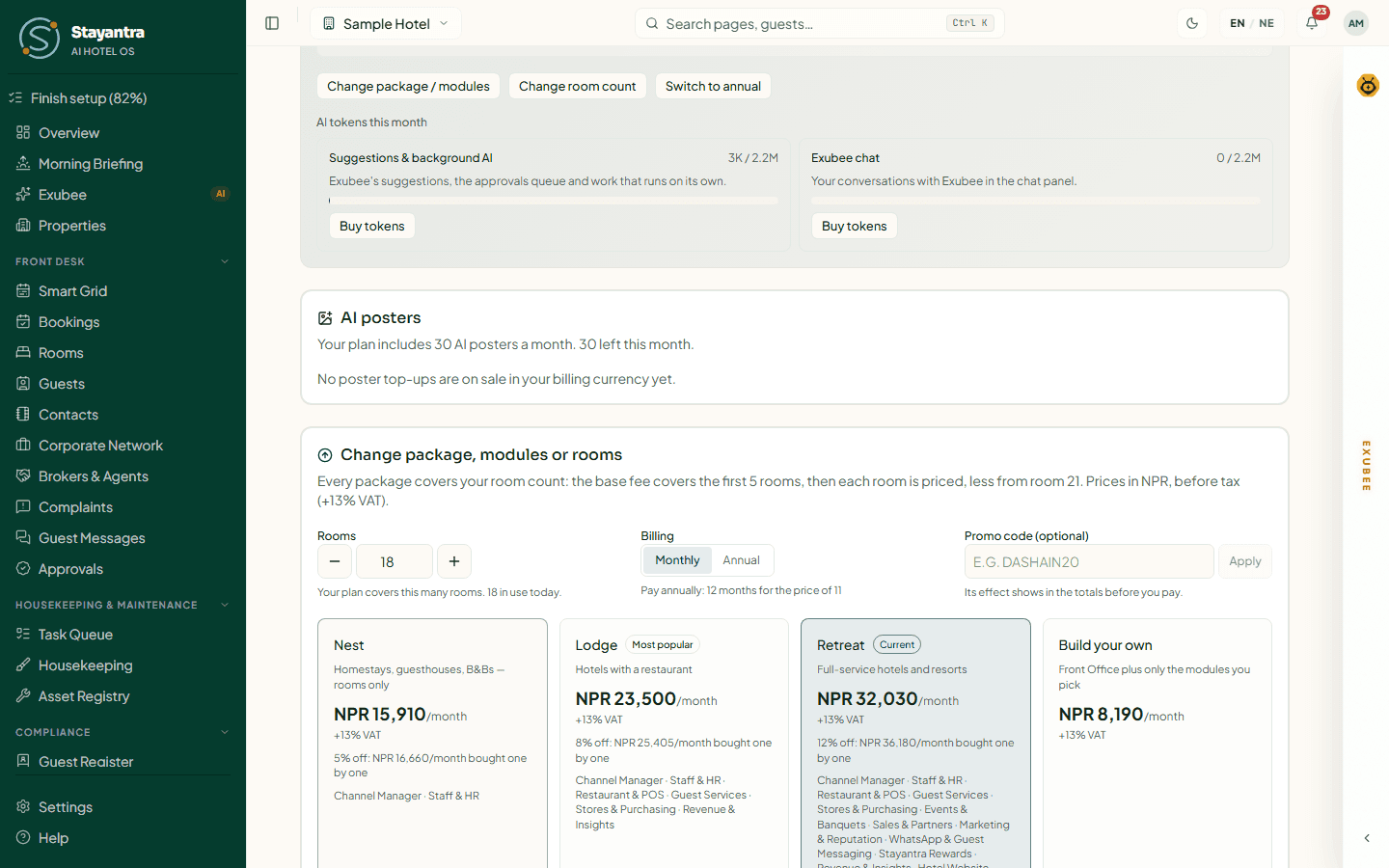
| Nest | Small hotels and B&Bs — rooms only | Front Office, Channel Manager, Staff & HR |
| Lodge (most popular) | Hotels with a restaurant | Nest plus Restaurant & POS, Guest Services, Stores & Purchasing, Revenue & Insights |
| Retreat | Full-service hotels and resorts | Lodge plus Events & Banquets, Sales & Partners, Marketing & Reputation, WhatsApp & Guest Messaging, Stayantra Rewards, Hotel Website |
| Build your own | Any hotel | Front Office plus only the modules you pick |
A package costs less than its modules bought separately: Nest 5% off, Lodge 8% off, Retreat 12% off the package's modules. You can add any other module to a package.
Two add-ons are never discounted: Exubee Cockpit (the full Exubee assistant) and Auto-Pilot, priced per stream you let Exubee run on its own. See Exubee and approvals.
A module you do not have shows as locked in the sidebar, with a link back to this page.
How the price is worked out
Each module has a base fee that covers your first 5 rooms, plus a fee for each room above that. Rooms 6–20 are charged in full, rooms 21–50 at 80%, and rooms from 51 at 65%. The room count is the number of rooms your plan covers (Rooms covered); dormitory beds count as one room for every 4 beds.
Then, in this order: the package discount, any promotion, the annual discount (Pay annually: 12 months for the price of 11), rounding to the nearest NPR 10, and 13% VAT for hotels in Nepal. Prices are in NPR for Nepal.
You never have to work this out: the picker prices every choice for your hotel, and the Next invoice estimate shows each line and the total.
Price list (price book v1)
Prices are per month, before tax. Nepal prices carry +13% VAT; India prices are shown with +18% GST, payable by the recipient under reverse charge; international prices carry no Stayantra tax. The figures below are price book v1; the pricing page always shows the book in effect and works out any room count, and the picker prices it for your own hotel.
Every module
Each module's base fee covers your first 5 rooms; the per-room fee applies from room 6, tapered as above.
| Module | Nepal (NPR) | India (INR) | International (USD) |
|---|---|---|---|
| Front Office (core) | NPR 4,000 + 200/room | INR 3,280 + 164/room | USD 79 + 6/room |
| Channel Manager | NPR 5,000 + 150/room | INR 4,100 + 123/room | USD 49 + 2.5/room |
| Staff & HR | NPR 1,000 + 40/room | INR 820 + 33/room | USD 39 + 2/room |
| Restaurant & POS | NPR 2,000 + 40/room | INR 1,640 + 33/room | USD 49 + 1/room |
| Guest Services | NPR 600 + 20/room | INR 492 + 16/room | USD 19 + 0.5/room |
| Stores & Purchasing | NPR 1,500 + 25/room | INR 1,230 + 21/room | USD 49 + 1/room |
| Events & Banquets | NPR 1,500 + 20/room | INR 1,230 + 16/room | USD 59 + 1/room |
| Sales & Partners | NPR 1,000 + 25/room | INR 820 + 21/room | USD 29 + 1/room |
| Marketing & Reputation | NPR 2,000 + 40/room | INR 1,640 + 33/room | USD 49 + 2/room |
| WhatsApp & Guest Messaging | NPR 1,500 + 50/room | INR 1,230 + 41/room | USD 59 + 3/room |
| Stayantra Rewards | NPR 1,000 + 20/room | INR 820 + 16/room | USD 29 + 1/room |
| Revenue & Insights | NPR 2,500 + 80/room | INR 2,050 + 66/room | USD 79 + 3/room |
| Hotel Website | NPR 1,500 + 20/room | INR 1,230 + 16/room | USD 29 + 0.5/room |
| Exubee Cockpit | NPR 1,200 + 30/room | INR 984 + 25/room | USD 39 + 1.5/room |
| Auto-Pilot (per stream) | NPR 1,500 + 50/room | INR 1,230 + 41/room | USD 49 + 2/room |
The Channel Manager's base fee is waived for a hotel that connects its own Channex account; the per-room fee still applies. Restaurant & POS includes one outlet and Events & Banquets one hall. Auto-Pilot is priced per stream.
Example monthly prices
At 10, 25 and 50 rooms, monthly, before tax (any room count is priced the same way). Each price is rounded to the nearest NPR 10, INR 10 or USD 1:
Nepal (NPR)
| Package | 10 rooms | 25 rooms | 50 rooms |
|---|---|---|---|
| Nest | NPR 11,350 | NPR 16,540 | NPR 23,950 |
| Lodge | NPR 17,830 | NPR 24,970 | NPR 35,190 |
| Retreat | NPR 25,300 | NPR 34,290 | NPR 47,140 |
| Front Office (core) alone | NPR 5,000 | NPR 7,800 | NPR 11,800 |
India (INR)
| Package | 10 rooms | 25 rooms | 50 rooms |
|---|---|---|---|
| Nest | ₹9,310 | ₹13,570 | ₹19,650 |
| Lodge | ₹14,620 | ₹20,490 | ₹28,880 |
| Retreat | ₹20,750 | ₹28,130 | ₹38,670 |
| Front Office (core) alone | ₹4,100 | ₹6,400 | ₹9,680 |
International (USD)
| Package | 10 rooms | 25 rooms | 50 rooms |
|---|---|---|---|
| Nest | $209 | $348 | $548 |
| Lodge | $408 | $614 | $908 |
| Retreat | $651 | $953 | $1,384 |
| Front Office (core) alone | $109 | $193 | $313 |
Read your plan
The Your plan card shows:
| Field | Meaning |
|---|---|
| Plan name and modules | Your package (or Build your own) and every module you have. |
| Status | Free Trial, Active, Past due, Account Frozen, Paused or Cancelled. |
| Next invoice | The date and about how much, including VAT. |
| Current billing period | From and to. |
| Payment method last used | For example Khalti, and the date. |
| Rooms covered | Your licensed rooms, and a lower number from your renewal if you have reduced it. |
| Billing | Monthly or Annual. |
| Price list | The Stayantra price list your prices come from. A move to a new price list is announced in advance. |
Below it, Next invoice … (estimate) lists the invoice line by line. If a discount is running, it says when it ends.
Choose or change your package
Open the picker
Click Choose your package (during the trial) or Change package / modules.
Set rooms and billing
Enter your Rooms (at least the rooms you have in use). Choose Monthly or Annual. Type a Promo code (optional) and click Apply if you have one.
Pick a package or modules
Choose Nest, Lodge, Retreat or Build your own, and tick any extra modules. The total updates as you go.
Confirm
Click Continue to payment (or Review this change), check the summary, and confirm.
When a change takes effect depends on what you change:
- Your first paid plan starts today: "Your first paid period starts today. Your free trial ends when the payment is confirmed."
- Adding a module, a bigger package or more rooms starts today. You pay the difference for the days left in the current period, and the full price from the next invoice.
- Removing a module, a smaller package, fewer rooms, or switching between monthly and annual waits for your next renewal. Until then you keep everything you have. Nothing is refunded and no data is deleted.
A scheduled change shows under the plan. Click Cancel this change to keep your current plan.
Other buttons on the plan card: Change room count and Switch to annual. For more than 300 rooms, Stayantra sets up your plan and its price with you ("Talk to us").
Pay an invoice
Stayantra issues each invoice on the day your period ends. An unpaid invoice appears as Outstanding Invoice with its amount. The owner pays it with one of:
| Button | Currency |
|---|---|
| Pay via eSewa | NPR |
| Pay via Khalti | NPR |
| Pay via Fonepay | NPR |
| Pay by card or Link (Stripe) | USD |
You are taken to the provider to pay, then back to this page, which says "Payment successful! Your subscription is now active." or explains what happened. If you paid and the page is not updated yet, wait a minute and refresh — do not pay twice.
If a payment is late
- An invoice left unpaid for 14 days moves the account to Past due. The owner is told "Payment overdue" with the date the grace period ends.
- The grace period is 14 more days. The page shows "Grace period ends on … Pay the outstanding invoice below to keep the account active."
- If it is still unpaid, the account is frozen ("Account frozen — payments required"). Only check-out and settling bills keep working, Auto-Pilot stops, and staff cannot use the rest of the dashboard until the invoice is paid. Paying restores access straight away.
Hibernate for the off-season
Closing for the monsoon or winter? Under Hibernate for the off-season, choose an optional Reopening date and click Hibernate, then Yes, hibernate. You can hibernate for up to 5 months a year once you have paid for 3 months. While hibernating you pay a reduced fee, Stayantra is read-only, channel sync and Auto-Pilot stop, and your booking engine and marketplace listing stay open. Click Wake the hotel now to reopen.
Other things on this page
- AI token pools — how much of your monthly Exubee allowance you have used, with top-ups.
- AI poster packs — extra marketing poster credits.
- Refer a hotel — copy Your referral link. When a hotel you invite chooses a paid plan and has paid for 30 days, you both get a free month. On the trial, your month is saved and added when you start paying.
- Setup help — book, upgrade or pay for help setting up the hotel: yourself for free with these guides, remote setup with Stayantra's team, or an on-premise installation. See Setup help and pricing.
- Billing history — every Stayantra statement with its Ref, For, Period, Amount, Status, Issued, Paid and Paid with.
Troubleshooting
| What you see | What to do |
|---|---|
| Open Business verification instead of a price | Your KYC is not verified yet. Finish Business verification. |
| "Your hotel has … rooms in use: deactivate rooms before going below that." | Deactivate rooms in Front Desk → Rooms first, or keep the higher count. |
| "Online payment is not set up yet." | Contact Stayantra from Help → Open a support ticket to pay another way. |
| "Your plan and its price were agreed with Stayantra." | Your plan has a custom price. Contact Stayantra to change it. |
| A payment went through but the plan did not change | Do not pay again. Open a support ticket with the provider's reference. |
Taking payments
Take guest payments at the desk in cash or online, handle foreign notes, verify bank transfers, split bills, print statements and give money back.
Team, rosters, attendance, leave and payroll
Add staff and give them skills, plan the shift roster, track attendance with location and selfie, handle leave, and run monthly payroll with SSF and TDS.