
Bookings and folios
Every stay in Stayantra is a booking: one guest, one room, a check-in and a check-out date. Each booking has a folio — the guest's bill — where room nights, extras, payments and refunds are recorded. This page covers the Bookings list, making a booking, the booking page, check-in, check-out, changes and cancellations, and the bill.
Where to find it: Front Desk → Bookings. The booking page opens when you click a booking anywhere — the list, the Smart Grid, a guest's profile or a notification. Who can use it: owners, managers and front desk staff. Taking payments needs the cashier skill (or manager or owner). See Who can do what.
A booking's statuses
| Status | Meaning |
|---|---|
| Pending | The booking is waiting for something before it is firm — usually a bank transfer or deposit the guest has to send. |
| Confirmed | The room is held for the guest. A booking made at the desk starts here. |
| Checked In | The guest is in the room. |
| Checked Out | The stay is finished and the bill is closed. |
| Cancelled | The booking was cancelled and the room went back on sale. |
| No Show | The guest never arrived. The no-show fee in the booking's terms was posted. |
The Bookings list
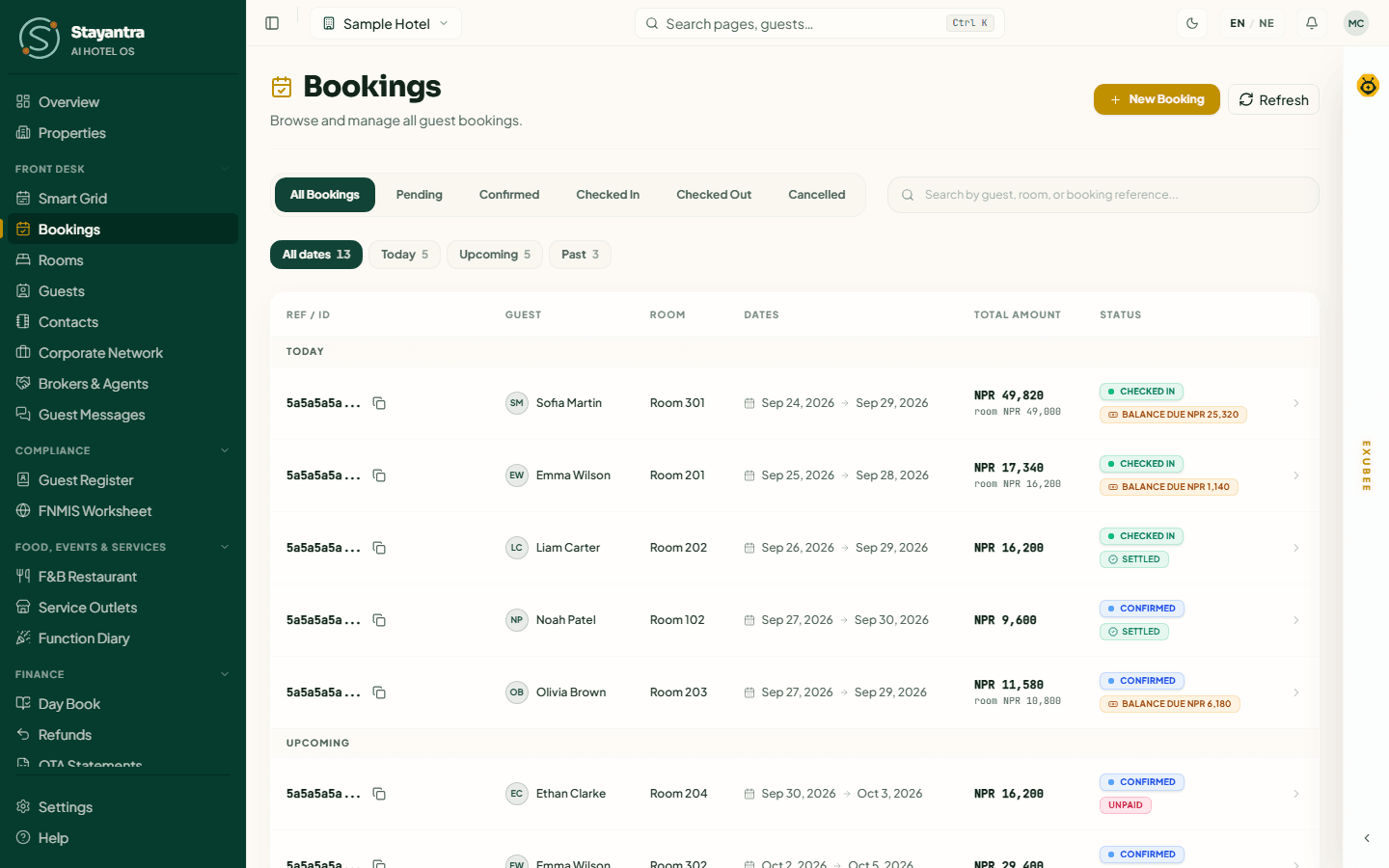
- Status tabs: All Bookings, Pending, Confirmed, Checked In, Checked Out, Cancelled.
- Date filter: All dates, Today, Upcoming, Past, each with a count. Tabs and dates combine — for example Confirmed + Today is today's arrivals still to check in. With All dates, the list is split under Today, Upcoming and Past headings.
- Search by guest name, room number or booking reference.
- Columns: Ref / ID (the start of the booking number; the copy button copies the full number), Guest, Room ("Unassigned" if no room is set), Dates, Total Amount and Status. The total is the whole bill so far, extras included; when it differs from the room price, the room price is shown under it in small type.
- Payment chip under the status: Balance due, Settled, Refund due (the guest paid more than they owe), Pay at hotel or Unpaid.
- A booking that is part of a multi-room reservation shows the reservation's reference; click it to open the reservation.
The list shows 50 bookings a page — use Previous and Next. Click any row to open the booking. Refresh reloads the list.
Make a booking
Open the form
In Bookings, click New Booking. (The same form opens from Book a Room on the Overview, from the search box's New booking, and from the Smart Grid with the room and dates filled in.)
Above the steps are up to three extra choices:
- Rate plan — appears once you have picked the dates and a room. Pick a rate plan, or leave No rate plan to charge the room's own rate. A plan with meals or extras shows a Package badge and what the inclusions are worth.
- Booked through a broker — for a stay sold by a broker, travel agency or OTA. Pick the broker, then Who collects the guest's money: Hotel collects or Broker collects. The preview shows the guest price and the commission. See Brokers and agents.
- Group block — appears only when a group block covers these dates. Choose it to take the room from the block at the group's rate.
Step 1 — dates
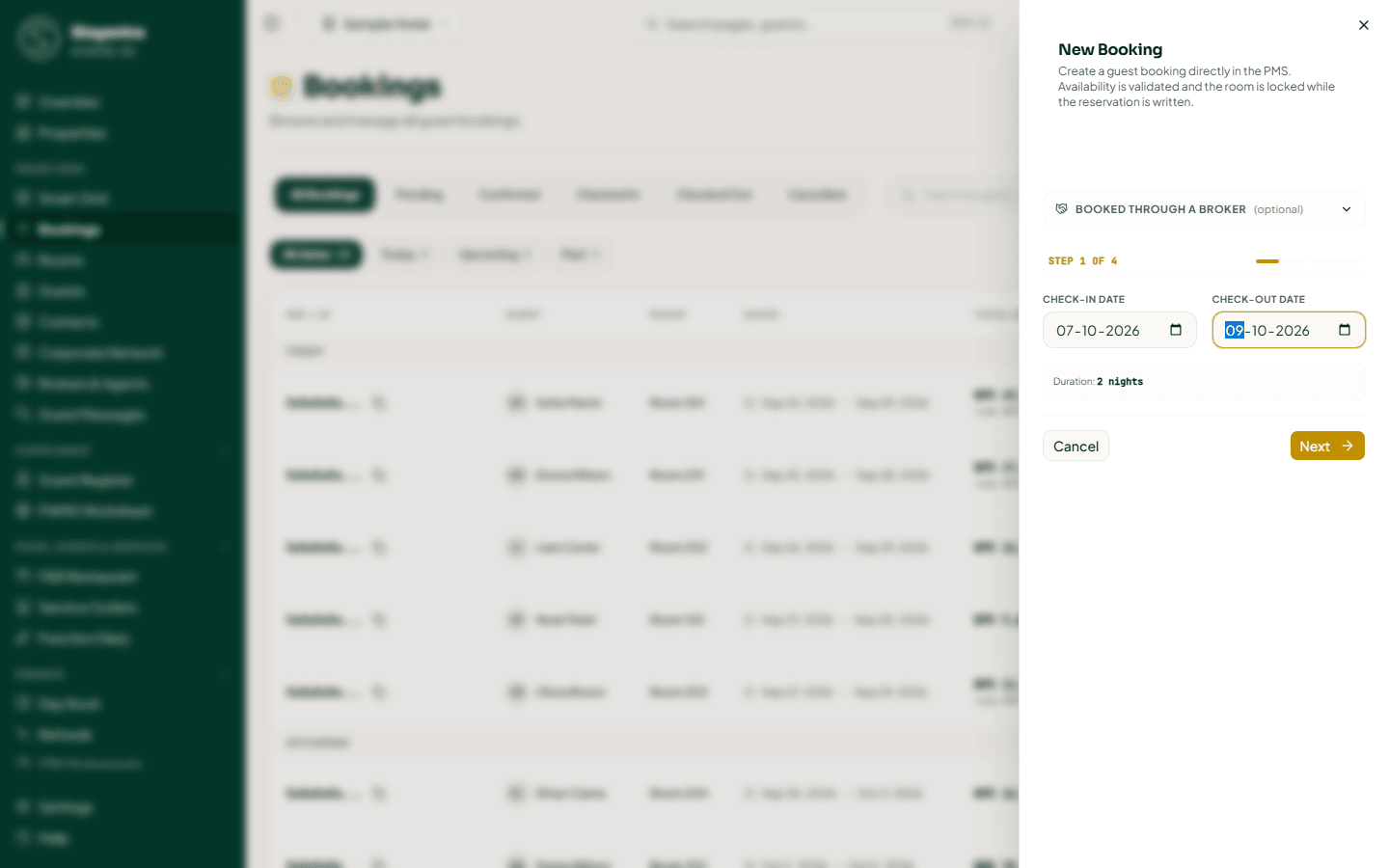
Enter the Check-In Date and Check-Out Date. The form shows the number of nights. Check-in cannot be in the past. Click Next.
Step 2 — room and guests
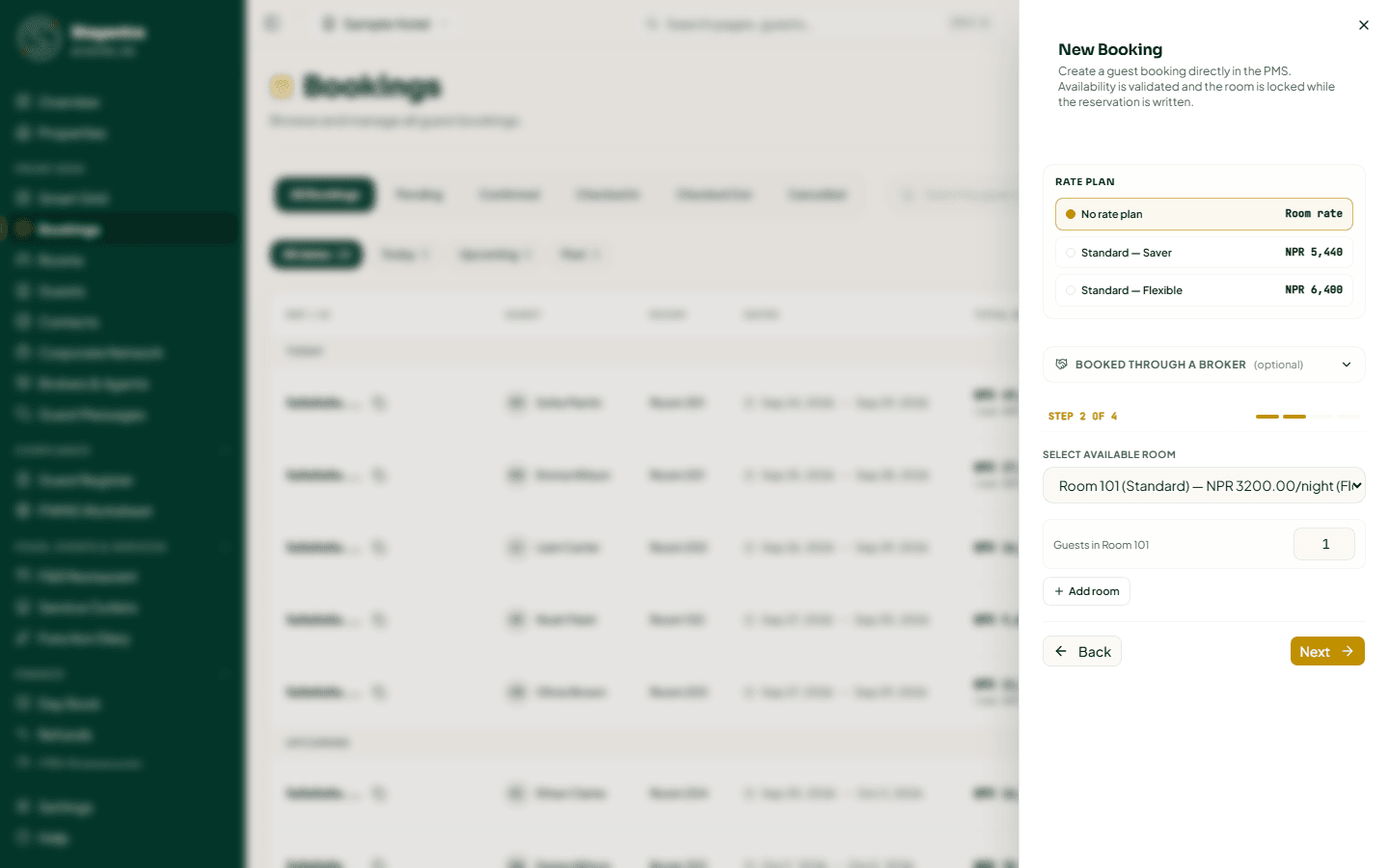
- Select Available Room lists only rooms free for every night, with type, nightly rate and floor. If a room type has nothing free, the form says so.
- Guests in Room 101 — how many people will sleep in the room. If that is more than the room takes, a notice shows the extra-guest charge.
- Agreed rate for Room 101 (managers and owners only) — a nightly rate you agreed with the guest. Leave it empty to charge the normal rate. The booking keeps both figures.
- Add room books more rooms for the same guest and dates (up to 20). Each added room has its own room, Guests and Rate plan. See Multi-room reservations.
Step 3 — the guest
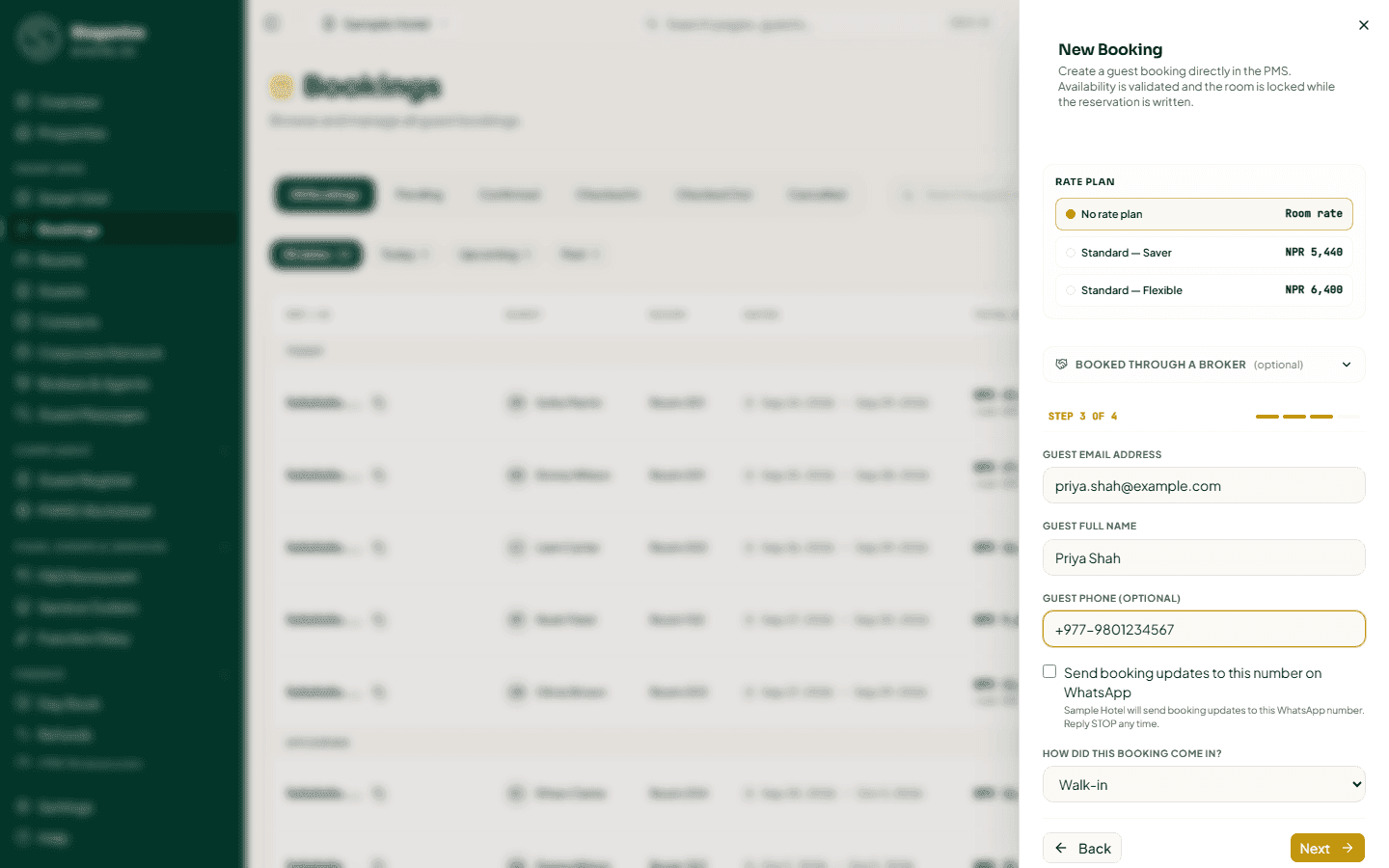
- Guest Email Address — required. As you type, Stayantra suggests guests already on file. Pick one to use their profile ("Existing guest — 3 previous stays"); Not them? clears it.
- Guest Full Name — required.
- Guest Phone (Optional). When you enter one, you can tick Send booking updates to this number on WhatsApp if the guest agrees.
- How did this booking come in? — Walk-in, Phone or Email.
Step 4 — check and confirm
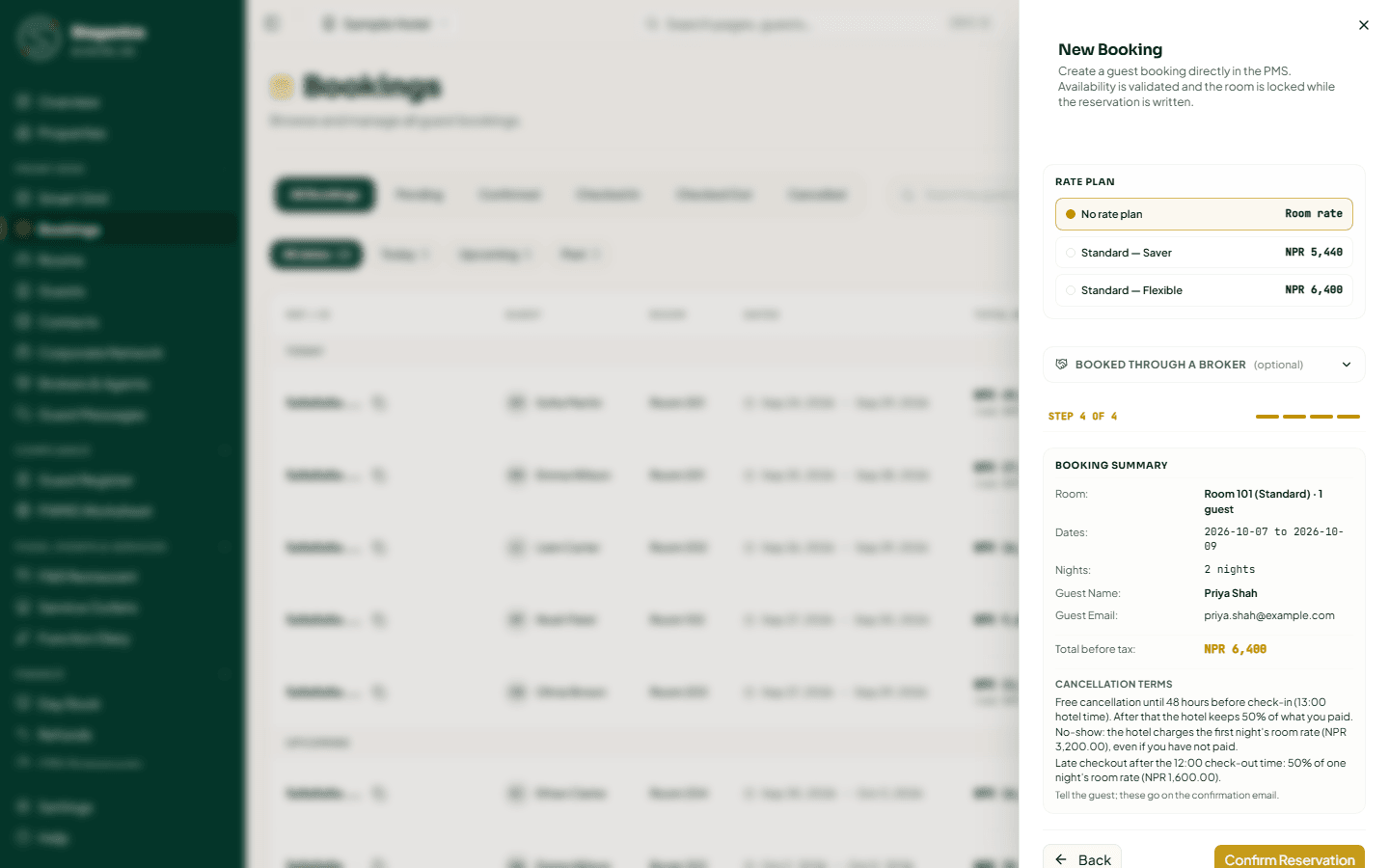
The Booking Summary shows the rooms, dates, nights, guest and the total (with tax where the hotel has set tax rates) and the cancellation terms the guest is sold under.
- On a non-refundable rate the whole bill is paid now: choose how the guest paid (Cash, Card terminal or Fonepay QR) and, for card or QR, the slip or QR reference.
- If a rate plan has closed these dates, a manager or owner can still take the booking: enter the reason and click Book anyway. The owner and managers are told. Other staff see "Only a manager or the owner can book dates the rate plan has closed."
Click Confirm Reservation.
What happens next: the booking is saved as Confirmed, the room is held, the guest gets a confirmation email and the owner is told. The form then shows Booking created. with:
- what the guest owes and by when, and Payment link or QR to send the guest a link or show a QR for the balance;
- if the guest works for a company on the Stayantra network, Ask {guest} to confirm so the stay is billed to the company (see Corporate Network);
- Open booking and Book another.
Two people cannot book the same room for the same night: Stayantra locks the room while it saves, and the second person is told the room is no longer free.
[!TIP] If the internet drops at the desk, you can still take a single-room walk-in with no rate plan or broker. It is saved on this device as a provisional booking and sent when the connection is back. Until then it is not a confirmed booking — Stayantra may still say the room was taken.
The booking page
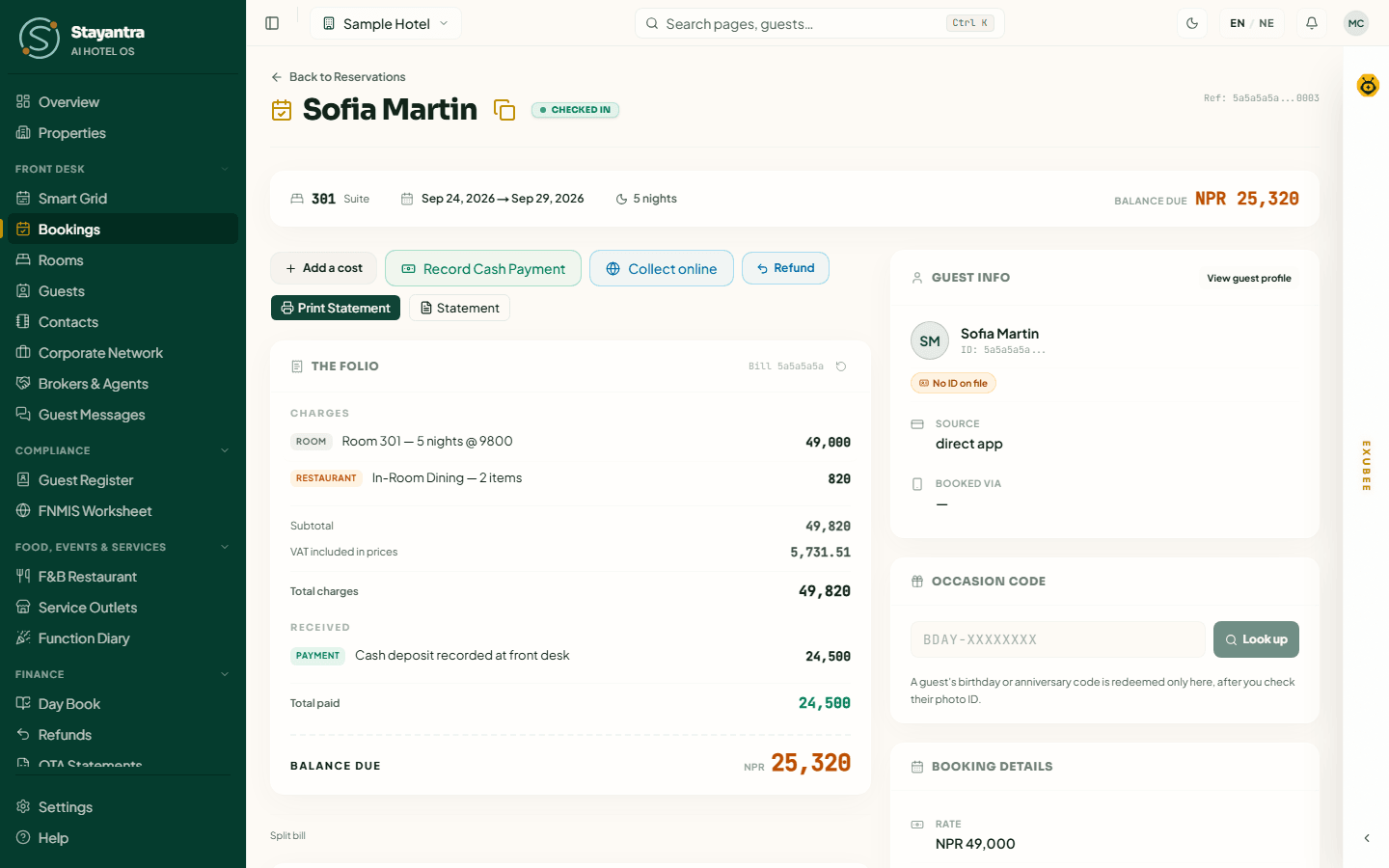
- The header shows the guest's name, the status and the booking reference (with a copy button). A booking in a multi-room reservation shows "Room 2 of 3 · {reference}"; click it to open the reservation.
- The strip under it shows the room and room type, the dates, the number of nights, and Balance due, Refund due or Settled.
- Left side: payment reminders, the bill and its buttons, split bills, company billing and service orders.
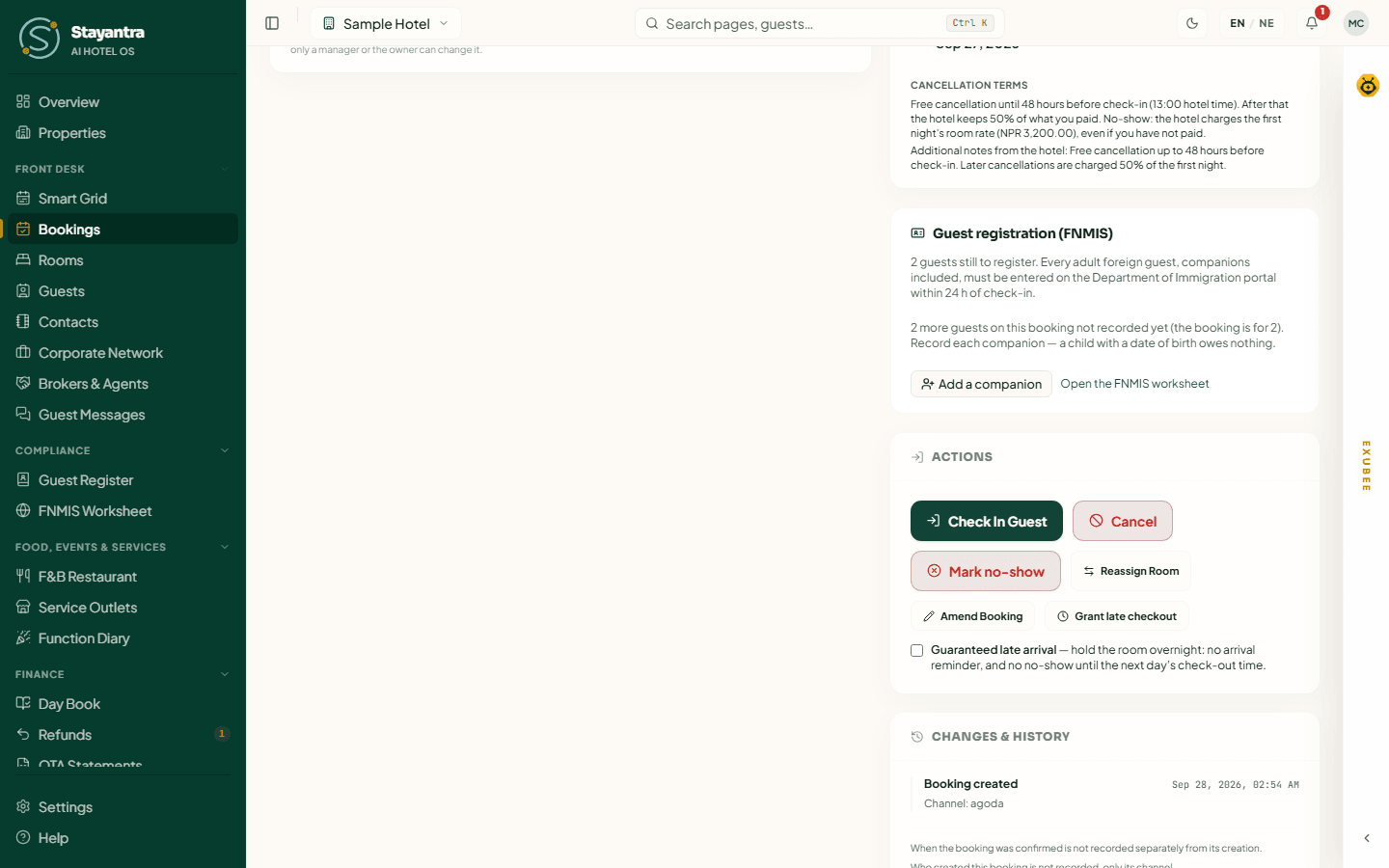
- Right side: Guest Info, the Occasion code card, Booking Details (rate, payment plan, created date, Cancellation terms), Package includes (for a package rate), the broker (for a broker booking), Guest registration (FNMIS) for foreign guests, Stayantra Rewards perks, Actions, and Changes & history (every change to the booking, who made it and why).
Check a guest in
Open the booking
In Bookings, choose Confirmed and Today, and click the guest.
Make sure an ID is on file
A guest cannot be checked in without an identity document. The Guest Info panel shows ID on file or No ID on file. To add one, click View guest profile and open the Documents tab:
- Upload file — a photo or scan of the passport, citizenship card or other ID.
- Capture with phone — sends a request to your phone's Stayantra Connect app; take the photo there and it appears here ("Waiting for the phone").
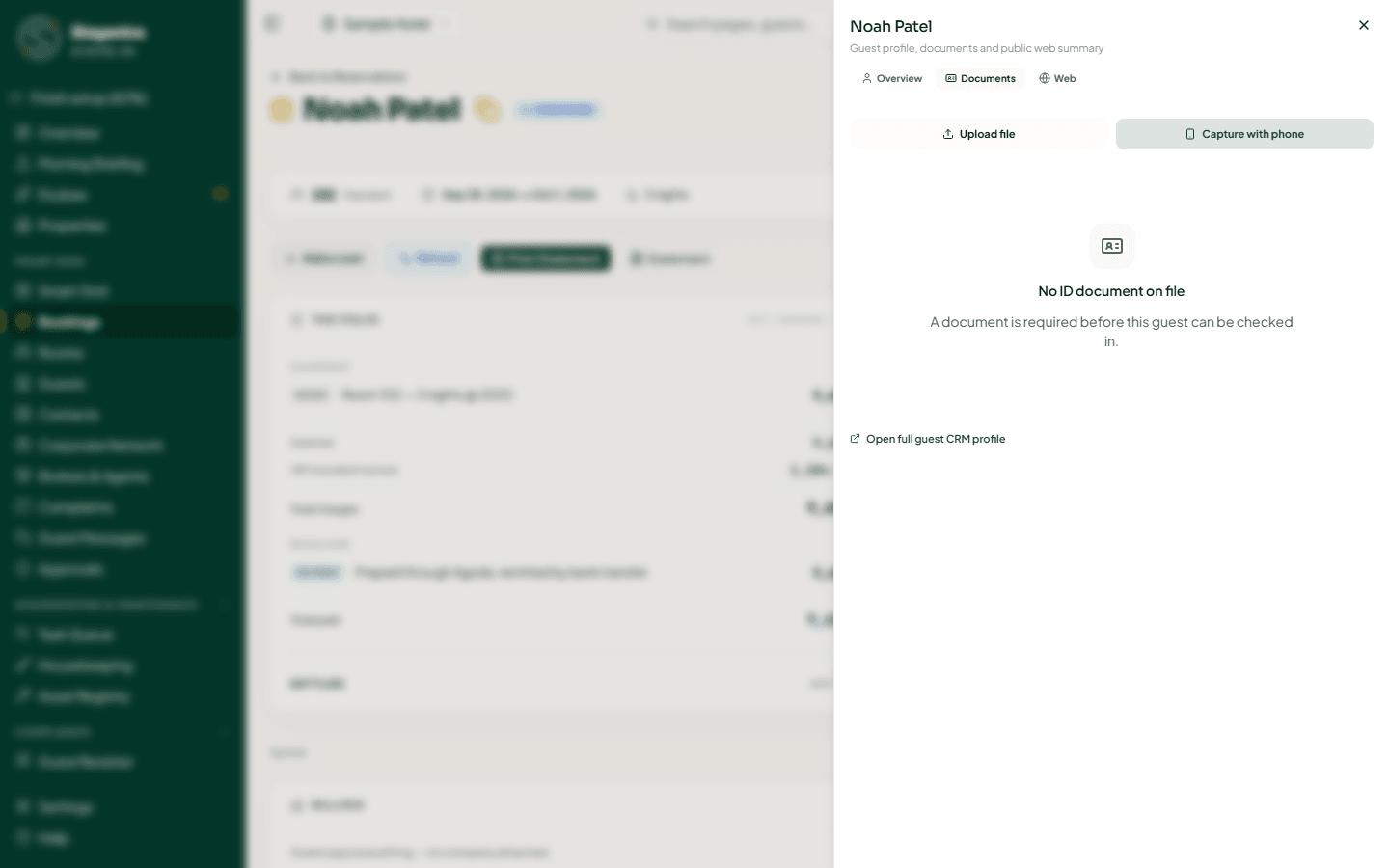
Stayantra reads the document's details (name, number, dates) from the image. If the text is not readable, it says "Text not readable — enter the fields manually."
Register foreign guests
For a guest with a foreign passport, the Guest registration (FNMIS) panel asks for the passport and visa details you must report to the Department of Immigration. See Compliance.
Check in
In Actions, click Check In Guest. The message "Guest successfully checked in." appears, the booking becomes Checked In and the room becomes Occupied.
Find the booking from a guest's stay pass
A guest with the Stayantra Go app can show the QR code on their stay pass. On Bookings, click Scan stay pass, then scan the QR with the desk's USB or Bluetooth barcode scanner. The scanner types the code and presses Enter for you. You can also paste the code and press Enter.
The dialog shows the guest, room, dates, status and balance due. Click Continue to check-in to open the booking, then click Check In Guest as above. The box empties after every scan, so it is ready for the next guest. If the pass is refused, the dialog says why: not a stay pass, out of date or expired (ask the guest to reopen it in Go), or a stay at another hotel.
If check-in is refused
| Message | Why | What to do |
|---|---|---|
| "A document is required before this guest can be checked in." | No ID on file. | Click the message to open the guest's Documents tab and add one. |
| Room not ready for check-in | The room is Dirty, still waiting for inspection, or under Maintenance. Only an Available room can take a guest. | Have housekeeping clean or inspect it, or click Move to another clean room. A manager or owner can enter a reason and click Check in anyway. |
| This booking starts on {date} | The guest is early — nobody can be checked in before the arrival date. | A manager or owner enters a reason under Start the stay today — reason and clicks Start today and check in. The extra nights are added to the bill and the owner is told. Other staff see "Ask a manager or owner to check this guest in early." |
Other arrival actions
- Guaranteed late arrival — tick it when the guest will arrive late at night. The room is held overnight: no arrival reminder, and the booking cannot be marked a no-show until the next day's check-out time.
- Occasion code — a guest's birthday or anniversary code from the Stayantra app. Type it in (like BDAY-XXXXXXXX) and click Look up. Check the guest's photo ID, tick I checked the guest's photo ID and apply it; the discount goes on the bill. If the ID does not match, choose ID doesn't match — refuse and report: the code cannot be used again and the owner is told. Applying a code needs discount permission (the cashier skill, managers and owners).
Change a booking
Change the dates or room — Amend Booking
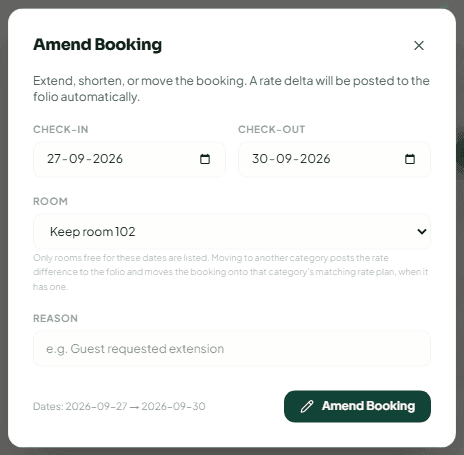
In Actions, click Amend Booking. Change the Check-in, Check-out or Room — only rooms free for the new dates are listed — and give a Reason. Click Amend Booking.
Use this to extend a stay, shorten it, or move the guest to a room of another type. The difference in price is posted to the bill automatically. For a guest already checked in you can change the check-out date and the room. If the new room is not ready, a manager can move the guest anyway with a reason.
You can also drag the booking on the Smart Grid.
Move to another room of the same type — Reassign Room
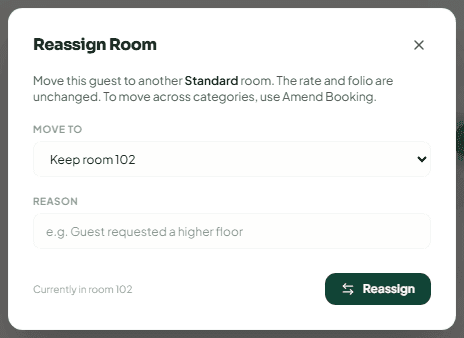
Reassign Room moves the booking to another room of the same type. Pick the room under Move to, add a Reason (for example "Guest requested a higher floor") and click Reassign. The rate and the bill do not change. To move across room types, use Amend Booking.
Grant a late checkout
Grant late checkout lets a guest stay past check-out time. Choose Until (hotel time) and the Fee — the hotel's own late-checkout fee, No fee, or Another amount. A fee below the hotel's needs a reason, and the owner and managers are told. The fee is posted to the bill.
Cancel a booking
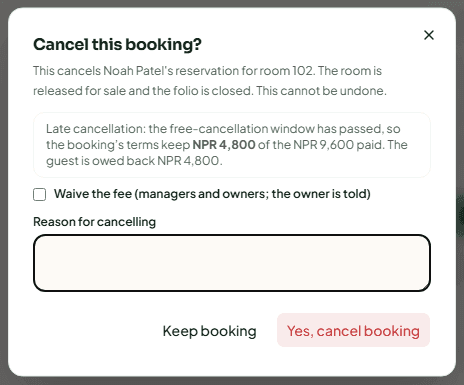
Open the cancel dialog
In Actions, click Cancel.
Read what the terms do
The dialog Cancel this booking? says what the booking's cancellation terms mean now:
- Free cancellation — anything paid is owed back to the guest.
- Late cancellation — the free-cancellation window has passed, so the terms keep a fee; the rest is owed back.
- Non-refundable rate — what was paid is kept.
A manager or owner can tick Waive the fee and say why. The owner is told.
Give the reason and confirm
Type the Reason for cancelling and click Yes, cancel booking. The room goes back on sale and the bill is closed. This cannot be undone.
If money is still owed back, the booking page says so: "This cancelled booking still holds NPR 4,500 of the guest's money… Refund it from the bill." Refunds are always given by a person — see Refund a guest.
[!IMPORTANT] A booking made on an OTA can only be cancelled by the OTA. Ask the guest to cancel it with Booking.com, Agoda or Expedia; the room stays held until that cancellation arrives. Otherwise choose why — "The OTA already shows it cancelled" or, for Booking.com, an invalid card — and the request goes to a manager for approval.
Mark a no-show
When a confirmed guest never arrives, click Mark no-show in Actions.
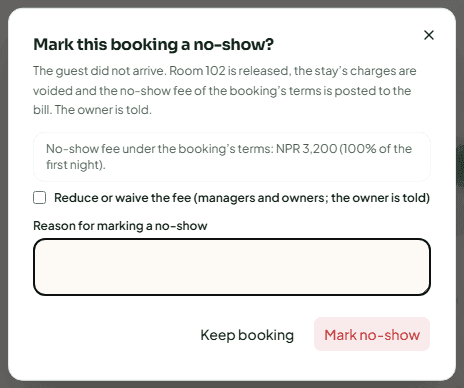
The dialog shows the no-show fee from the booking's terms, for example "NPR 3,000 (100% of the first night)". Give the Reason for marking a no-show and click Mark no-show. The room is released, the stay's charges are voided, the fee is posted and the owner is told.
- The room is held for the guest until the hotel's hold ends (later still for a guaranteed late arrival). Before then, the dialog says when a no-show can be marked.
- A manager or owner can tick Reduce or waive the fee and enter a lower amount (0 waives it).
- For an OTA booking, the no-show goes to a manager for approval and is then reported to the OTA, so it does not charge commission on a stay that never happened.
If the guest turns up after all, a manager or owner clicks Reinstate booking. The booking goes back to confirmed if the room is still free, and the no-show fee is voided.
Check a guest out
Settle the bill
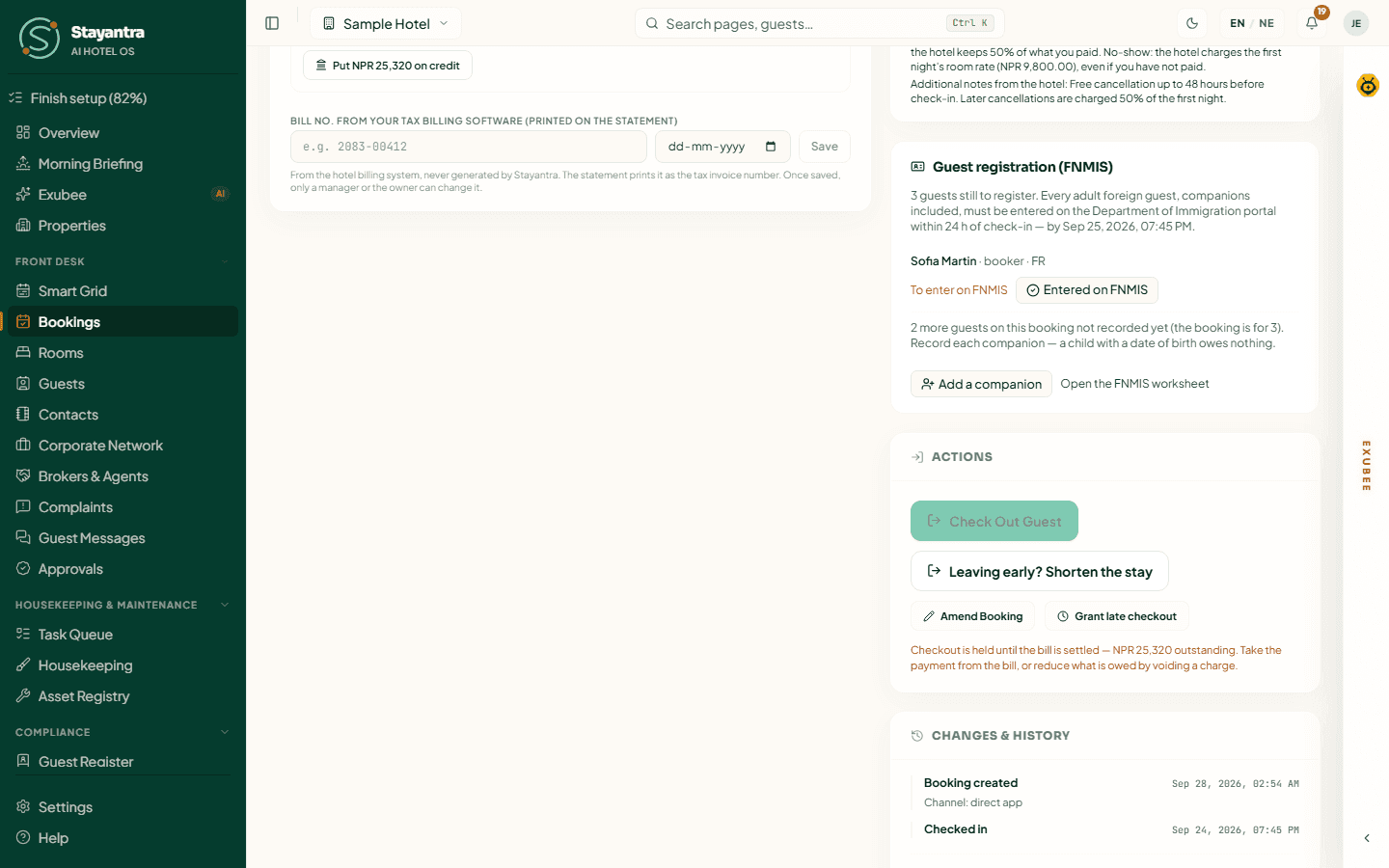
The Check Out Guest button stays grey while the guest owes money: "Checkout is held until the bill is settled — NPR 2,450 outstanding." Take the payment (see Take a payment) or void a wrong charge.
Check out
Click Check Out Guest. Stayantra may ask one more thing first:
- Leaving early — if the booking runs past today: Shorten to today and check out releases the unused nights and takes them off the bill (plus the hotel's early-departure fee, if it has one), or Keep the booked nights and check out.
- Company bill — when part of the stay is billed to a company, it confirms where that balance goes.
- Tax invoice number — a VAT-registered hotel is asked for the invoice number its IRD-approved billing software issued for the stay. Save and check out, or Check out without it.
- Orders not on the bill yet — laundry, transport or food orders still open, or a minibar not yet checked. Bill it for each (or cancel an order the guest never had), then check out again. A manager or owner can choose Guest already left? Check out anyway with a reason.
The booking becomes Checked Out and the room becomes Dirty, ready for housekeeping.
The bill (folio)
A bill is opened the first time anything is charged or paid on the stay. Until then the page says "No bill has been opened for this stay yet."
The bill lists:
- Charges — room nights and every extra, each with its type (Room, Food & drink, Minibar, Laundry, Transport, Events, Service charge, VAT, Tourist tax, Discount, Other).
- The totals — Subtotal, then Service charge, VAT and Tourist tax where they apply (or VAT included in prices when your rates already include VAT), and Total charges.
- Received — every payment and refund, and Total paid.
- Balance due, Refund due or Settled.
Add a charge
Open Add a cost
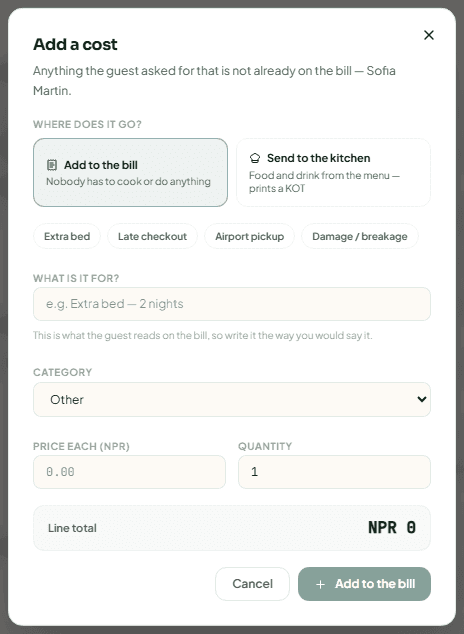
Above the bill, click Add a cost.
Choose where it goes
Add to the bill ("Nobody has to cook or do anything") or Send to the kitchen (food and drink from the menu — it prints a kitchen order ticket, a KOT).
Describe it
Use a quick pick (Extra bed, Late checkout, Airport pickup, Damage / breakage) or fill in What is it for? — write it the way the guest should read it on the bill — and the Category. For a minibar item, pick it from the list; a different price needs a reason. You can also Take from stock so the item comes off your inventory. Enter the Price each and the Quantity; the Line total shows what goes on the bill.
Add it
Click Add to the bill. Then Add another or Done.
Laundry, transport and event orders have their own Service Orders panel lower on the page. Each order moves through its stages (for laundry: Requested, Collected, In Progress, Ready, Delivered) and is put on the bill with Bill to Folio. See Housekeeping and operations.
Correct a charge
A charge is never deleted. Managers and owners click the void button on the line, give a Reason for voiding (required) and click Void charge. The line stays on the bill, crossed out, with the reason and the name of who voided it. Post a corrected charge if one is owed. Some voids need the owner's approval: the line stays until the owner approves it.
[!NOTE] There is no free-hand discount button on a room bill. To lower what a guest pays, agree a rate when you make the booking (managers and owners), apply an occasion code, or void the charge and post the correct one.
Take a payment
| Button | Use it for | Who |
|---|---|---|
| Record Cash Payment | Cash at the desk. Enter the Amount and an optional note, then Record Payment. Tick The guest paid in foreign notes for dollars or other currency — it is converted at the day's rate. You can print a receipt afterwards. | Cashier skill, managers, owners |
| Collect online | eSewa, Khalti, Fonepay QR or card — whichever the hotel has switched on. The guest pays on their own phone and the bill updates itself once the payment is confirmed. | Cashier skill, managers, owners |
| Verify payment received | A bank transfer or deposit the guest sent before arriving. Enter the Amount received, Sent by, Transfer reference and Arrived on, then Record the transfer. | Cashier skill, managers, owners |
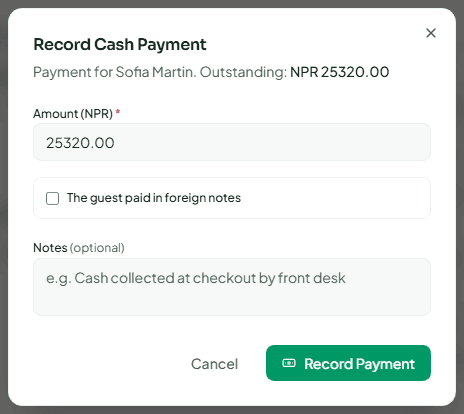
[!IMPORTANT] Cash must go into a drawer. Open your cashier shift in Finance → Cashier Shifts before you take or hand back cash, or Stayantra refuses with "Open your cashier shift before taking or handing back cash." See Finance.
Online methods only appear once the hotel has switched them on. See Payments and payouts. If a transfer or deposit is due by a date and does not arrive, Stayantra puts a proposal to release the room in Approvals — it never releases the room on its own.
Refund a guest
Click Refund above the bill. Choose How it goes back — Cash from the drawer, Refund to the card through Stripe, or Sent from the Fonepay Business app (with the Fonepay reference) — the amount, and Why. Click Review refund, read what will happen, then confirm.
A cash or Fonepay refund records money you hand back yourself; Stayantra does not send money through eSewa or Khalti. A refund above the cashier's limit goes to a manager or owner in Approvals first. See Payments.
Split the bill
Use a split when two people pay separately, or a guest wants to pay in parts.
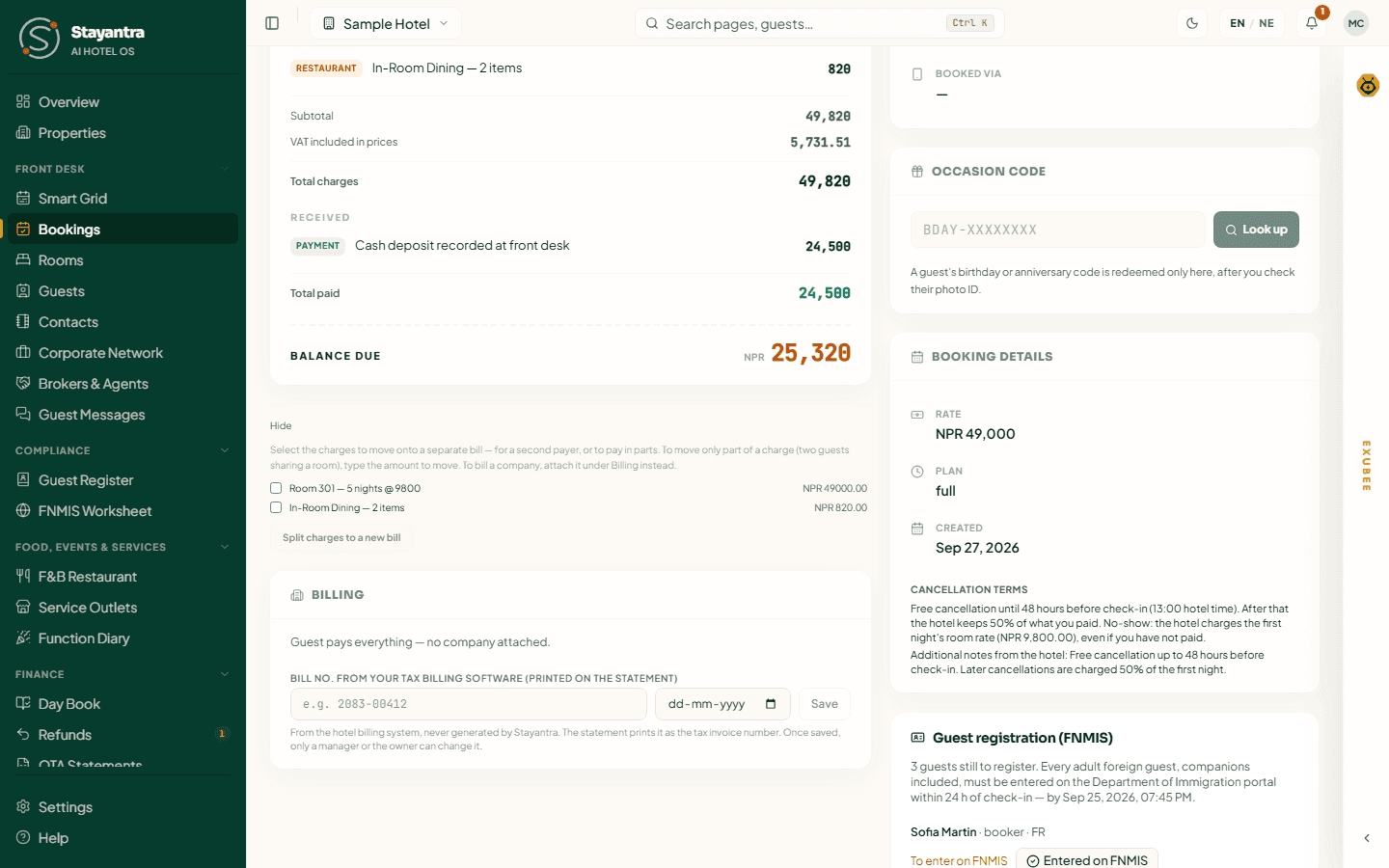
Click Split bill, tick the charges to move, and — to move only part of a charge (two guests sharing a room) — type the amount to move. Click Split N charges to a new bill. The new bill appears under the first with its own balance and takes its own payments. To bill a company, use the billing section instead (below).
Bill a company
The billing section under the bill shows who pays:
- A company on the Stayantra network — if the guest belongs to one, click Ask {guest} to confirm. Once they confirm (by email link or in the Stayantra app), click Bill {company}. The company's travel policy decides what it covers; anything else stays on the guest's bill. Stayantra settles the company's bill at check-out. See Corporate Network.
- Bill to a company on credit (managers and owners) — for a company you bill yourself. Enter the Company, PAN / VAT number, Billing contact and Reason, then Put NPR … on credit. Nothing is added to the bill; the guest can check out, and after check-out the balance stays open as the company's receivable in Finance → Open balances.
Statements and tax invoices
Print Statement prints a short 80 mm statement for the guest; Statement opens the full A4 statement, which you can download as a PDF. Neither is a tax invoice.
[!IMPORTANT] Stayantra is not an IRD billing system and never issues tax invoices. Issue the tax invoice from your IRD-approved billing software, then type its number in Bill no. from your tax billing software in the billing section, so it prints on the statement. Every change to that number is kept in its Change history.
Who can do what
| Action | Owner | Manager | Front desk | Cashier skill |
|---|---|---|---|---|
| See bookings and bills | Yes | Yes | Yes | Yes |
| Make, amend, move, cancel a booking; mark a no-show | Yes | Yes | Yes | No |
| Check in and check out | Yes | Yes | Yes | No |
| Add a charge | Yes | Yes | Yes | No |
| Take a payment, verify a transfer | Yes | Yes | No | Yes |
| Refund (within the limit) | Yes | Yes | No | Yes |
| Void a charge, reinstate a no-show | Yes | Yes | No | No |
| Agreed rate, early check-in, check in to a room not ready, book closed dates, waive fees | Yes | Yes | No | No |
A front desk clerk who also takes money needs both the front desk and cashier skills. Set skills in Staff.
When something goes wrong
| What you see | What to do |
|---|---|
| "No rooms available for those dates." | Every room is taken or blocked. Try other dates, or check the Smart Grid. |
| You need more than 20 rooms for one party | Make a group block. |
| "That group block cannot take this stay." | The block is full, its code is wrong, or the room is not the block's room type. |
| "Booking not found" | The link is wrong, or the booking belongs to another of your hotels — switch hotel. |
| "Action queued for sync" | You are offline. The action runs when the connection is back. |
| "You do not have permission…" | Your role or skills do not include this action. Ask a manager. |