
Taking payments
This page covers how the hotel takes a guest's money: at the front desk (cash, eSewa, Khalti, Fonepay, card), online when the guest books, and by bank transfer. It also covers splitting a bill, printing a statement and giving money back.
Where to find it: on a booking's page (Front Desk → Bookings, then open the booking). The money buttons sit above the bill. Finance → Finance Center → Record Cash Payment also finds any open bill by guest name.
Who can use it:
| Task | Owner | Manager | Cashier | Front desk |
|---|---|---|---|---|
| Record a cash payment | Yes | Yes | Yes | Only with the cashier skill too |
| Collect online (eSewa, Khalti, Fonepay, card) | Yes | Yes | Yes | No |
| Verify a bank transfer | Yes | Yes | Yes | No |
| Refund | Yes | Yes | Yes, up to their limit | No |
| Split a bill, print a statement | Yes | Yes | Yes | Yes |
"Cashier" means a staff member with the cashier skill. Give desk staff who take money both the front_desk and cashier skills. Anyone taking cash needs an open cashier shift.
How a guest can pay
| Way | Where | Who switches it on |
|---|---|---|
| Cash (NPR, or foreign notes) | At the desk | Always available |
| eSewa, Khalti | At the desk (QR or link on the guest's phone) and online | The hotel, in Settings → Hotel profile → Payments |
| Fonepay | At the desk (dynamic QR) and online | The hotel (its own merchant code or Stayantra's) |
| Card (Stripe), charged in USD | At the desk (link on the guest's phone) and online | Stayantra |
| Direct bank or wallet transfer to the hotel | Online bookings, verified by staff | The owner, in the guest payment rules |
| Your own QR standee or card terminal | Restaurant and service outlets | Always available — record the reference |
[!IMPORTANT] Stayantra turns this on. Card payments through Stripe, and every online payment collected by Stayantra, start only after your business verification is approved. Ask for it from Help → Open a support ticket.
Setting up the payment methods is covered in Payments and payouts.
Record a cash payment
Open the booking
Open the guest's booking. While the guest owes money, Record Cash Payment appears above the bill.
Enter the amount
Type the amount, up to what the guest owes. Add Notes if useful — for example "Cash collected at checkout by front desk".
Record it
Click Record Payment. The payment appears on the bill and in your cashier drawer.
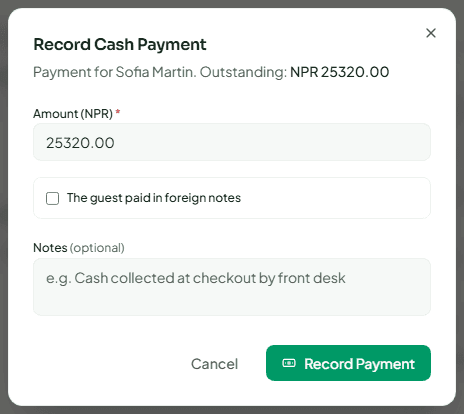
If you have no cashier shift open, Stayantra refuses: "Open your cashier shift before taking or handing back cash." Open one on Finance → Cashier Shifts first.
Foreign notes
When a guest pays in dollars, rupees or another currency, tick The guest paid in foreign notes, choose the Currency of the notes and enter the Notes taken. Stayantra converts them at the current rate and credits the bill in your hotel's currency. The notes stay in your drawer as that currency and are counted separately when you close the shift. If the rate cannot be found right now ("These notes could not be priced right now"), take the payment in NPR or try again shortly.
Collect online at the desk
The guest pays from their own phone, with no cash changing hands.
Open Collect online
On the booking, click Collect online. Only the methods your hotel has set up are listed. If none are, it says "No online payment method is set up for this hotel."
Choose how the guest pays
- eSewa or Khalti — a QR code appears. The guest scans it with that app.
- Fonepay QR — a QR on this screen for any Nepali bank or wallet app. Guests from India can scan it with a UPI app (PhonePe, Google Pay, Paytm or BHIM).
- Card — a QR the guest scans with their phone camera to pay by card on Stripe's page (Apple Pay and Google Pay work there too). It is charged in USD.
Wait for the payment
The dialog says Waiting for payment. When the provider confirms, the payment posts to the bill on its own. You can also Copy link and send it to the guest.
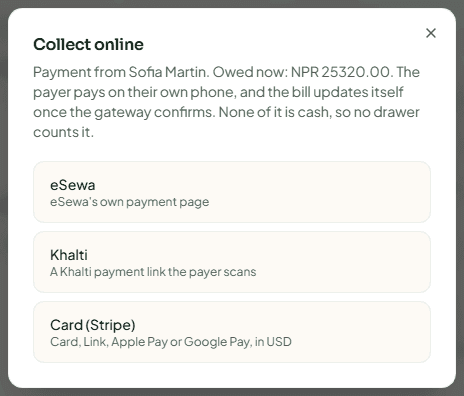
Online payments never touch a cash drawer. A Fonepay QR that expires or is cancelled posts nothing; click Show a new QR to try again.
Verify a bank transfer
If your hotel lets online guests pay directly into your eSewa, bank account or QR, their booking shows Payment due with the amount and deadline. When the money arrives:
- On the booking, click Verify payment received.
- Enter the Amount received, Sent by (for example Bank transfer, Khalti or Fonepay QR), the Transfer reference and the date it Arrived on.
- Confirm. The payment is recorded on the bill.
If a transfer or a required deposit has not arrived by its deadline, Exubee proposes releasing the room, and a manager decides on the Exubee page. Nothing is released on its own. See Exubee and approvals.
Payments when guests book online
When a guest books on the Stayantra booking site, your hotel website or the booking widget, the owner's Guest payment rules decide how they pay:
- Pay online through eSewa, Khalti, Fonepay or card. Stayantra collects it and pays you weekly — see Pay with Stayantra.
- Pay online directly to the hotel — the guest transfers to your own account, and staff verify it as above.
- Deposit — Off, Optional or Required, as a percentage of the stay, with a due time for bookings that cannot pay at once. Deposits can apply only on certain dates (for example peak season) or rate plans.
- Pay at the hotel — the guest reserves without paying and settles at check-in, if Allow Pay at Hotel is on in Settings → Hotel profile → Listing & offers.
Guests can also split a stay's payment with friends. See Book online and Split pay.
The owner sets these in Settings → Hotel profile → Payments.
Split a bill
Under the bill, Split bill moves charges onto a separate bill — for a second payer, or to pay in parts. Tick the charges to move. To move only part of a charge (two guests sharing a room), type the amount to move. Click Split bill. To bill a company instead, attach it under Billing on the booking. See Bookings and folios.
Print a statement or receipt
- Print Statement prints an 80 mm folio statement for the guest.
- Statement opens the full A4 folio statement, with a PDF download.
Neither is a tax invoice. Stayantra bills are not IRD tax invoices: issue the VAT invoice from your IRD-certified billing system and record its number in Finance Center.
A receipt is emailed automatically for event instalment payments when the guest has an email address.
Give money back
On the booking, click Refund. Enter the amount (an overpaid bill is filled in for you), choose How it goes back, and give a reason — for example "Guest left two nights early — refunded in cash". Click Review refund, check the summary, then confirm.
| How it goes back | What happens |
|---|---|
| Cash from the drawer | Recorded in your open cashier drawer, which is expected to hold that much less at close. |
| Refund to the card through Stripe | Stripe sends the money back to the card the guest paid with. This moves real money and cannot be undone here. |
| Sent from the Fonepay Business app | You send it from the Fonepay Business app first, then record the Fonepay reference here. It is not cash, so no drawer changes. |
Recording a cash or Fonepay refund does not send money through eSewa, Khalti or a card — hand the cash over, or make the transfer, yourself.
A refund above your limit becomes Send for approval: an owner or manager approves it, you cannot approve your own, and nothing moves until then. The owner sets the limits in Settings → Limits & RBAC → Refund rules.
Refunds the hotel owes after a cancellation are listed together on Refunds.
Currencies
Your hotel works in one base currency — NPR for hotels in Nepal. Prices, bills and reports are in it.
- Card payments through Stripe are charged in USD at the day's rate.
- UPI payments (for guests from India) are charged in INR.
- Foreign notes at the desk are converted to NPR at the current rate.
- eSewa, Khalti and Fonepay are always in NPR.
Finance
See the hotel's money, check each day's takings, run cashier shifts, send refunds you owe, follow Pay with Stayantra payouts and check OTA commission statements.
Plan and billing
Your Stayantra subscription — the free trial, packages and modules, room count, invoices with 13% VAT, paying by eSewa, Khalti, Fonepay or card, and what happens if a payment is late.