
Your marketplace listing
The Stayantra marketplace (the guest website) and the Stayantra Go app let travellers find your hotel and book it directly. Your listing is built from what you already keep in Stayantra — your hotel profile, photos, rooms, rates and guest reviews — so there is no separate listing to maintain. Bookings land on your Smart Grid like any other, and Stayantra takes no commission on them.
This page is for hotels. How a guest searches and books is in Book online.
Where to find it: Settings → Hotel profile → Listing & offers. Who can use it: owners and managers.
Before your listing goes live
A hotel appears on the marketplace and in the Go app only when all of these are true:
- Marketplace Listing is switched on (see below).
- Your setup is finished and the hotel is launched.
- Your business verification is approved.
- Your subscription is in good standing (a frozen, paused or cancelled plan hides the hotel from search and lists, though existing guests can still reach their bookings).
[!IMPORTANT] Stayantra turns this on. Your listing, and online bookings from it, start only after Stayantra approves your business verification. Submit your documents in Business verification.
Until then, a guest who finds your hotel's page sees "This hotel is not accepting online bookings yet."
Switch your listing on or off
Open Listing & offers
Go to Settings → Hotel profile and choose Listing & offers.
Turn on Marketplace Listing
Under Visibility, switch on Marketplace Listing — "Show this hotel in the public Stayantra marketplace catalog and search results."
Save
Press Save Changes.
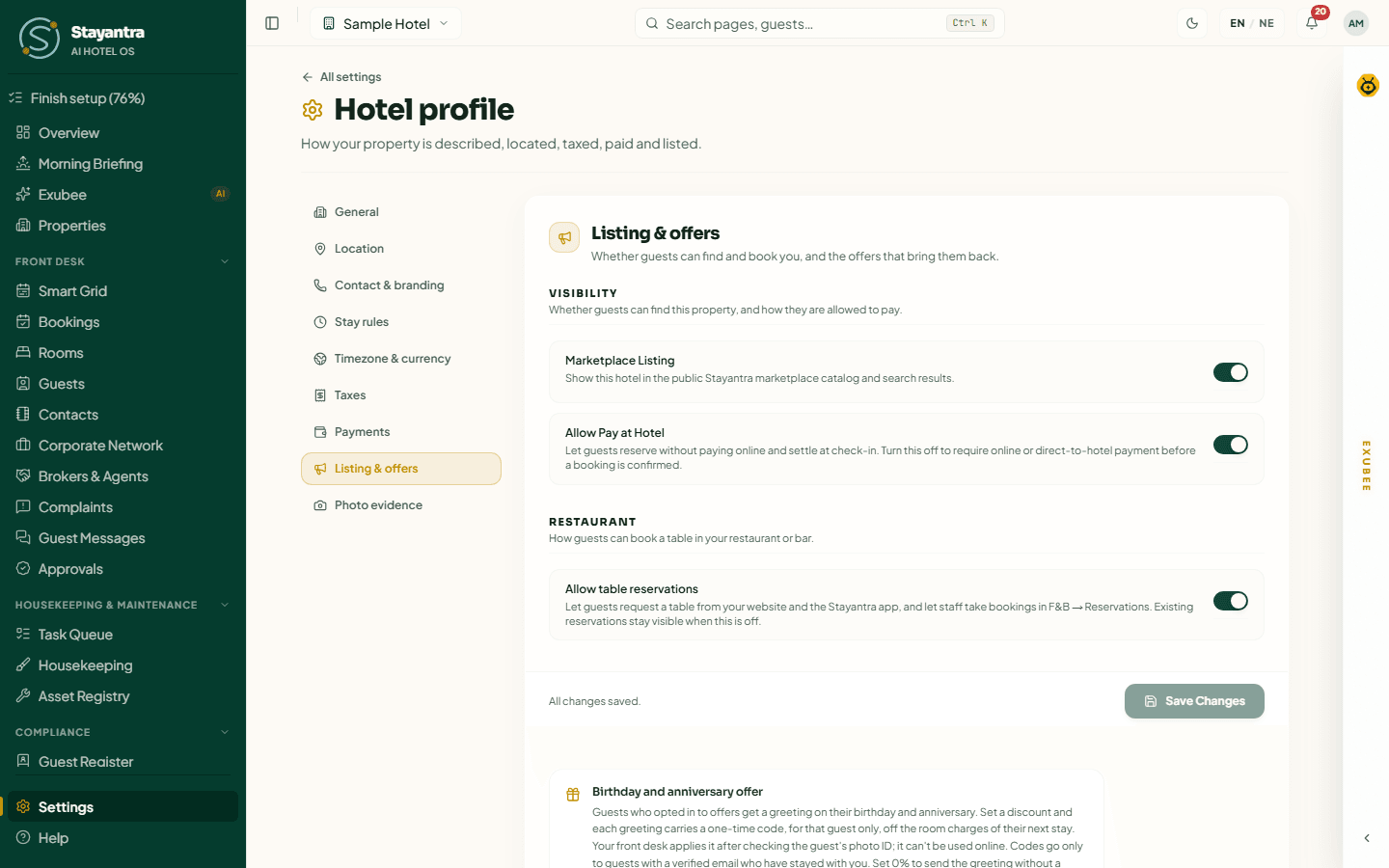
If your verification is still being reviewed, the switch says "Will go live once your KYC is verified." Your choice is saved and applied the moment verification is approved.
On the same page:
- Allow Pay at Hotel lets guests reserve without paying online and settle at check-in. Switch it off to require payment online (or directly to your account) before a booking is confirmed.
- Allow table reservations lets guests request a restaurant table from your website and the app.
Switching the listing off hides the hotel from search within a few minutes. Bookings already made are not affected.
What guests see on your page
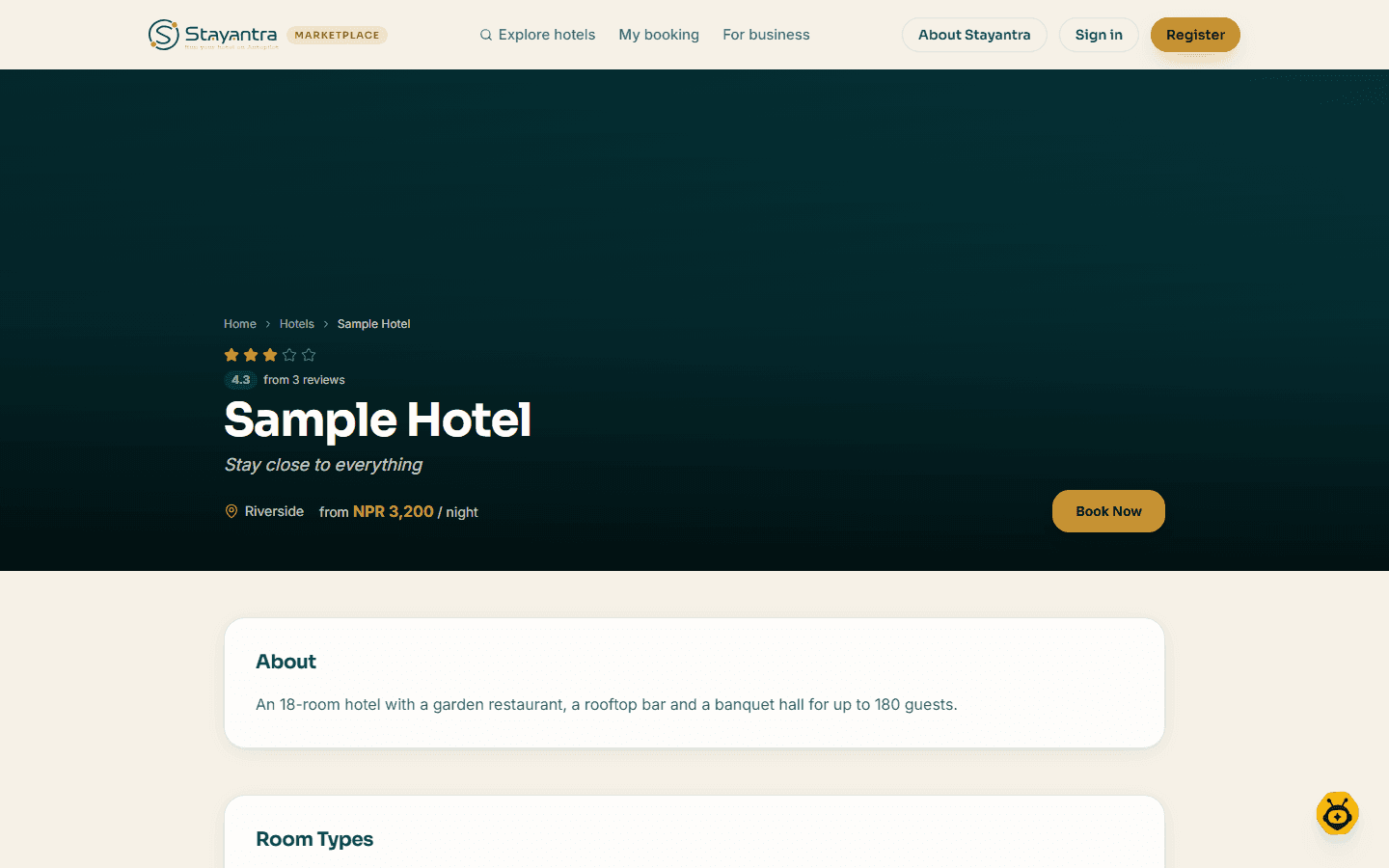
Your hotel page shows, in this order:
| Section | Where it comes from — change it here |
|---|---|
| Name, star rating and tagline | Hotel profile → General |
| Photos | Hotel profile → General (cover photo and gallery) |
| About | Hotel profile → General (description) |
| Room Types, with live availability and prices | Your room types and the rates on What You Sell |
| Hotel Amenities | Hotel profile → General |
| Event halls | Your event spaces, if you have them |
| Guest Reviews | Your public guest reviews (below) |
| Hotel Policies | Hotel profile → Stay rules — check-in, check-out, cancellation |
| Location | Hotel profile → Location — the map uses your coordinates |
| Other Hotels in (your city) | The first three listed hotels in your city |
It ends with "Ready to stay at Sample Hotel? Book directly — no commission, no middleman." and a Book Now button. The Go app shows the same information.
Only rates sold on your direct channels are offered here. Rates you sell only through an OTA are not.
Reviews on your listing
- Only reviews from Stayantra guests after their stay are shown, up to the eight most recent, with the guest's first name and last initial: "From verified guests who stayed at this hotel."
- Ratings given during a stay are private, and OTA reviews are not shown.
- A review under 3 stars is held for 72 hours so you can reply first — see Review Quarantine.
- Your reply shows under the review as Response from the hotel.
- Anyone can report a review to Stayantra.
How hotels are ordered
Stayantra publishes exactly how hotels are ranked, at How hotels are ranked on the marketplace
(/ranking). In short:
- Search results and city pages are ordered by official star rating, highest first, then by name. Nobody can pay to move up. Guests can sort by price or guest rating themselves.
- Featured hotels — the "Hotels in your city" row on the home page and the top of each city page — show up to 6 hotels, ordered by a merit score.
- Price, booking volume, your plan and commission are never part of the order.
The merit score
| Part | Weight | What raises it |
|---|---|---|
| Guest rating | 55% | Your average public review, adjusted so a handful of 5-star reviews cannot top the list alone. |
| Number of reviews | 15% | More reviews, with diminishing returns (10 reviews earn half this part). |
| Complete profile | 20% | A description, a map location, an address, a price, a photo and room types. |
| Star rating | 10% | Your official star rating. |
To be featured at all, a hotel must be listed, have at least one photo, and have a room type priced above zero with a room that can be booked.
What you can do: fill in every part of your hotel profile, add good photos, set your map location, and ask guests to review their stay. These are the things the score measures.
Sponsored places
Up to 2 of the 6 featured places (the 2nd and 5th) can be Sponsored: a hotel paid for the position. They are always labelled "Sponsored" with a "Why am I seeing this?" link, must meet the same bar as every featured hotel, rotate every 10 minutes when several hotels in a city have paid, and never appear in search results or city lists.
Stayantra sells sponsored places directly — you cannot buy them in the app. The Sponsored placement card on Listing & offers shows any campaigns you have (city, dates, status, Impressions, Clicks, CTR) and warns if one is "Not currently showing on the rail", with the reason (for example "No cover or hero photo").
[!IMPORTANT] Stayantra turns this on. Sponsored placement is sold and set up by Stayantra. Ask for it from Help → Open a support ticket, or email support@stayantra.com.
Direct bookings, no commission
- Guests pay your real rate. The marketplace adds no markup, and Stayantra charges no commission on marketplace bookings today. Your Hotel Agreement promises 30 days' notice before that could change, and there is no rate parity requirement.
- A marketplace or Go booking arrives on your Smart Grid within seconds. On the booking, Source reads "direct web" and Booked via reads Marketplace or Go app (or the AI assistant it came through, such as ChatGPT or the Exubee concierge).
- Guests can pay online (in full or a deposit), pay at the hotel if you allow it, or pay directly into your own account. Money Stayantra collects for you online is paid out to you through Finance → Pay with Stayantra. The only deductions are payment provider fees and any currency conversion — see Guest payments.
Troubleshooting
| What you see | What to do |
|---|---|
| The hotel does not appear in search | Check Marketplace Listing is on, your business verification is approved, and your subscription is active. |
| "Will go live once your KYC is verified." | Finish Business verification. |
| Guests see "not accepting online bookings yet" | Your business verification is not approved yet. |
| A room type is missing from the page | It has no rate on sale for direct channels, or no active room. |
| The map is missing | Set your coordinates in Hotel profile → Location. |
| You are not featured | Check the featured conditions above: a photo, and a priced room type with a bookable room. |
Related
- Book online — the guest's side
- Hotel profile — the details your listing shows
- Guest reviews
- Booking widget and website