
Inventory and procurement
Stayantra keeps one stock record for the whole hotel — kitchen, housekeeping, maintenance and general stores — and one buying process in front of it. Inventory is what you hold. Procurement is how more of it arrives and how suppliers get paid.
Where to find it: in the sidebar, Stock & Purchasing → Inventory and Stock & Purchasing → Procurement. Both need the Procurement module on your plan.
Who can use it:
| Task | Owner | Manager | Store staff | Other staff |
|---|---|---|---|---|
| See stock, raise purchase requests, issue stock, record adjustments | Yes | Yes | Yes | No |
| Create and edit stock items, see stock value | Yes | Yes | No | No |
| Add vendors | Yes | Yes | Yes | No |
| Approve requests and purchase orders | Yes | Yes (up to the owner's limit) | No | No |
| Receive deliveries (GRN), record market purchases | Yes | Yes | Yes | No |
| Enter and pay supplier bills | Yes | Yes | No | No |
"Store staff" means staff with the store skill.
How buying works
- Someone raises a purchase request for what their department needs — or Stayantra raises one when an item runs low.
- The manager adds vendor quotes and selects the best one. That creates a purchase order — or sends it to the owner first if it is above the owner's limit.
- When the goods arrive, store staff record a goods received note (GRN). Stock goes up.
- The supplier's bill is entered and paid.
Small cash buys at the bazaar skip all of this: record them as a market purchase.
Inventory
Stock & Purchasing → Inventory has six tabs: Items, Stock Ledger, Adjustments, Valuation (owners and managers only), Expiry and Stores. Use the department filter (F&B / Kitchen, Housekeeping, Maintenance, General) to see one department.
Add a stock item
Open the form
On Items, click New item.
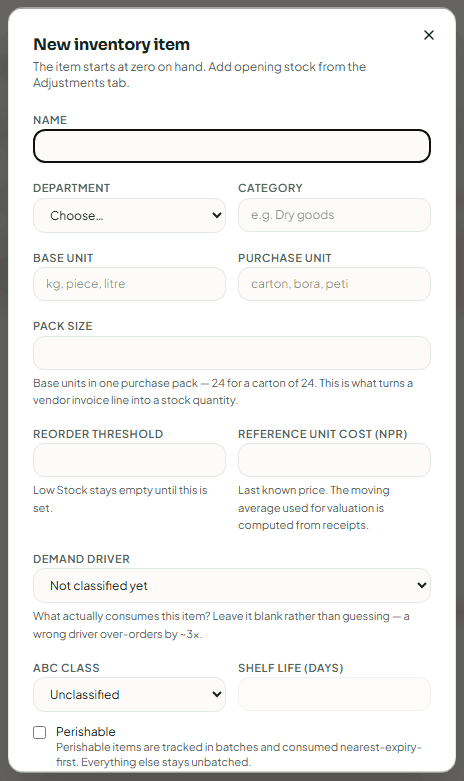
Describe it
- Name and Department (required). Without a department the item shows in every console.
- Category — for example "Dry goods".
- Base unit — how you count it in stock (kg, piece, litre).
- Purchase unit and Pack size — how you buy it (carton, bora, peti) and how many base units are in one pack, for example 24 for a carton of 24. This turns an invoice line into a stock quantity.
- Reorder threshold — when the stock falls to this, the item shows on Low Stock.
- The unit cost — the last known price. Valuation uses a moving average of what you actually paid on deliveries.
- Demand driver — what uses it up: Per room-night (toilet paper, tea bags, water), Per arrival (soap, slippers, linen), Per meal cover (rice, cooking oil) or Fixed / occupancy-independent (floor cleaner, bulbs). Leave it blank rather than guess — a wrong driver over-orders by about three times.
- ABC class — A (high value, count often), B or C (low value, count rarely).
- Shelf life (days) and Perishable — perishable items are tracked in batches and used nearest-expiry-first.
Save
Click Create item. The item starts at zero. Add what you already hold on the Adjustments tab with Set opening stock.
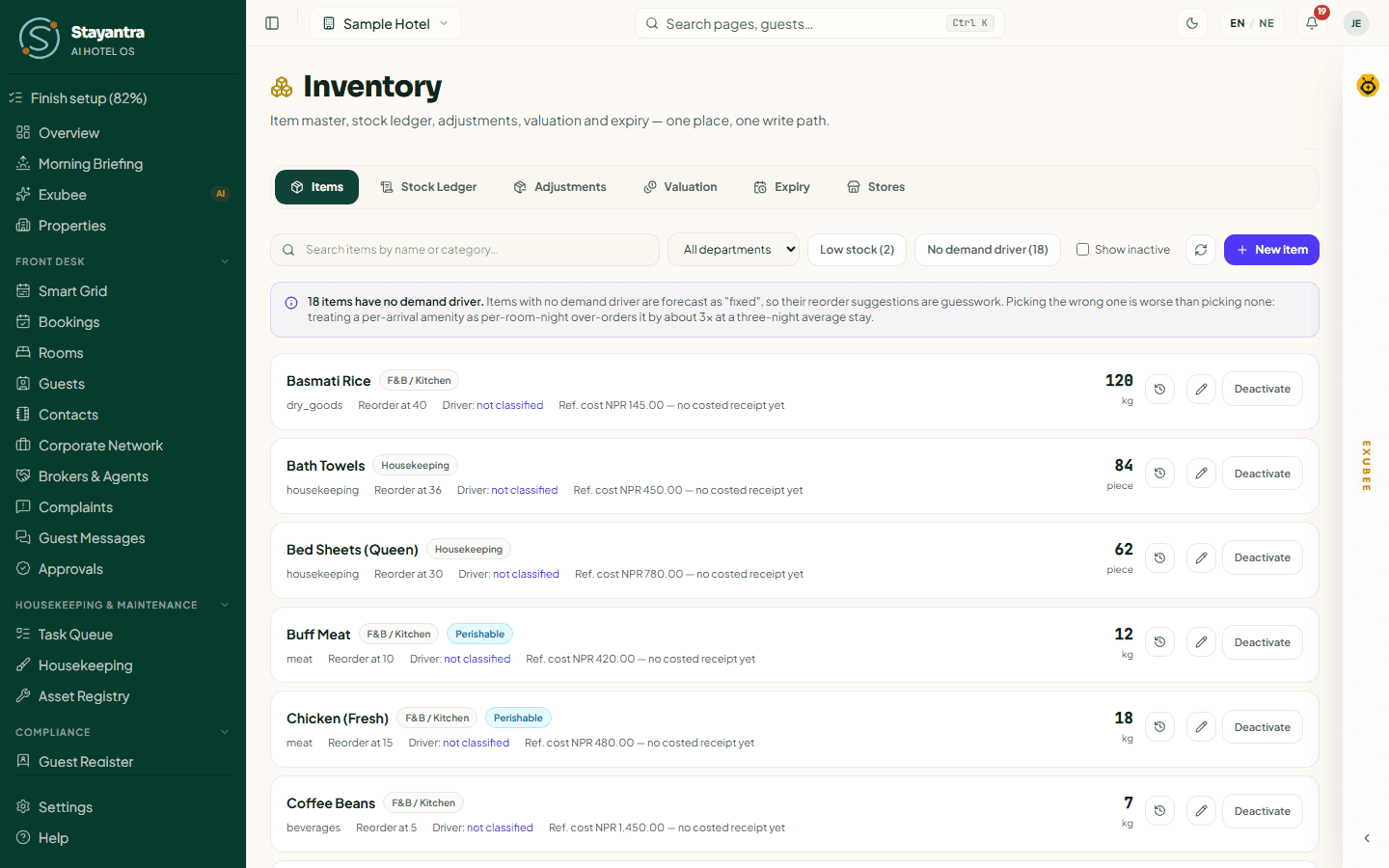
On each item you can view its stock movements, Edit item, move stock between stores (Transfer), or Deactivate it (it leaves counts, orders and recipes; its history is kept). Tick Show inactive to see deactivated items.
Stock Ledger
Every movement of stock, newest first: Goods received, Issued to department, Used on a task, Stock count variance, Adjustment, Wastage / write-off, Transferred out, Transferred in and Opening balance. Filter by item, store, movement type and dates. Stock levels never change any other way.
Adjustments
Use Adjustments for two things:
- Set opening stock — what you already hold when an item first enters Stayantra, with its unit cost. Do this once per item.
- Wastage or correction — spoilage, breakage or a miscount. Choose the item and store, Type (Wastage / write-off or Correction), Direction (Remove from stock or Add to stock), the quantity and a Reason (required). Click Record adjustment.
Stock added by hand, and write-offs above the owner's limit, wait for a manager or the owner to approve them in Approvals. The balance does not change until then.
Goods from a supplier belong on a GRN, and draws by a department belong on a stock issue — not here.
Valuation
What your stock is worth, item by item, at its moving-average cost. Only owners and managers see this tab. Items not yet received on a purchase order are valued at their reference price.
Expiry
Batches of perishable items by expiry date: Next 7 days, Next 30 days, Next 90 days or All dated batches. Expired batches are still counted and valued until you write them off on Adjustments.
Stores
Each store — Main, Bar, Kitchen, Minibar — keeps its own balance, and the hotel's total is their sum. Type a name and click Add store; Rename or Retire a store later. Under Where automatic draws come from, choose the store each outlet's sales take recipe ingredients from, and the store for Minibar charges. Anything not set draws from the Main store.
Procurement
Stock & Purchasing → Procurement has these tabs: Requests, Market purchase, Vendors, Purchase Orders, Low Stock, Suggested Order, Stock Counts, Import Invoices, Bills & payments, Returns, Supplier reports and Settings. Store staff do not see the supplier-money tabs.
Raise a purchase request
Open the form
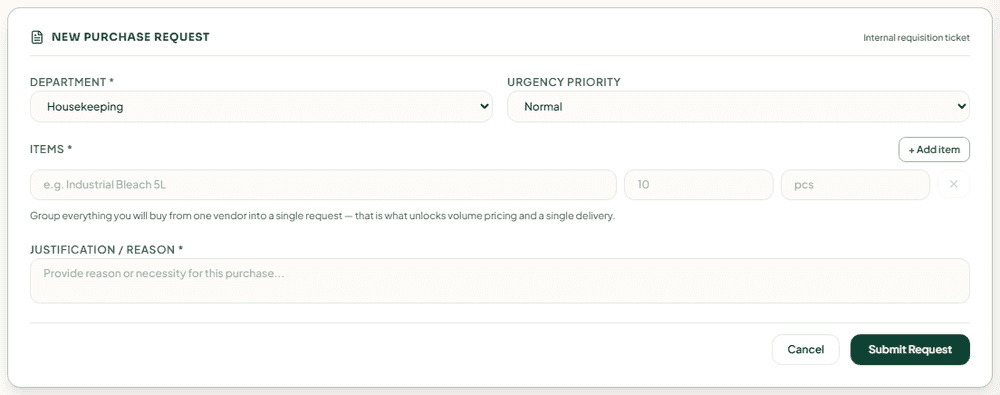
On Requests, click New Request.
Fill it in
Choose the Department and the Urgency Priority (Low, Normal, High, Urgent). Add each item with its quantity and unit (+ Add item for more). Group everything you will buy from one vendor into one request — that is what unlocks volume pricing and a single delivery. Write the Justification / Reason.
Submit
Click Submit Request. It shows as Submitted.
Requests marked Auto were raised by Stayantra because an item crossed its reorder threshold or is near expiry. Requests marked Suggested came from the Suggested Order.
| Status | Meaning |
|---|---|
| Submitted | Raised, waiting for quotes. |
| Quoted | At least one vendor quote is attached. |
| Approved | A quote was chosen and approved. |
| Ordered | A purchase order exists. |
| Received | The goods arrived. |
| Rejected | Turned down, with a reason. |
| Cancelled | Withdrawn by the requester or a manager. |
Compare quotes and order
Add quotes
Open the request and click Add Vendor Quote. Select Vendor, then enter the quantity and Unit price for every item, and any Notes (e.g. Includes delivery). Click Add Quote. Repeat for each vendor.
Compare
With two or more quotes, Analyze Quotes (Exubee AI) compares them for you.
Choose one
Click Select & Create PO on the best quote. If the order is above the owner's approval limit, the button reads Select & Send For Approval and the owner approves it in Approvals before any purchase order exists.
A manager can also Reject request (with a reason), and the requester or a manager can Cancel request or Close request.
[!NOTE] The owner's approval limit is NPR 25,000 by default. The owner changes it in Settings → Limits & RBAC → Purchase rules → Owner approval above. The same panel sets the Bill price tolerance, Stock write-off approval above, Market purchase without approval up to and One supplier, seven days, without approval up to. Every purchase order is sent to the owner as a notice.
Receive a delivery (GRN)
Find the order
On Purchase Orders, find the order (search by PO number, vendor, department or item, or filter Awaiting delivery).
Record what arrived
Each order still awaiting goods shows a Record Goods Received Note (GRN) section. For each line, enter the quantity received (Recv) and any rejected (Rej) with a Rejection reason. Perishable items need a Batch / lot no. and an expiry date. Leave a line blank if it did not arrive — you can receive the rest later. Choose the Store received into and type the supplier's Invoice Reference.
Post it
Click Record GRN & Update Inventory and confirm. Stock goes up and the item's average cost updates.
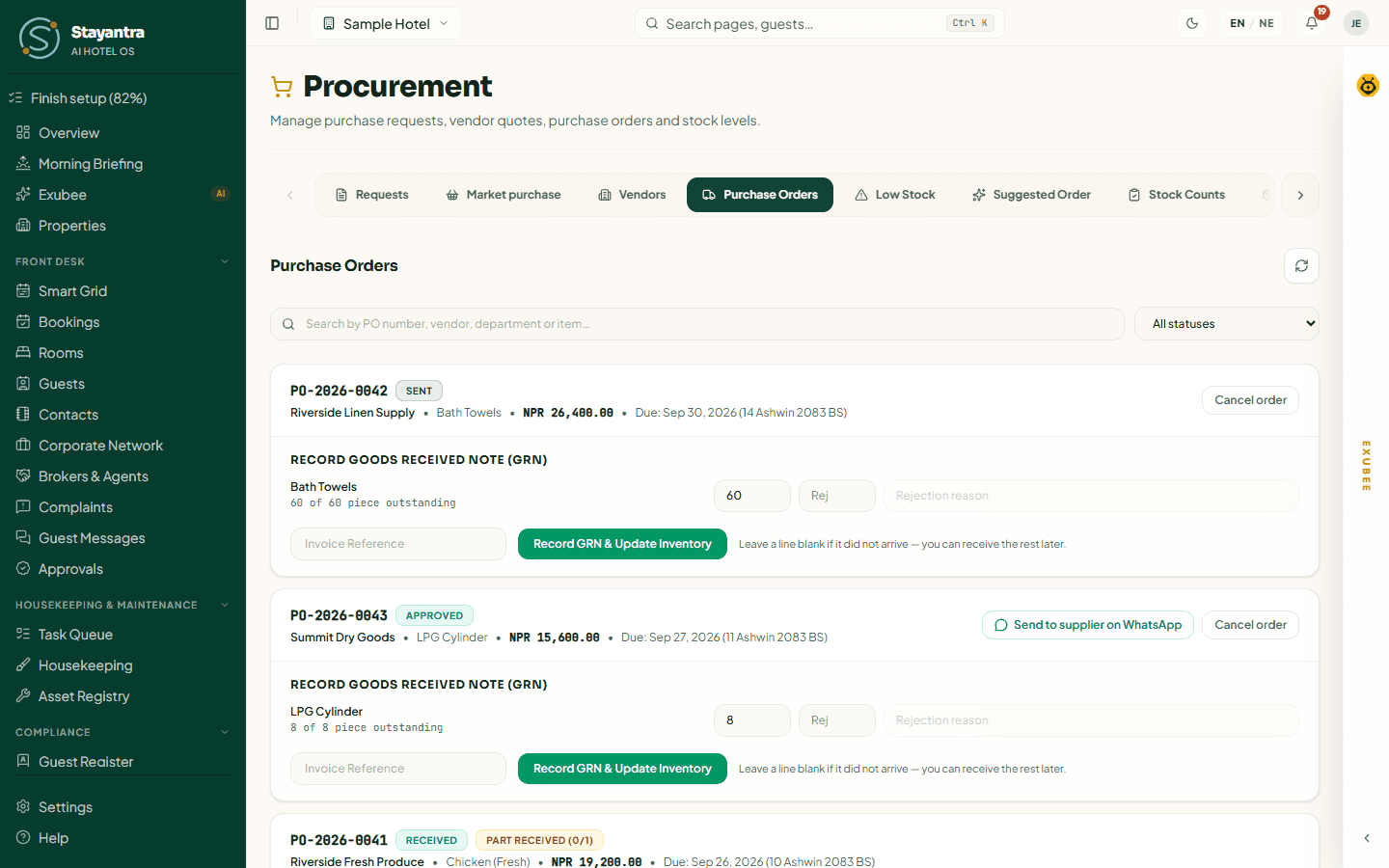
Other actions on an order: Cancel order (nothing received yet — the request goes back to quoted), Close short (nothing more is expected), Return goods, and Reverse a delivery (undo a GRN entered by mistake: its stock goes back out and its cost is voided). Stayantra does not message the vendor when you cancel — tell them yourself. When your hotel's WhatsApp is connected, Send to supplier on WhatsApp sends an approved order to the vendor.
Record a market purchase
For cash buys at the market, with no purchase order:
- On Market purchase, fill in Bought from (or The market — no named supplier) and For (the department), and the Receipt number (if printed).
- Add each line: what was bought (a stock item, or Not a stock item — recorded as a cost only), Quantity, Price paid per unit, and for perishables the Lot and Use by date.
- Add a Receipt photo (or the seller's handwritten slip) and Notes, and save.
The cash comes out of your cashier drawer, so you need an open cashier shift (owners excepted). A purchase above the market-purchase limit waits for approval. The owner is told about every market purchase.
Vendors
Vendor Directory lists your suppliers with a Quality score built from their deliveries. Click Add Vendor and fill in Vendor Name, Contact Person, Phone, Email and Supply Categories (comma-separated). The vendor is also added to Contacts. Under Tax settings, owners and managers set Withhold TDS from payments with its TDS rate (%), and VAT-registered (bills carry 13% VAT).
Low Stock
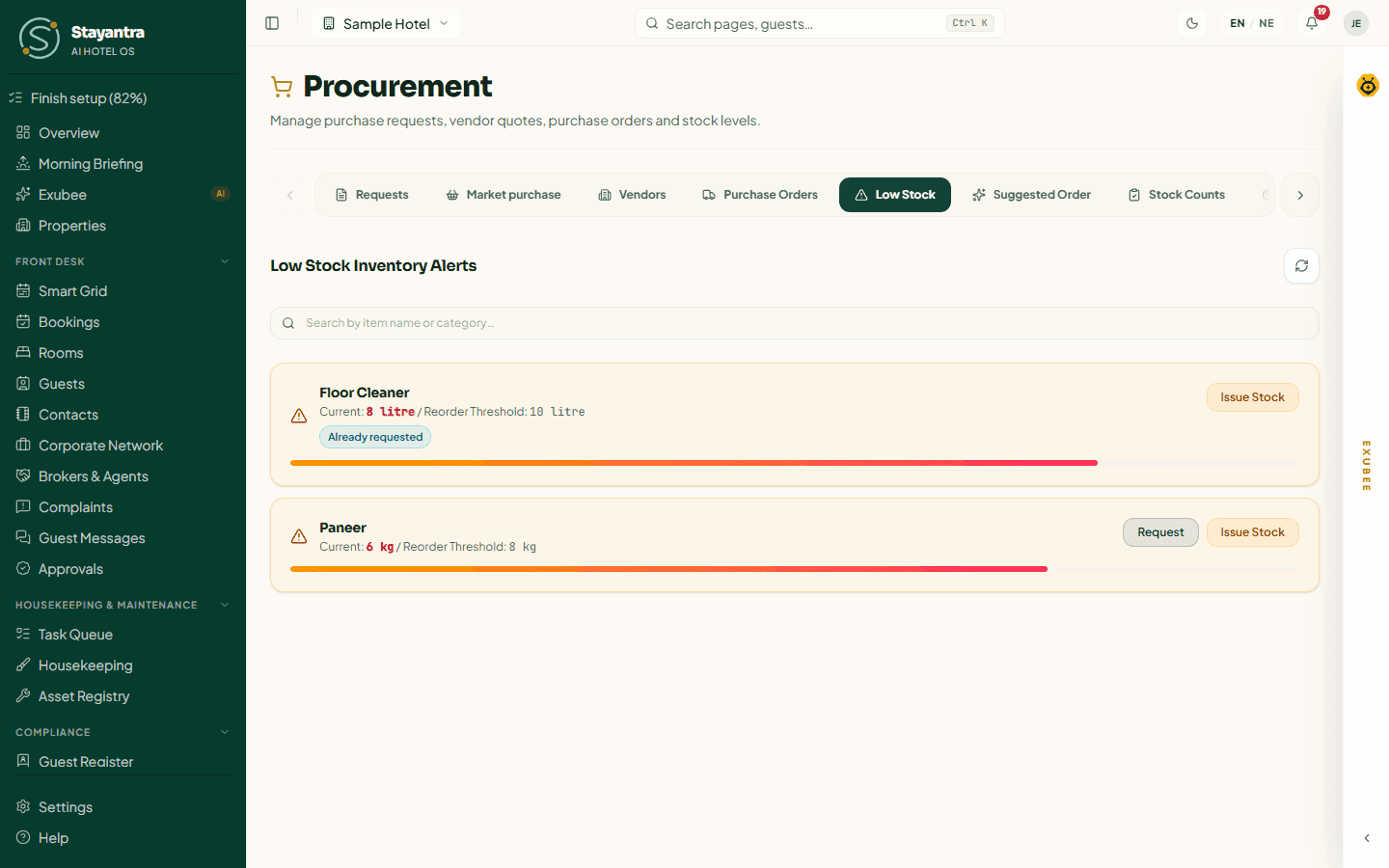
Low Stock Inventory Alerts lists every item at or below its reorder threshold, with a bar showing how low it is. For each item:
- Request — file a purchase request for it (quantity and reason). Already requested shows when one is open.
- Issue Stock — hand stock to a department from a store (quantity, department, optional reason), then Confirm Stock Drawdown.
Suggested Order
Stayantra forecasts what you will use from your bookings and each item's demand driver, and suggests what to order now. Reorder at shows each item's reorder point. Items whose stock plus what is already on order covers the reorder point are listed under Already covered. Click Create purchase request to turn the suggestion into a request.
When vendors have quantity price breaks, the Bulk-buy optimiser tells you whether a bulk deal is Worth taking, Marginal or not, after the Carrying cost, Spoilage risk and Cash tied up. Vendor price comparison, the optimiser and one-click requests need a higher package — the page says so if yours does not include them.
Stock Counts
A physical count is the only way to find stock that was used but never issued.
Start the count
Click Start a count, choose the Count date and Store, and click Create count sheet. Every item's system quantity is noted now.
Count
Enter the counted quantity for each item. Where it differs from the system, give a reason (breakage, unrecorded issue). Click Save progress as you go.
Approve
Click Submit for approval. A manager or owner reviews it and clicks Approve & adjust inventory. Stock changes only then.
Import Invoices
Upload photos, scans or PDFs of six to twelve months of past bills — or paste a CSV (date,vendor,invoice_no,item,qty,unit,rate) — to give the forecast a real starting point. Stayantra reads them, proposes stock items and unit conversions, and you confirm each one. This needs a manager or owner, and reading photos needs the Ascent package or above.
Bills & payments
- When a supplier's bill arrives, click Enter bill. Choose the Supplier, the Purchase order (optional) to bring in its lines, the Bill date and Due date, and check each line's price before VAT. Click Save as draft, check it, then post it. Posting records what the hotel owes.
- To pay, click Pay supplier. Choose the supplier, amount, Method and Reference, and tick the bills it settles (oldest due first). TDS is withheld automatically if the supplier has it set. Click Record payment. The owner is told about every payment.
The Supplier bills table shows each bill's Due date, Total, Still owed and Status, and Overdue bills. The Supplier account shows every bill and payment. A payment entered by mistake or a bounced cheque can be undone with Reverse.
Returns
Goods rejected at delivery, and goods you send back later (Return goods), are listed here. When the supplier responds, click Resolve and choose how they settled it: Credited (a debit note takes the value off what you owe, optionally set against unpaid bills), Replaced or Closed.
Supplier reports
- What we owe suppliers — totals Overdue, Due in 7 days, Paid, not yet set against bills and Received, awaiting bill.
- Ageing — unpaid bills by days past due, up to Over 90 days.
- Statement for supplier — pick a supplier and Open printable statement.
- Monthly tax reports — the Purchase register (taxable, non-taxable, VAT, with the supplier's PAN) and TDS withheld, to deposit with IRD, each with a CSV download for your accountant.
Settings
Owners and managers set how Stayantra forecasts and suggests orders: Carrying cost rate (default 25% a year), Cash budget per cycle and Store room capacity (hard limits on suggestions), Cycle service level (90%, 95% recommended, or 99%), Amenity refresh policy, Laundry (in-house or sent out), Auto-create purchase requests for low or expiring items, and the Expiry alert window. Click Save settings.
Guest reviews
Read every review your guests leave, reply to it, pull in Booking.com, Airbnb and Expedia reviews, and handle low ratings in Review Quarantine.
Finance
See the hotel's money, check each day's takings, run cashier shifts, send refunds you owe, follow Pay with Stayantra payouts and check OTA commission statements.