
Events and banquets
The Function Diary is where you sell your halls and lawns — weddings, pasni and bratabandha, conferences, parties. It shows every hall against the next two weeks, slot by slot, and takes each booking from first enquiry to the final bill.
Where to find it: in the sidebar, Food, Events & Services → Function Diary. It needs the Events module on your plan.
Who can use it:
| Task | Owner | Manager | Staff |
|---|---|---|---|
| See the diary | Yes | Yes | Front desk staff |
| Take an enquiry, hold, quote, confirm | Yes | Yes | Front desk staff |
| Record deposits and instalments, settle | Yes | Yes | Cashiers |
| Refund a deposit | Yes | Yes | Cashiers, up to their limit |
| Add and edit halls | Yes | Yes | No |
| Change Event Settings | Yes | Yes (except the owner-only rules) | No |
| Cancel a confirmed or paid banquet | Yes | Yes | No |
How a function booking moves
| Status | Meaning |
|---|---|
| enquiry | Someone asked about the date. Nothing is held. |
| tentative_hold | The slot is held for this guest until the hold expires. Nobody else can book it. |
| confirmed | Booked. Confirming needs the deposit to be paid first, if your settings ask for one. |
| completed | The function has taken place. |
| settled | The final bill is done. |
| cancelled | Called off. Any money paid shows under Money. |
| expired | The hold ran out and the slot went back on sale. |
Separately, each booking shows its Money state: Unbilled, Balance due, Settled, Credit held (money paid ahead of a function still to happen), Refund due (the hotel owes money back on a cancelled function) or Refunded.
Set up your halls
You add your halls once, usually during the setup wizard. To change them later, click Manage Halls at the top of the diary.
Open the halls list
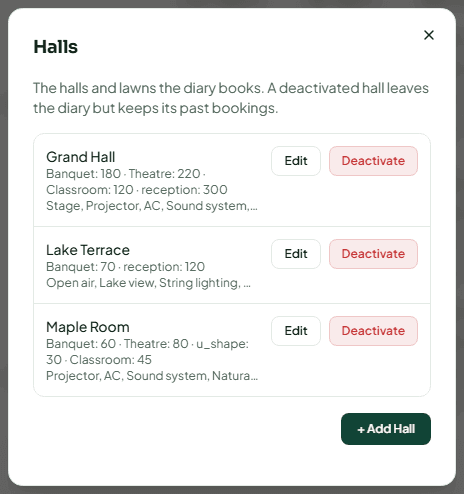
Click Manage Halls. The Halls dialog lists each hall with its capacities.
Add or edit a hall
Click + Add Hall (or Edit on a hall). Fill in:
- Name — for example "Grand Hall" or "Garden Lawn".
- Capacity for each layout — Theatre, Banquet and Classroom (seats). Leave a layout empty if the hall is never set up that way.
- Amenities — separated by commas, for example "Stage, Projector, Generator backup".
Click Add Hall or Save Changes.
Set the time between events
Under Time between events, set the minutes each hall needs for setup and cleaning. Two bookings in the same hall (or in halls combined with it) cannot be closer together than this. Only the owner can change these.
To take a hall off sale, click Deactivate on it and confirm Deactivate. Past bookings are kept and you can reactivate it at any time. A hall with upcoming enquiries, holds or confirmed bookings cannot be deactivated.
Set your event rules
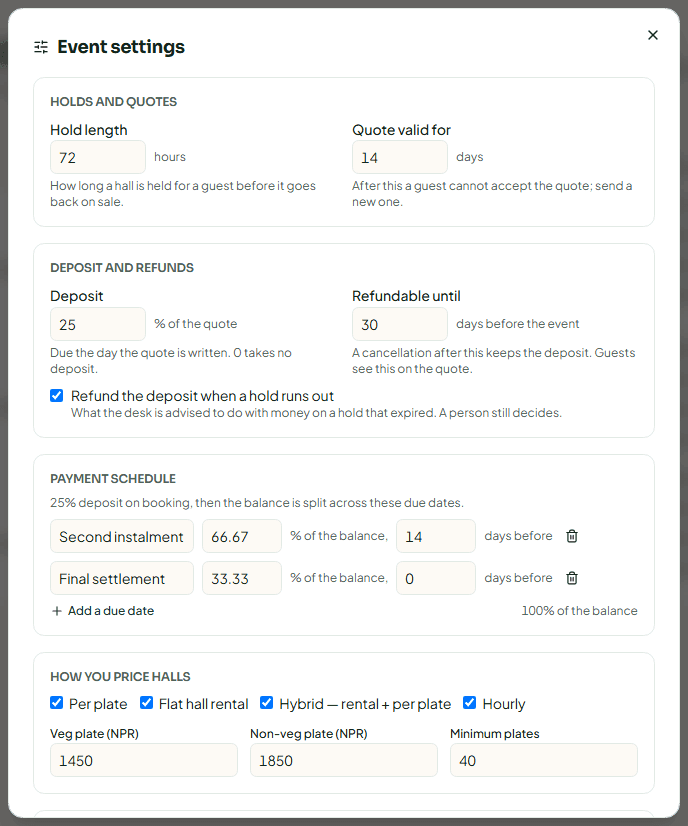
Click Event Settings to set how you sell functions. Owners and managers can change most of them.
| Section | Setting | What it does |
|---|---|---|
| Holds and quotes | Hold length (hours) | How long a hall is held before it goes back on sale. The default is 72 hours. |
| Quote valid for (days) | After this the guest cannot accept the quote; send a new one. | |
| Deposit and refunds | Deposit (% of the quote) | Due the day the quote is written. 0 takes no deposit. |
| Refundable until (days before the event) | A cancellation after this keeps the deposit. Guests see this on the quote. | |
| Refund the deposit when a hold runs out | What the desk is advised to do with money paid on a hold that expired. A person still decides. | |
| Payment schedule | Balance instalments | Split the balance into named instalments, each a share of the balance due a number of days before the event. |
| How you price halls | Pricing models | Per plate, Flat hall rental, Hybrid — rental + per plate or Hourly. |
| Veg plate, Non-veg plate, Minimum plates | Your catering rates. | |
| Slots | Slot name, start, end | For example Morning 08:00–14:00 and Evening 17:00–23:00. |
| Extras | Name and price | Decoration, DJ, photography and so on. |
| Combined halls | Which halls combine | Booking a combined hall blocks the halls it is made of. |
| Rules | Warn before a hold ends | You and the managers on duty are told this long before a hold runs out. |
| Price cut on a confirmed banquet | Lowering a confirmed banquet's price by more than this share needs a manager or the owner. | |
| AI plate-rate floor | Exubee may not quote a plate below this share of your lowest catering rate. Only the owner can change this. |
Click Save settings.
Read the diary
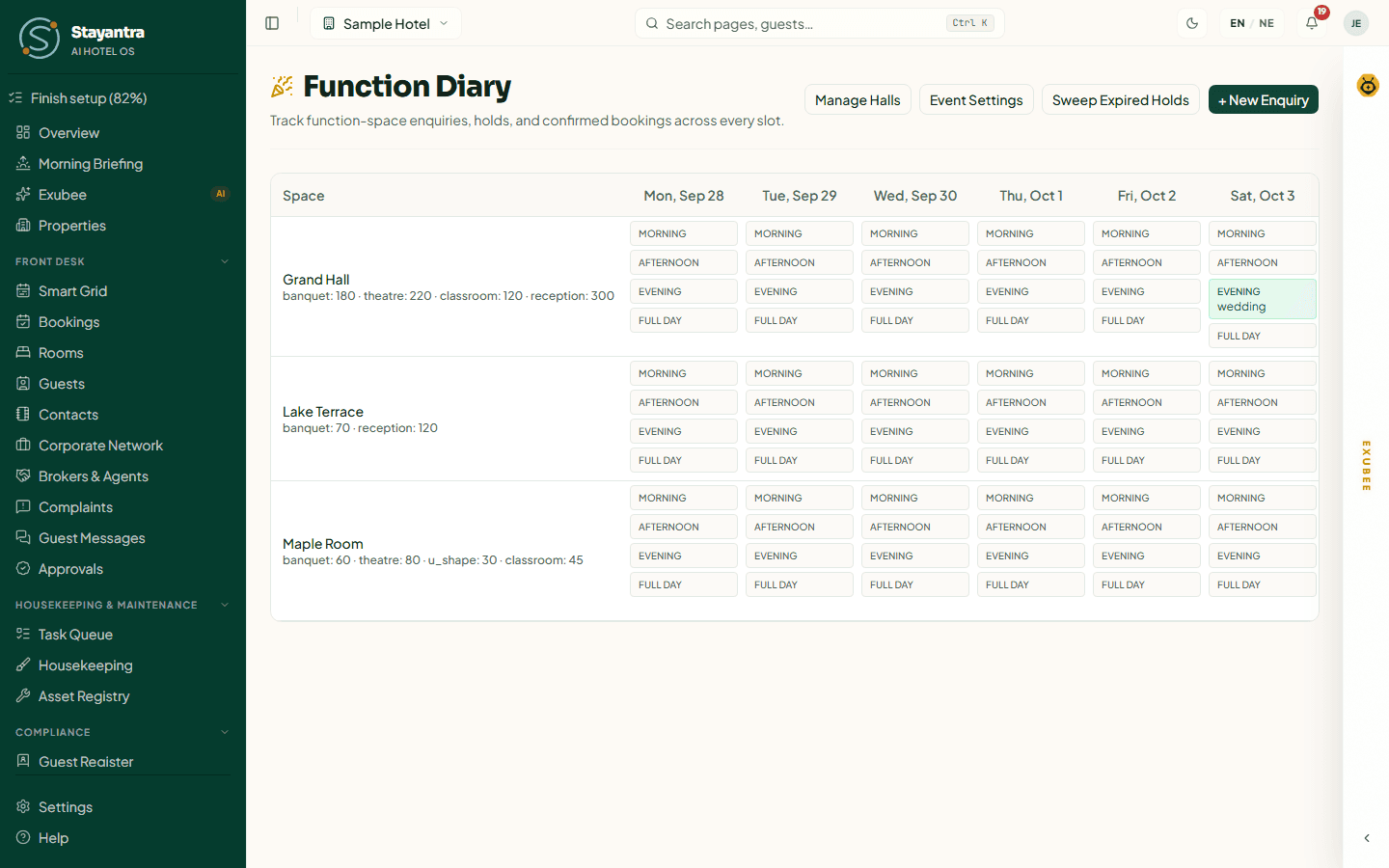
Each row is a hall, with its capacities under each layout. Each column is a day, from today for the next two weeks — scroll sideways to see the later days. Each day has one box per slot:
- A grey box is free. Click it to start an enquiry for that hall, date and slot.
- A coloured box is taken. It shows the event type (or the status). Click it to open the booking.
- Co marks a booking made by a company in the Stayantra corporate network.
Take an enquiry
Start it
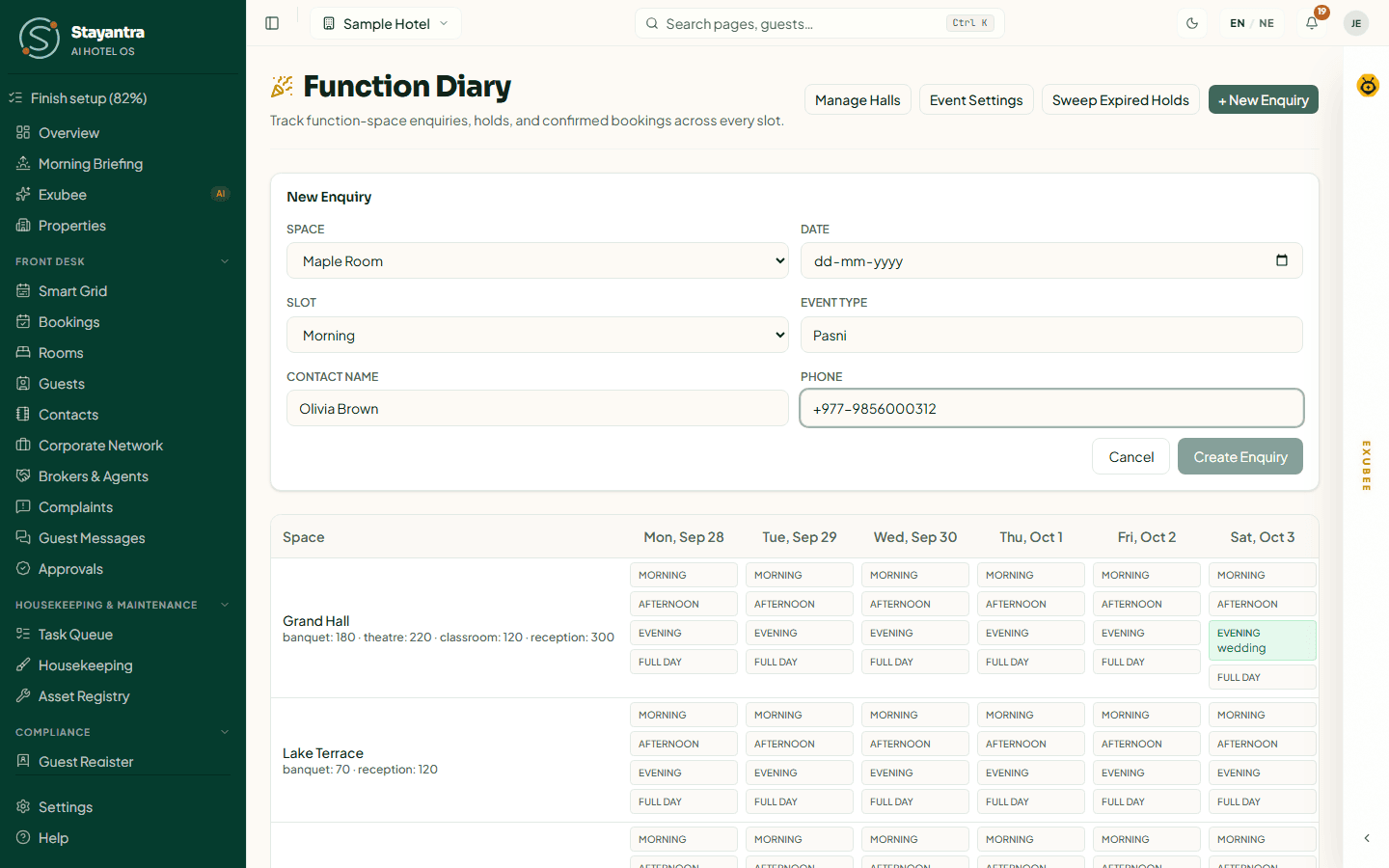
Click + New Enquiry, or click a free slot in the diary.
Fill in the basics
Choose the Space, the Date and the Slot. Type the Event Type (for example Wedding, Conference), the Contact Name and the Phone.
Save
Click Create Enquiry. The slot shows the enquiry. Nothing is held yet.
Open a booking
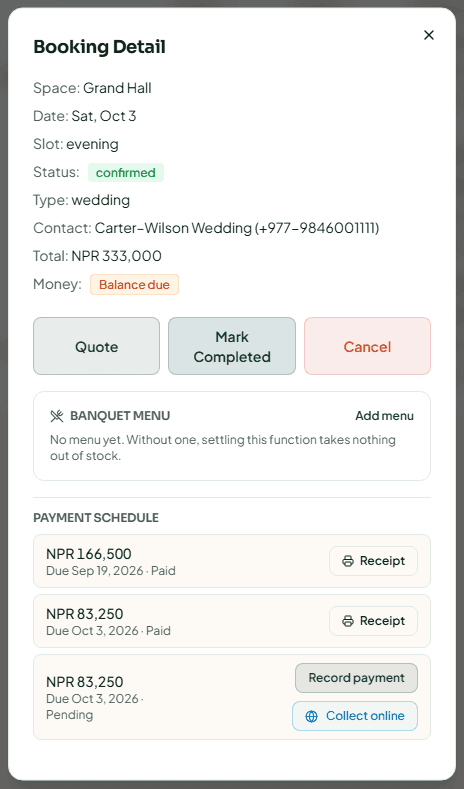
Click a booking in the diary to open Booking Detail. It shows the Space, Date, Slot, Status, Type, Contact, Hold Expires (for a hold), Total (or Not quoted yet) and Money. The buttons depend on the status:
| Button | When | What it does |
|---|---|---|
| Build Quote / Quote | Until cancelled, expired or settled | Opens the quote. |
| Hold | Enquiry | Holds the slot for the hold length. |
| Confirm | Tentative hold | Confirms the booking. Refused until the deposit is paid, if one is due. |
| Extend Hold | Tentative hold | Gives the guest more time. |
| Mark Completed | Confirmed | Records that the function took place. |
| Settle | Completed | Closes the final bill. |
| Refund or Forfeit | Money is Refund due | Decides what happens to money paid on a cancelled function. |
| Cancel | Until completed | Cancels, with a reason. |
Below the buttons are the Banquet menu (the dishes served, which the settlement takes out of stock) and the Payment schedule.
Build and send a quote
Open the quote
In Booking Detail, click Build Quote.
Price it
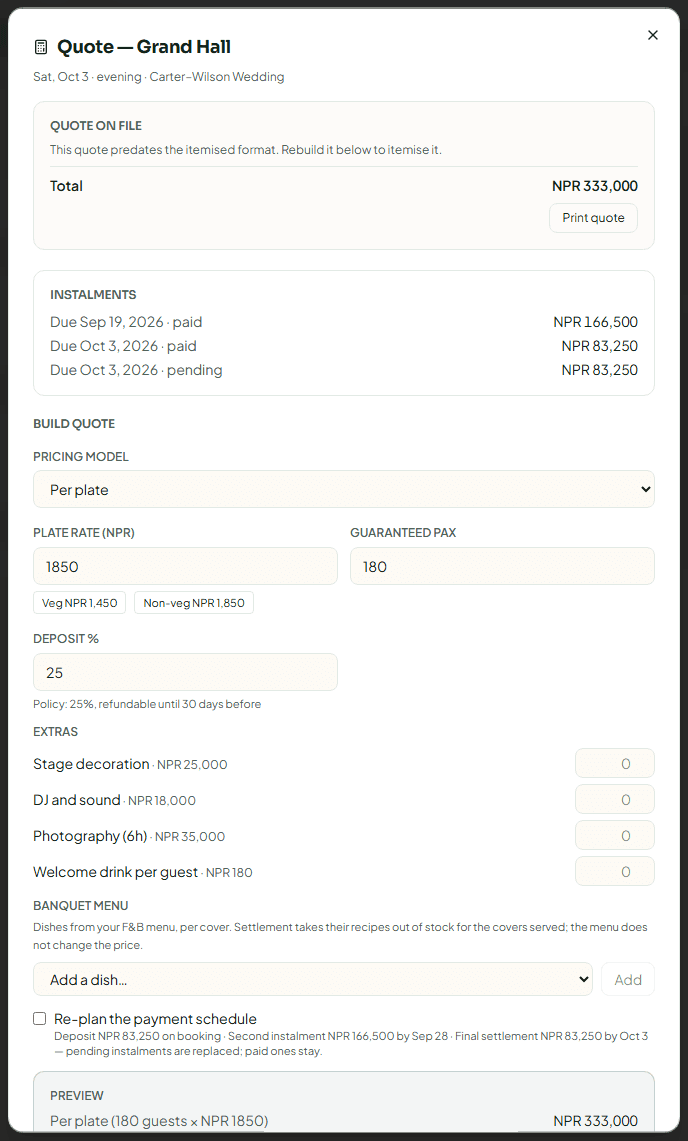
Under Build quote, choose the Pricing model. Then fill in what that model needs: Hall rental, Plate rate and Guaranteed pax, or Hourly rate and Hours. Your catering rates are shown for reference. Set the Deposit %, tick any Extras and choose the Banquet menu.
Check the schedule
Click Write the payment schedule to see the deposit and instalments with their due dates. Preview shows the total the guest will see.
Save and share
Click Save quote. The quote is saved on the booking. Print it for the guest from Quote on file. A guest who asked from the Stayantra site or app is told the price and can accept it there.
Re-pricing a confirmed banquet asks for a Reason for re-pricing this confirmed banquet (for example "Guest added 50 covers"). The owner is told, and the old and new prices are recorded. Pending instalments are replaced; paid ones stay.
Hold the date and collect the deposit
Hold it
In Booking Detail, click Hold. The slot turns amber and Hold Expires shows when it goes back on sale.
Record the deposit
Under Payment schedule, click Record payment on the deposit instalment. Choose the Method — Cash, eSewa, Khalti, Fonepay, Card (Stripe), Bank transfer or Cheque — and add a Reference (optional) (cheque number or wallet transaction ID) and Notes (optional). Click the Record button, which shows the amount. A receipt is emailed if the guest has an email on file; click Receipt on a paid instalment to print one. To let the guest pay from their phone instead, click Collect online on the instalment (see Taking payments).
Confirm
Click Confirm. If the deposit is not fully paid, Stayantra refuses and tells you how much is still needed.
Record each later instalment the same way when the guest pays it. Recording a payment needs the cashier skill, a manager or the owner.
If the guest needs more time
Click Extend Hold, set Extend by (1 to 720 hours) and a Reason (for example "Family is transferring the deposit on Monday"), and click Extend hold. The reason is kept on the booking's history.
A hold with money paid on it never expires on its own. Other holds expire when their time runs out. Click Sweep Expired Holds to release every overdue hold now — the button then shows how many expired.
After the function
- Click Mark Completed once the function has taken place.
- Click Settle. The dialog shows the Pricing model, Total on file, Guaranteed pax and Plate rate. Enter the Covers served. More covers than the guarantee adds a pax adjustment; fewer bills the guarantee. Check Still owed after settling, then click Settle booking.
The banquet menu's ingredients are taken out of stock when you settle.
Cancel a function
Click Cancel, write a Reason (for example "Family postponed the wedding to next season") and click Cancel booking. Only a manager or the owner can cancel a confirmed banquet or one with money paid on it; the owner and managers are told.
If money was paid, the booking's Money turns Refund due and a Refund or Forfeit button appears. The dialog shows what was Received, Billed and is Held by the hotel. Choose Refund it (a Reason (required for a refund) is needed) and click Refund deposit, or Forfeit it and click Forfeit deposit when the cancellation came after your refund window. A refund above your limit is sent to a manager to approve.
Recording a refund does not send any money: hand the cash over or make the transfer first, then record it here. A cash refund counts against your open cashier drawer. See Refunds.
Enquiries from guests
Guests can ask for a hall themselves on your hotel's page on the Stayantra booking site. They pick the hall, date, slot and number of guests. The request lands in the diary as an enquiry, and the owner and managers get a New event hall enquiry notification.
When you save a quote, the guest is told the price. If they accept it from My events, the enquiry becomes a tentative hold, and you carry on from there.
Guests can only send requests while your hotel is live and listed. See Your marketplace listing.
Catering orders for an event
To charge a guest's room for a small function — a private dinner, a room-party setup — without using the diary, use the Events queue in Service Outlets.
Restaurant, bar and service outlets
Run your menu, take orders to tables, rooms and walk-ins, send tickets to the kitchen, bill and close the day — plus laundry, transport and event charges.
Revenue management
Set up what you sell — rates, packages and what they include — then control dates with restrictions, hold rooms for OTAs, track events and competitors, and approve Exubee's price suggestions.