
Business verification (KYC)
Stayantra verifies every hotel before guests can find or pay it online, so no fake hotel ever reaches a guest. You upload your registration, tax and licence documents and fill in your business details; Stayantra's team checks them. Until then you can set everything up and run the hotel inside Stayantra on your trial.
Where to find it: the Finish setup link in the sidebar → Open Business verification, or go to /dashboard/setup/kyc. Who can use it: the hotel owner or a co-owner. A manager sees only whether verification is in progress, never the documents. Other staff cannot open it.
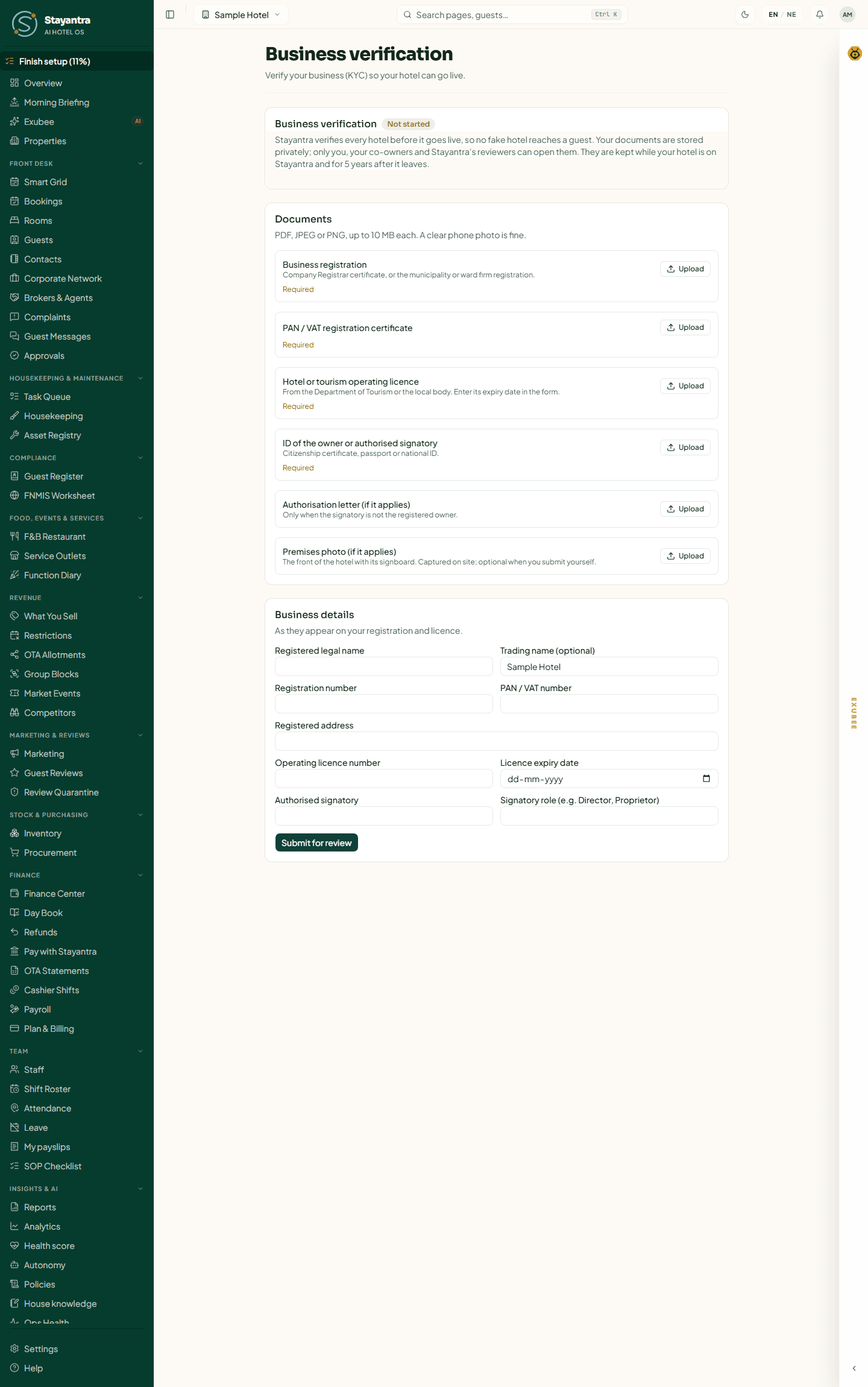
What stays off until you are verified
The Finish setup page shows a Not live yet: business verification needed card listing what waits for verification:
- Listing and search on the Stayantra marketplace and the Go app
- Online bookings: booking engine, website widget, public API and AI assistants
- OTA sync through the channel manager
- Online guest payments
- Payouts of money Stayantra collects for you
- Choosing a paid plan
Everything else works: rooms, rates, staff, the front desk, bookings you take at the desk or by phone, housekeeping, the restaurant, reports and Exubee.
The documents you need
The list depends on the country you chose in the setup wizard. Each file must be a PDF, JPEG or PNG of 10 MB or less. A clear phone photo is fine.
Hotels in Nepal
| Document | Required | Notes |
|---|---|---|
| Business registration | Yes | Company Registrar certificate, or the municipality or ward firm registration. |
| PAN / VAT registration certificate | Yes | |
| Hotel or tourism operating licence | Yes | From the Department of Tourism or the local body. Enter its expiry date in the form. |
| ID of the owner or authorised signatory | Yes | Citizenship certificate, passport or national ID. |
| Authorisation letter | Only if it applies | Only when the signatory is not the registered owner. |
| Premises photo | No | The front of the hotel with its signboard. Optional when you submit yourself. |
Hotels in India and other SAARC countries
| Document | Required |
|---|---|
| GST certificate or business registration | Yes |
| Trade or hotel licence (enter its expiry date in the form) | Yes |
| Business PAN | Yes |
| ID of the owner or authorised signatory (passport or national ID) | Yes |
| Authorisation letter | Only when the signatory is not the registered owner |
| Premises photo | No |
Hotels elsewhere
| Document | Required |
|---|---|
| Business registration | Yes |
| Tax ID | Yes |
| ID of the owner or authorised signatory (passport or national ID) | Yes |
| Authorisation letter | Only when the signatory is not the registered owner |
| Premises photo | No |
Submit your verification
Open Business verification
In the sidebar click Finish setup, then Open Business verification on the go-live card.
Upload each document
Under Documents, click Upload beside each document and choose the file. The file appears with the date and Waiting for review. Documents still missing are marked Required. Use Add another for a second page, and Withdraw to remove a file you uploaded by mistake.
Fill in the business details
Under Business details, enter them exactly as they appear on your registration and licence:
| Field | Required |
|---|---|
| Registered legal name | Yes |
| Trading name | No |
| Registration number | Yes |
| PAN / VAT number | Yes |
| Registered address | Yes |
| Operating licence number | Yes |
| Licence expiry date | Yes |
| Authorised signatory | Yes |
| Signatory role (e.g. Director, Proprietor) | Yes |
Click Submit for review
The page says "Submitted. Stayantra will review it and tell you when it is done." The status becomes Submitted, waiting for review.
[!NOTE] Submit is refused until every required field is filled and every required document is uploaded. The message names what is missing.
What the statuses mean
The badge next to Business verification shows where you are. Stayantra sends the owners a notice when you submit, and again when the review asks for more, verifies you or does not approve.
| Status | What it means | What you do |
|---|---|---|
| Not started | Nothing submitted yet. | Upload the documents and submit. |
| Submitted, waiting for review | Stayantra has your submission and will pick it up. | Wait. You can still add or change files and submit again. |
| In review at Stayantra | Someone is checking it now. Your trial is paused meanwhile, so you do not lose trial days to the review. | Wait. Nothing can be changed while it is in review. |
| More needed | The reviewer needs something else. Their reason is shown under From Stayantra, and any document they could not accept is marked Not accepted with the reason. | Upload what is asked, fix the details, then click Resubmit for review. |
| Verified | Your business is verified. Listing, online bookings, OTA sync, online payments and payouts are open. | Nothing. Renew your licence here before it expires (see below). |
| Not approved | The submission was rejected. The reason is shown under From Stayantra. | Correct it and click Resubmit for review, or open a support ticket if you disagree. |
| Verification needed | A verified hotel must verify again, for example because the registered legal name changed or the hotel has a new owner. A live hotel stays live during a grace period, shown as "Your hotel stays live until …". | Submit the new documents before that date. |
| Not needed (existing hotel) | The hotel was on Stayantra before verification began. | Nothing. |
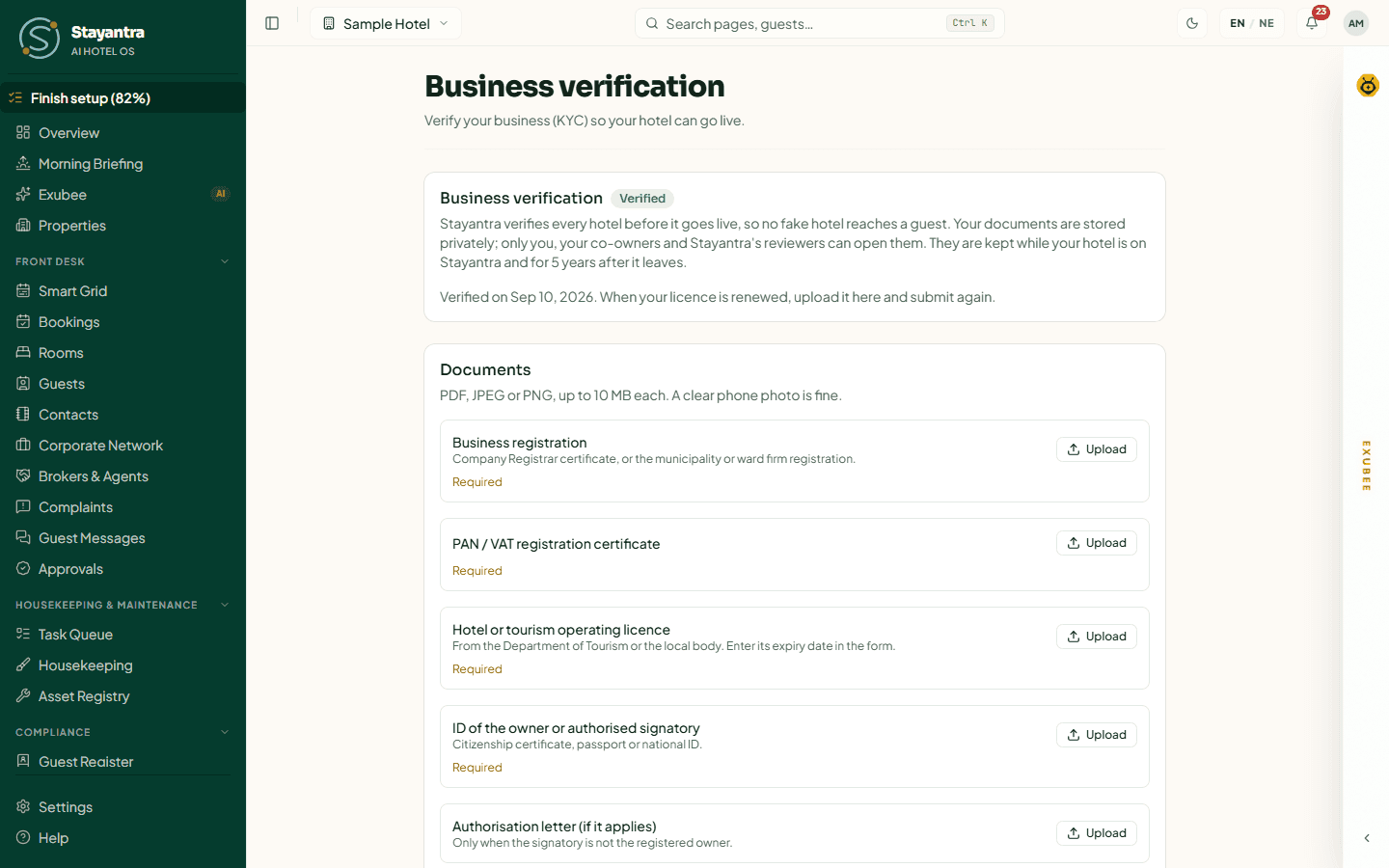
When you are verified
- The go-live card on Finish setup says Your hotel can go live.
- If you left Marketplace Listing on (it is on after the setup wizard), your hotel is listed automatically. You can turn it off in Hotel profile → Listing & offers.
- You can choose a paid plan in Finance → Plan & Billing.
Renewing your licence
A verified hotel's operating licence has an expiry date. Stayantra reminds you 30 days before it expires. When you renew it, upload the new licence here, update Licence expiry date, and click Submit for re-verification. You stay live while it is reviewed.
If the licence expires and is not renewed, your hotel stays live for 30 days after the expiry date; you are warned 7 days before that ends. After that the go-live card says Paused: your operating licence expired, and listing, online bookings, OTA sync, online payments and payouts pause until you submit the renewed licence.
Changes that need verifying again
Verification belongs to the business, so two changes send a verified hotel back to Verification needed:
- Changing Registered Legal Name in Hotel profile → Taxes.
- A change of owner (an ownership transfer).
You get a grace period (30 days unless Stayantra sets another) to submit again, and stay live meanwhile.
Your documents and privacy
Documents are stored privately. Only you, your co-owners and Stayantra's reviewers can open them; managers and staff cannot. They are kept while your hotel is on Stayantra and for 5 years after it leaves.
On-premise installation
If you booked an on-premise installation, the Stayantra team photographs your documents at the hotel; files they capture show "captured on site". Have the originals ready for the visit. See Setup help and pricing.
If something goes wrong
| What you see | What to do |
|---|---|
| "Files must be 10 MB or smaller." | Take a new photo at a lower resolution, or scan to PDF at a lower quality. |
| "Only the hotel owner or a manager can see business verification." | You are signed in as staff. Ask the owner. |
| The Upload buttons are gone | Your submission is in review. Wait for the result. |
| The review is taking long | Open a support ticket from Help → Open a support ticket. Your trial is paused while you are in review. |
The setup wizard
Every step of the setup wizard, by chat with Exubee or by form, from Hotel Basics to Launch, and what "live" means before your business is verified.
Fill in your hotel profile
A walk through every Hotel profile page a new hotel must complete, field by field, and why each field matters for guests, bills and your listing.