
Guest reviews
Two pages look after what guests say about your hotel. Guest Reviews is where you read every review and write the hotel's reply. Review Quarantine holds low ratings back for a short time so you can reply before they go public, and lets you report a review that breaks the review guidelines.
Where to find them: Marketing & Reviews → Guest Reviews and Marketing & Reviews → Review Quarantine. Who can use them: owners and managers. Both pages are part of the Reviews & Marketing module. If your plan does not include it, the page shows a padlock and an Open Plan & Billing button.
Where reviews come from
| Source | How it arrives | Where it shows publicly |
|---|---|---|
| Stayantra | After checking out, a guest reviews the stay in the Stayantra Go app or from the review link on the marketplace. During the stay, a guest can also rate a service, such as a room cleaning. | Post-stay reviews show on your marketplace listing and your hotel website once they are public. Ratings of a service during the stay stay private. |
| Booking.com, Airbnb, Expedia | Fetched from the OTA through the channel manager. See Fetch OTA reviews. | On the OTA. They are never shown on your Stayantra listing. |
Google and TripAdvisor reviews are not brought into Stayantra.
Read your reviews
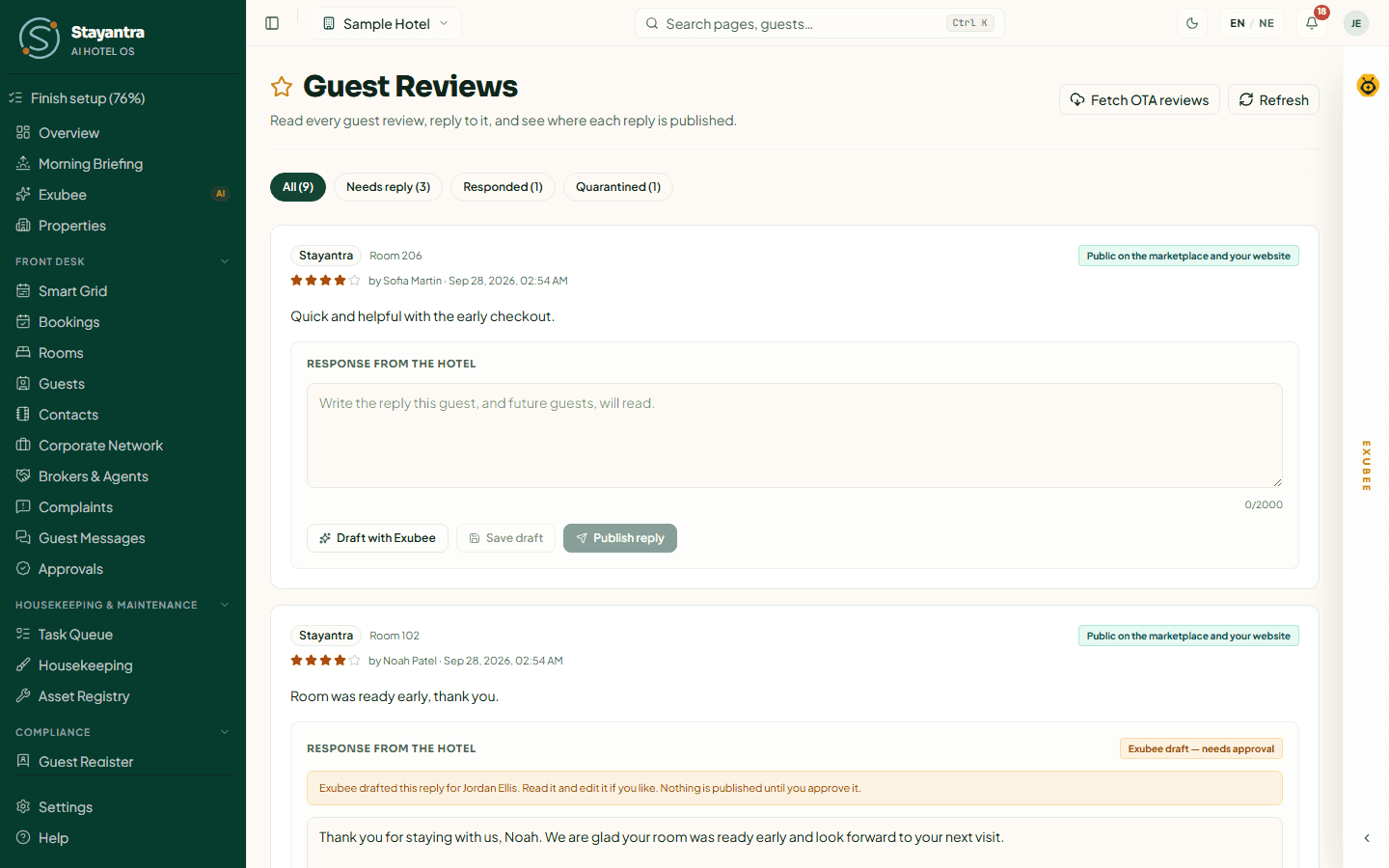
The filters across the top sort reviews by what they need from you. Each shows a count.
| Filter | What it shows |
|---|---|
| All | Every review, including private ratings that are not on any public page. |
| Needs reply | Public reviews with no published reply yet. This is your to-do list. |
| Responded | Reviews with a published reply. |
| Quarantined | Low ratings held in quarantine. You can prepare a reply here; it shows once the review is released. |
Each review card shows where it was posted, the room, the stars (or a score out of 10 for an OTA review), the guest's name and the date. A badge says where the review can be seen, for example Public on the marketplace and your website, Held in quarantine — not public yet, On Booking.com or Not on your public pages.
Press Refresh to reload the list.
Reply to a review
Your reply is public: the guest reads it, and so does everyone who reads the review later.
Write the reply
On the review card, type in the box under Response from the hotel. The box says "Write the reply this guest, and future guests, will read." A reply can be up to 2,000 characters.
Or let Exubee draft it
Press Draft with Exubee. Exubee writes a short reply (at most 120 words) in the language of the review. It never offers money or refunds and never names staff. The draft is marked Exubee draft — needs approval and nothing is published yet.
Save or publish
Press Save draft to keep working on it later, or Publish reply to put it live. For an Exubee draft, read it, edit it if you like, then press Approve and publish — or Keep as draft.
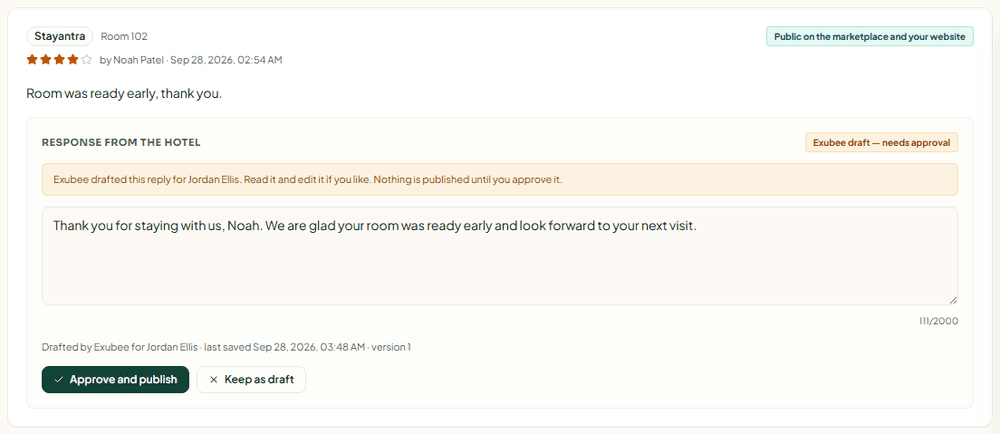
Exubee never publishes a reply on its own. A person always presses the button.
Reply statuses
| Status | Meaning |
|---|---|
| Draft | Saved, not public. |
| Exubee draft — needs approval | Exubee wrote it; a person must approve it. |
| Published | Live where the review is. |
| Published — an OTA post failed | Saved in Stayantra, but the OTA refused it. Press Try posting again. Owners and managers are also told. |
| Withdrawn | Taken down. |
Where your reply goes
| Review from | What happens when you publish |
|---|---|
| Stayantra | The reply shows under the review on the marketplace and your hotel website within about five minutes. You can Edit it or Withdraw it at any time (Yes, take it down to confirm). |
| Booking.com, Airbnb, Expedia | The reply is posted to the OTA through the channel manager, once. After that it cannot be edited or withdrawn from Stayantra — change or remove it on the OTA's own site. The card links to the Booking.com extranet, the Airbnb hosting dashboard or Expedia Partner Central. |
| Any other OTA, or no live channel manager | Stayantra cannot post the reply for you. The card says Reply on the extranet: write it on the OTA's own site. |
Fetch OTA reviews
Press Fetch OTA reviews at the top of Guest Reviews to pull the latest Booking.com, Airbnb and Expedia reviews. Each press fetches up to 100 reviews. Fetching again updates reviews you already have; it never makes duplicates. New OTA reviews also arrive on their own whenever the channel manager reports one.
When it works you see "Fetched N reviews from Channex, M new." If it cannot run, the message starts "OTA reviews were not fetched:" followed by the reason:
| Reason | What to do |
|---|---|
| "Channex is not connected." | Set up the channel manager first — see Connect your OTAs. |
| "The Channel Manager module is not on this plan." | Add the Channel Manager module in Finance → Plan & Billing. |
| "No Channex property is mapped." | The channel manager setup did not finish. Open Settings → Channel Manager and check the setup card. |
Fetching also needs the channel manager's Messages & Reviews app switched on for your property. Stayantra turns it on during channel manager setup, in the step "Turn on OTA guest messages and reviews".
When a new OTA review scores 6 out of 10 or lower, owners and managers get a Low-rated OTA review notification. OTA reviews are never quarantined — they are already public on the OTA.
Review Quarantine
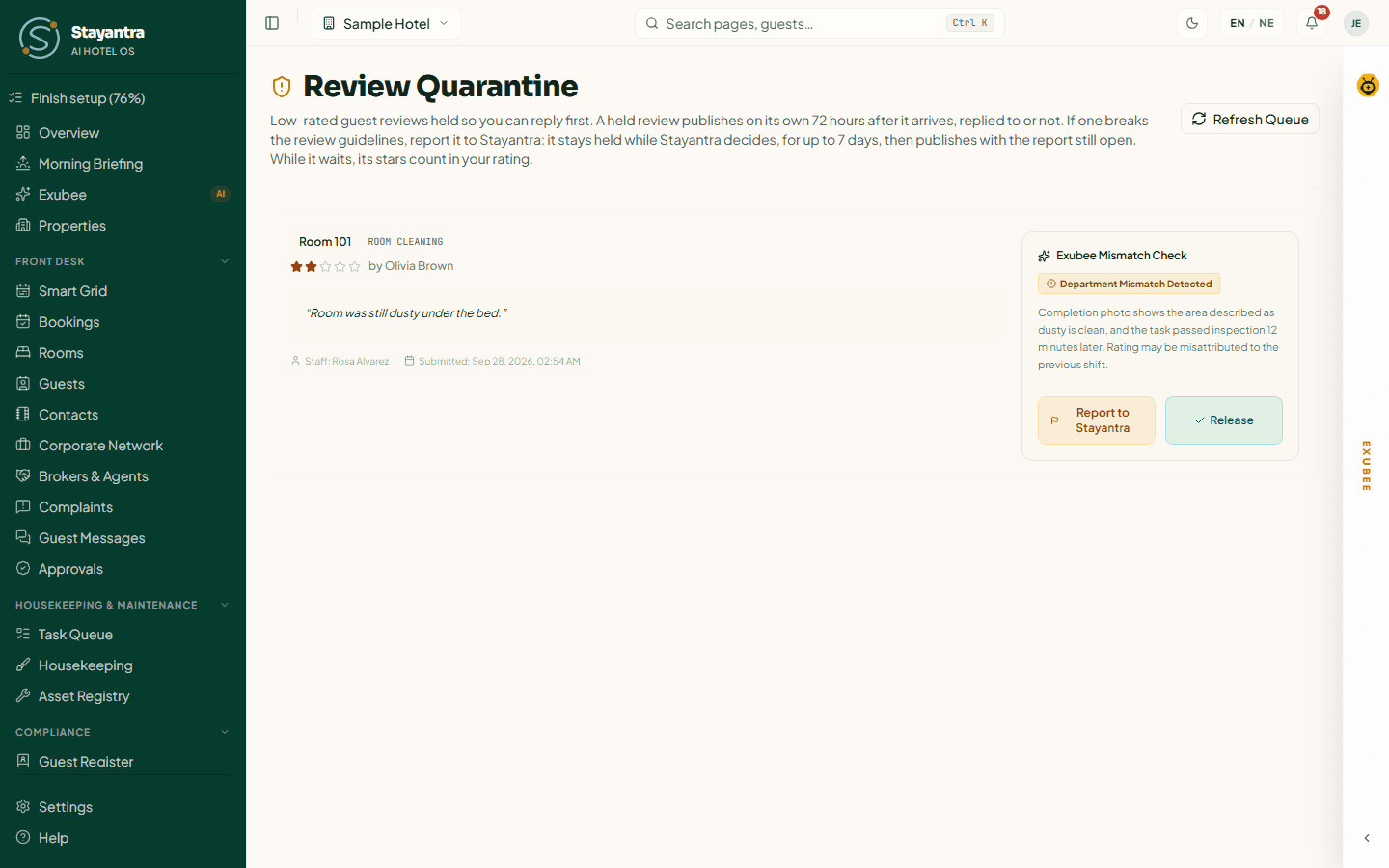
Which reviews are held
A Stayantra rating of 1 or 2 stars is held automatically. It goes to Review Quarantine instead of straight onto your public pages. There are two kinds:
- Post-stay reviews. These are public reviews. They are held for 72 hours so you can reply first, then they publish on their own — replied to or not.
- Ratings of a service during the stay (for example a room cleaning or a room-service order). These are private feedback for the hotel. They are held here for you to look at and are never published. A low rating during the stay also creates an urgent Mid-Stay Rescue task for the team.
OTA reviews are never held. If a guest later changes their rating to 3 stars or more, the review is released on its own.
What each card shows
- The room, the task that was rated (for example ROOM CLEANING), a Mid-Stay tag when it was rated during the stay, the stars and the guest's name.
- The guest's comment, the staff member who did the task, and when it was submitted.
- When it will publish: "Publishes automatically on (date) unless you report it."
- Exubee Mismatch Check: Exubee compares the complaint with the task that was rated. Department Mismatch Detected means the complaint may be about something else — for example a dusty room rated against a cleaning that passed inspection. No Mismatch — Complaint Fits the Rated Task means it fits.
Release a review now
If you do not want to wait for the 72 hours, press Release. The dialog asks "Release this guest review?" and reminds you that the rating counts in that staff member's rolling average. Add a note if you want, then press Release review. Reply to it on Guest Reviews.
Report a review to Stayantra
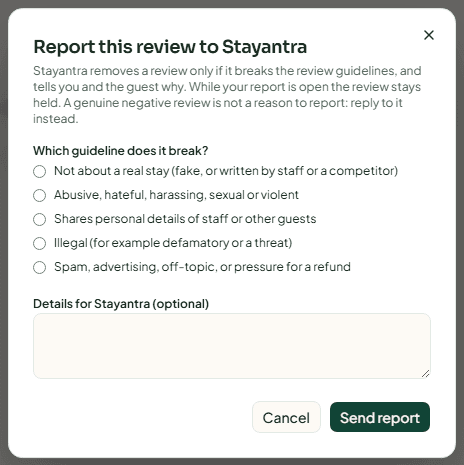
Report a review only if it breaks the review guidelines. A genuine negative review is not a reason to report — reply to it instead.
Open the report
On the card, press Report to Stayantra.
Choose the guideline it breaks
Under Which guideline does it break? pick one:
- Not about a real stay (fake, or written by staff or a competitor)
- Abusive, hateful, harassing, sexual or violent
- Shares personal details of staff or other guests
- Illegal (for example defamatory or a threat)
- Spam, advertising, off-topic, or pressure for a refund
Send it
Add anything Stayantra should know under Details for Stayantra (optional), then press Send report.
What happens next:
- The review stays held while Stayantra decides, for up to 7 days from your report.
- If Stayantra removes it, both you and the guest are told why. The review card on Guest Reviews then says "Stayantra removed this review after your report."
- If Stayantra keeps it, the card says "Stayantra reviewed your report and kept this review published."
- If Stayantra has not decided after 7 days, the review publishes and the report stays open with Stayantra.
- While a reported review waits, its stars already count in your hotel's rating. Reporting cannot lift your average.
You can have one open report per review.
[!IMPORTANT] Stayantra decides reported reviews. A hotel cannot dismiss, hide or delete a guest review itself. Only Stayantra can remove a review, and only when it breaks the review guidelines.
Your rating on the marketplace
Your star rating on the marketplace is the average of your public Stayantra post-stay reviews. A review held only for the 72-hour window does not count yet; a held review with an open report does. The listing shows up to eight recent reviews, with the guest's first name and last initial, and your reply under Response from the hotel. See Your marketplace listing.
Troubleshooting
| What you see | What to do |
|---|---|
| Needs reply is 0 but there are reviews under All | Those are private ratings or held reviews. Only public reviews need a reply. |
| You cannot edit a reply to a Booking.com review | That reply is already on the OTA. Change it on the OTA's extranet. |
| A review you reported was published | Stayantra did not decide within 7 days. Your report is still open; you will be told the outcome. |
| "Quarantine Queue Clear" | Nothing is held right now. |
| The page shows a padlock | Your plan does not include the Reviews & Marketing module. |
Related
- Marketing — posts and campaigns
- Your marketplace listing — where reviews show to guests
- Using Exubee — how Exubee drafts and why it waits for you
Marketing
Write posts or let Exubee draft them, approve and publish to Facebook, Instagram and email, and see how each post did.
Inventory and procurement
Track stock in your stores, count it, and buy what you need — purchase requests, vendor quotes, purchase orders, deliveries, market purchases and supplier bills.