
Set up your hotel yourself
You can set Stayantra up yourself, for free, using these guides. This page is the map: it lists every step in order, says which are required, and links to the page that walks you through each one. Most hotels finish the required steps in a day, then add the optional ones as they need them.
Who this is for: the hotel owner, or the person the owner asked to set the hotel up.
Three ways to get set up
- Self-installation: free. You follow these guides; support tickets are there if you get stuck.
- Remote setup: paid. The Stayantra team configures your hotel with you over guided screen-share sessions.
- On-premise installation: paid. The team comes to your hotel (in Nepal; elsewhere setup is remote), installs everything and trains your staff.
You choose in the setup wizard, and can change later from Finish setup. Setup help only goes up, never down: self → remote → on-premise; when you upgrade, anything already paid for and not yet delivered counts toward the new price. Prices and packages are on Setup help and pricing.
Your setup checklist
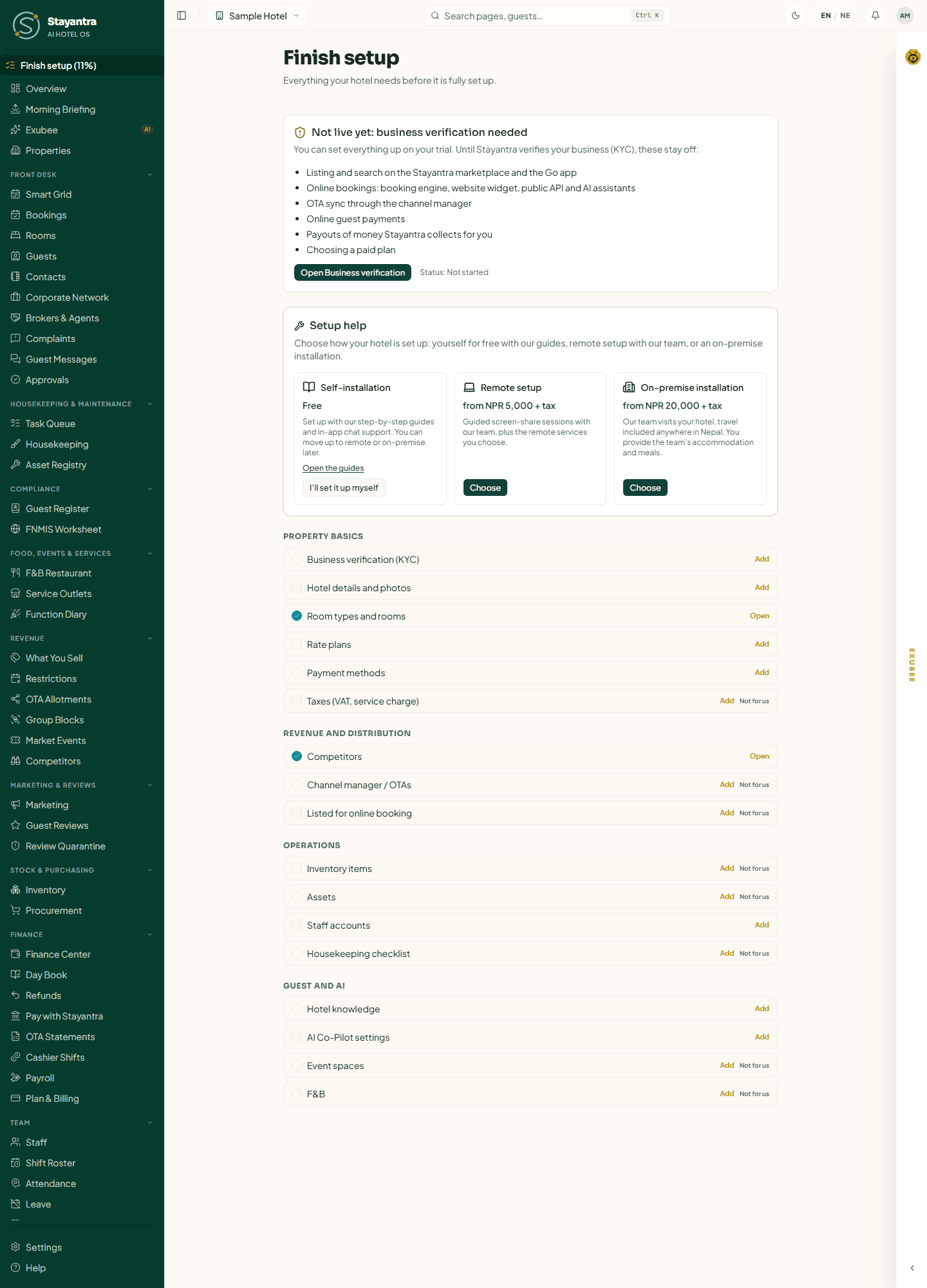
Once your hotel exists, the sidebar shows Finish setup (NN%) until everything is done. That page tracks the same steps as the table below, ticks them off as you complete them, and has an Add link to each. Optional tasks have a Not for us button (owner only) so they stop counting against you.
Follow these pages in order. "Required" means your hotel is not properly set up without it.
| # | Page | What it achieves | Required? |
|---|---|---|---|
| 1 | Create your account | Your owner login, by email or Google. | Required |
| 2 | The setup wizard | Creates the hotel, its room types and rooms, starts the free trial, and records your setup-help choice. | Required |
| 3 | Business verification (KYC) | Uploads your registration, PAN/VAT, licence and ID so Stayantra can verify you. Unlocks everything online. | Required |
| 4 | Fill in your hotel profile | Photos, description, location, contact, stay rules, taxes and listing: what guests see and agree to. | Required (photos, stay rules); taxes if you are VAT-registered |
| 5 | Rooms and rates | Checks your rooms and creates the rate plans and packages guests book. | Required |
| 6 | Payments and payouts | Chooses how guests pay online and where Stayantra pays you. | Required |
| 7 | Staff and owners | Invites managers and staff with their skills, and any co-owner. | Required (at least one staff account) |
| 8 | Install the apps | Gets staff onto Stayantra Connect and sets up the front-desk and kitchen devices. | Recommended |
| 9 | Connect your OTAs | Links Booking.com, Expedia, Agoda and others so availability and bookings stay in sync. | Optional (needs the Channel Manager module) |
| 10 | Booking widget and website | Takes direct bookings on your own website. | Optional |
| 11 | Restaurant and kitchen printers | Sets up menus, tables, the Kitchen screen and ticket printers. | Optional (if you run a restaurant) |
| 12 | Teach Exubee about your hotel | Gives Exubee your house knowledge and policies, and reviews its Co-Pilot settings. | Required |
| 13 | Import your data | Brings guests, bookings and rates over from your old system. | Optional |
| 14 | Finish setup and go live | Works through the last checklist items and checks before your first real guest. | Required |
| 15 | Setup help and pricing | What remote and on-premise help cost, if you want the team's help after all. | Reference |
| 16 | Getting help | How to open a support ticket and follow its replies. | Reference |
What business verification unlocks
Your hotel works inside Stayantra from the moment the wizard launches it: you can take bookings at the desk, run housekeeping and the restaurant, and use Exubee. Until Stayantra has verified your business, these stay off:
- Listing and search on the Stayantra marketplace and the Go app
- Online bookings: booking engine, website widget, public API and AI assistants
- OTA sync through the channel manager
- Online guest payments
- Payouts of money Stayantra collects for you
- Choosing a paid plan
Your free trial runs meanwhile, and it is paused while your documents are in review, so the wait costs you no trial days. See Business verification.
Where Stayantra must act
A few steps cannot be finished by the hotel alone. Ask for each from Help → Open a support ticket, and plan for them:
| What | Why Stayantra | Page |
|---|---|---|
| Reviewing your business verification | Stayantra's team checks every hotel's documents before it goes live online. | Business verification |
| Card payments | Stayantra activates Stripe card payments for your hotel. eSewa, Khalti and Fonepay you switch on yourself. | Payments and payouts |
| Trip.com and Hostelworld | Stayantra finishes these connections in Channex for you. Booking.com, Expedia, Agoda and Airbnb you connect yourself. | Connect your OTAs |
| A hotel website | Stayantra builds and publishes the hotel website. The booking widget on your own site you can add yourself. | Booking widget and website |
| Waiting on Meta's approval: connecting your hotel's WhatsApp number is not available yet. | Settings | |
| Phone apps for staff and guests | Connect and Go are in Google Play closed testing: Stayantra adds each person as a tester. The iPhone apps are not released yet. | Install the apps |
Stuck?
Open a support ticket from Help in the dashboard; see Getting help. If you would rather the team did it, you can upgrade to remote or on-premise setup at any time from Finish setup → Setup help.