
Brokers and agents
Many hotels in Nepal get guests through a local broker, a travel agency or an online travel agency (OTA) such as Booking.com. Each one takes a commission, and money moves both ways: sometimes the guest pays you and you owe the broker its commission; sometimes the broker takes the guest's money and owes it to you. Brokers & Agents keeps each one's terms and a running account, so you always know who owes whom.
Where to find it: Front Desk → Brokers & Agents. Bookings are sold through a broker from the New Booking form. Who can use it: managers and owners add brokers, change terms and record money in and out. Front desk staff can see brokers and book through them. Only the owner can adjust or reverse account entries. Brokers & Agents is part of the Sales & Partners module of your plan.
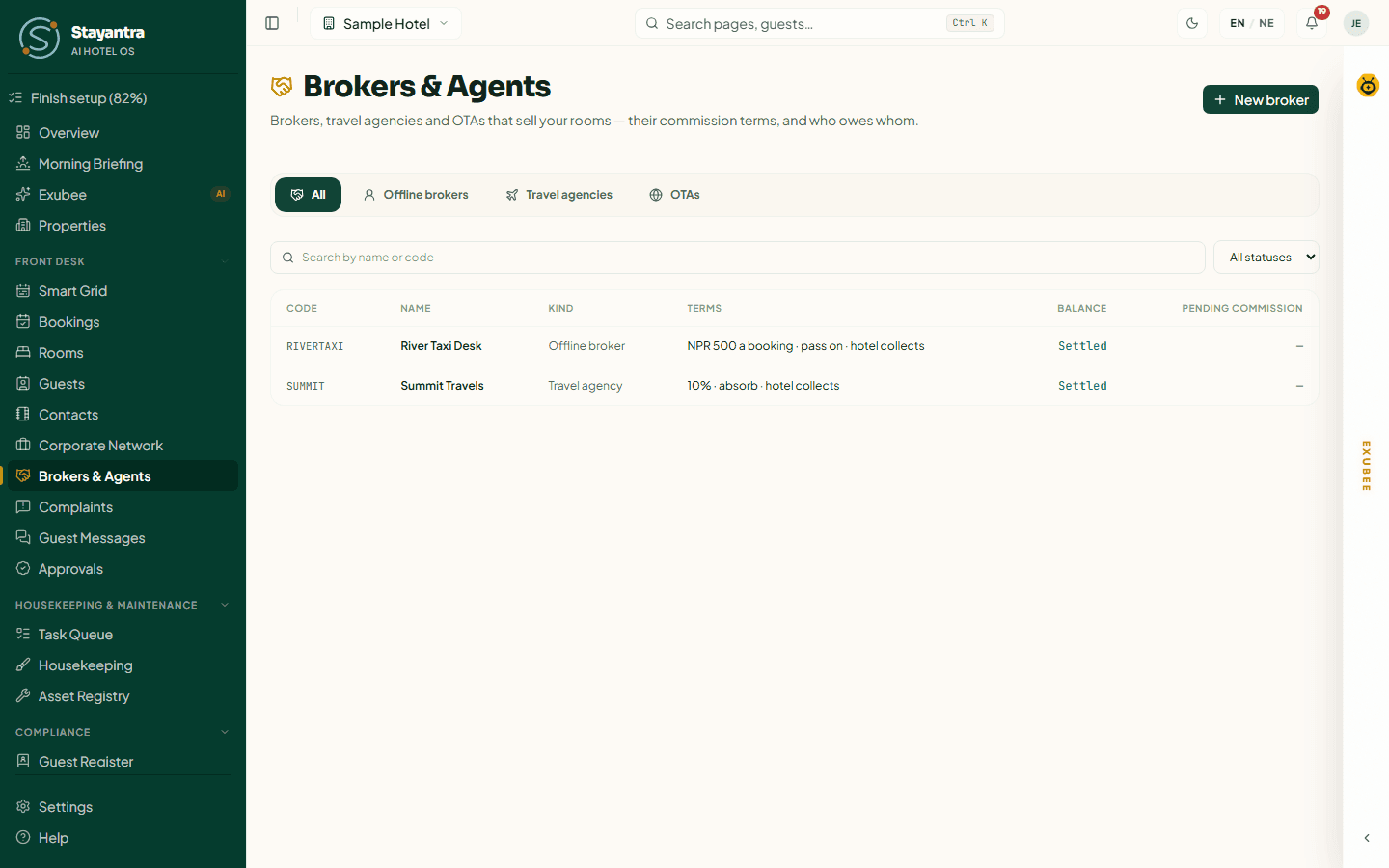
The list
- Tabs: All, Offline brokers, Travel agencies, OTAs.
- Search by name or code, and filter by status: Active, On hold, Closed.
- Columns: Code, Name, Kind (for example "OTA · Booking.com"), Terms (for example "15% · pass on · hotel collects"), Balance and Pending commission.
- Balance always says which way the money goes: Owes you NPR …, You owe NPR … or Settled.
Add a broker
Click New broker.
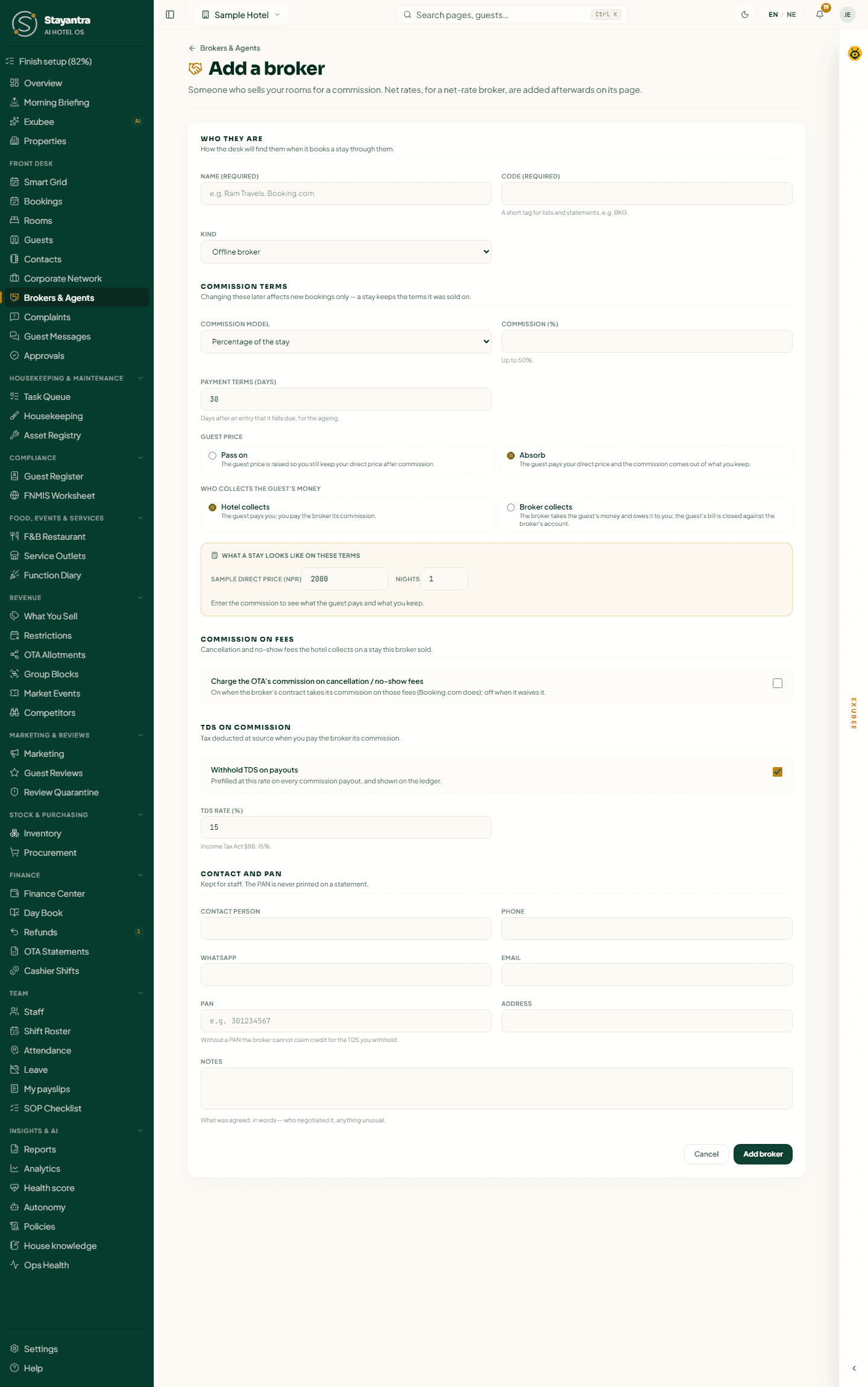
Who they are
| Field | What to enter |
|---|---|
| Name | The broker's or agency's name. Required. |
| Code | A short tag for lists and statements, like "BKG". Required, and unique. |
| Kind | Offline broker (a person or desk that sends guests), Travel agency, or OTA. |
| OTA | For an OTA: Booking.com, Agoda, Expedia, Airbnb, Trip.com, MakeMyTrip or Hostelworld. One broker per OTA. |
Commission terms
Commission model — how the broker is paid:
| Model | Meaning |
|---|---|
| Percentage of the stay | For example 15% of the room price. Up to 50%. |
| Flat amount per booking | A fixed amount for each booking, whatever its length. |
| Flat amount per room night | A fixed amount for each room, each night. |
| Net rate (buys at a B2B price) | The broker buys rooms from you at a net price you set per room type, and sells them at its own price. |
An OTA can use a percentage or a per-night amount.
Payment terms (days) — how many days after an entry the money falls due (30 by default). This drives the ageing on the broker's account.
Guest price — pass on or absorb
| Choice | What happens |
|---|---|
| Pass on | The guest price is raised so you still keep your direct price after commission. |
| Absorb | The guest pays your direct price and the commission comes out of what you keep. |
For an OTA you must choose one, and the form shows an example — "Direct NPR 2,000 → Booking.com NPR …". A net-rate broker always absorbs.
[!WARNING] Rate parity. If an OTA passes its commission on, your room shows on the OTA above your own website and Stayantra price. Many OTA contracts forbid that, and an OTA that finds itself undercut can rank you lower. Check your OTA contract before choosing Pass on.
Who collects the guest's money
| Choice | Meaning |
|---|---|
| Hotel collects | The guest pays you; you pay the broker its commission. |
| Broker collects | The broker takes the guest's money and owes it to you; the guest's bill is closed against the broker's account. |
The preview What a stay looks like on these terms shows, for a sample price and number of nights, what the guest pays, the commission and what you keep.
Commission on fees
Charge the OTA's commission on cancellation / no-show fees — tick it if the broker also takes commission on the fees you keep when a guest cancels late or does not come. It is ticked for a new Booking.com broker.
TDS on commission
Nepal's Income Tax Act (section 88) requires you to withhold 15% TDS on commission you pay. Tick Withhold TDS on payouts and set the TDS rate (%). Stayantra records the TDS on each payout; it does not file it for you.
- With TDS off, the form warns you: without TDS — and without the broker's PAN — the broker cannot claim credit, and your auditor may disallow the expense.
- For an OTA, TDS starts off until your accountant confirms it applies. If you switch it on, the OTA is still paid its commission in full; the TDS is your own cost, grossed up and deposited with IRD.
Contact and PAN
Contact person, Phone, WhatsApp, Email, PAN (9 digits), Address and Notes.
Click Add broker. New terms apply to new bookings only — a stay keeps the terms it was sold on.
Book a stay through a broker
In New Booking, open Booked through a broker, pick the broker, and check Who collects the guest's money (the broker's usual choice is filled in). The summary shows the guest price and the commission. When the booking is made, the confirmation says "Sold through {broker}: room NPR … Commission NPR …, pending until check-out." See Make a booking.
- The commission stays Pending until the guest checks out, then becomes Earned and joins the broker's account. It becomes Void if the stay is cancelled or a no-show.
- A broker on hold or closed cannot take new bookings.
- A net-rate broker needs a net rate for every night of the stay, or the booking is refused.
- A booking has a broker or a company, never both.
A broker's page
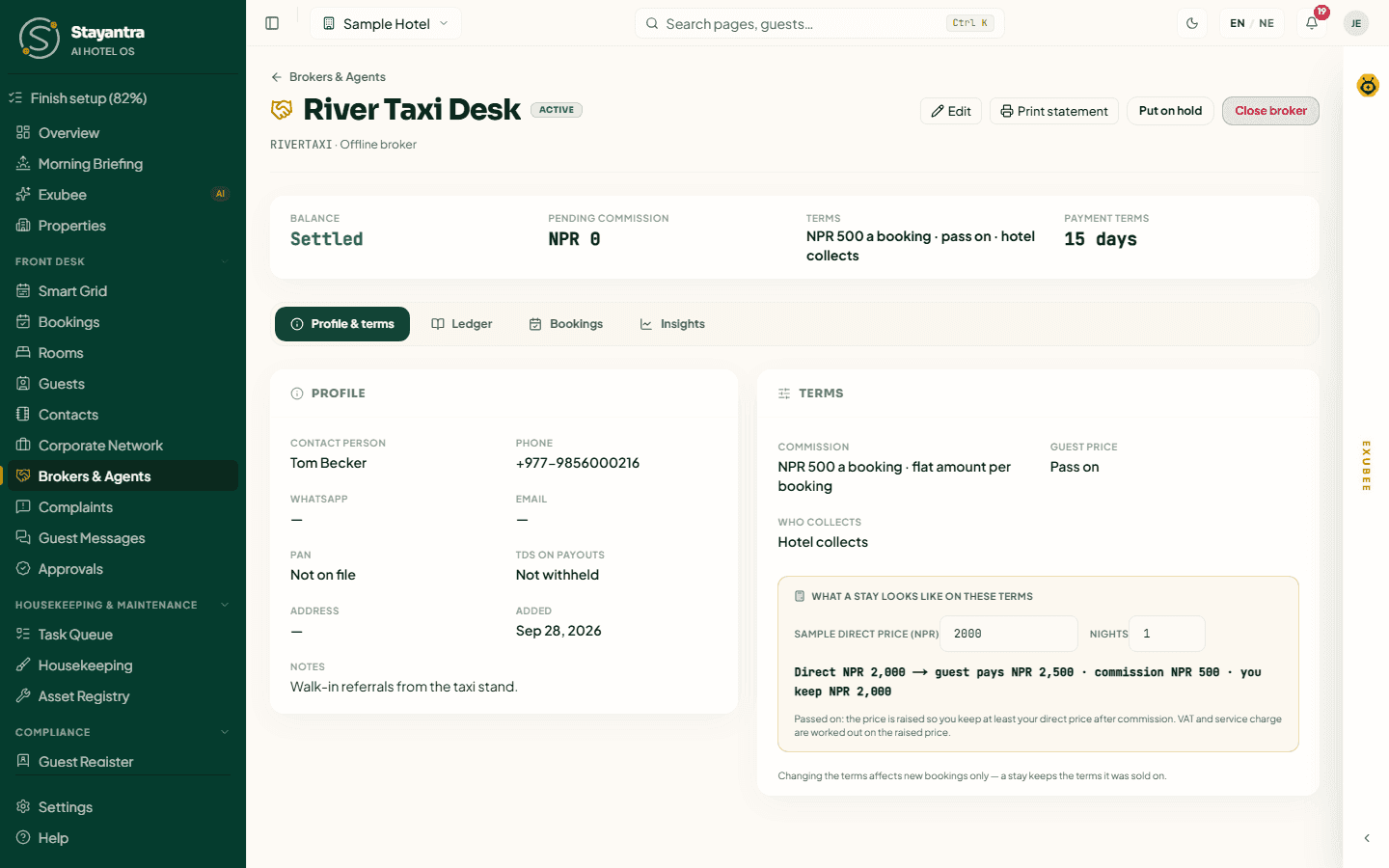
The top shows the broker's name, status, code and kind, and a strip with what they owe you or you owe them, the pending commission, the terms and the payment terms. Print statement prints the account (not a tax invoice).
| Tab | What is in it |
|---|---|
| Profile & terms | Contact, PAN, TDS, and the commission terms with the preview. For a net-rate broker, the Net rates. |
| Ledger | The account: every collection, receipt, commission, payout and adjustment. |
| Bookings | Every stay sold through the broker and its commission status (Pending, Earned, Void). |
| Insights | Bookings, room nights, sold revenue, commission earned and pending, effective rate, cancellations and no-shows over recent months. |
Net rates
For a net-rate broker, Add a net rate: the Room type, Net price a night (NPR), First night, Last night (optional — leave it open-ended) and notes, then Save net rate. Each rate shows Current, Upcoming or Ended. End this rate sets its last night.
The account (Ledger)
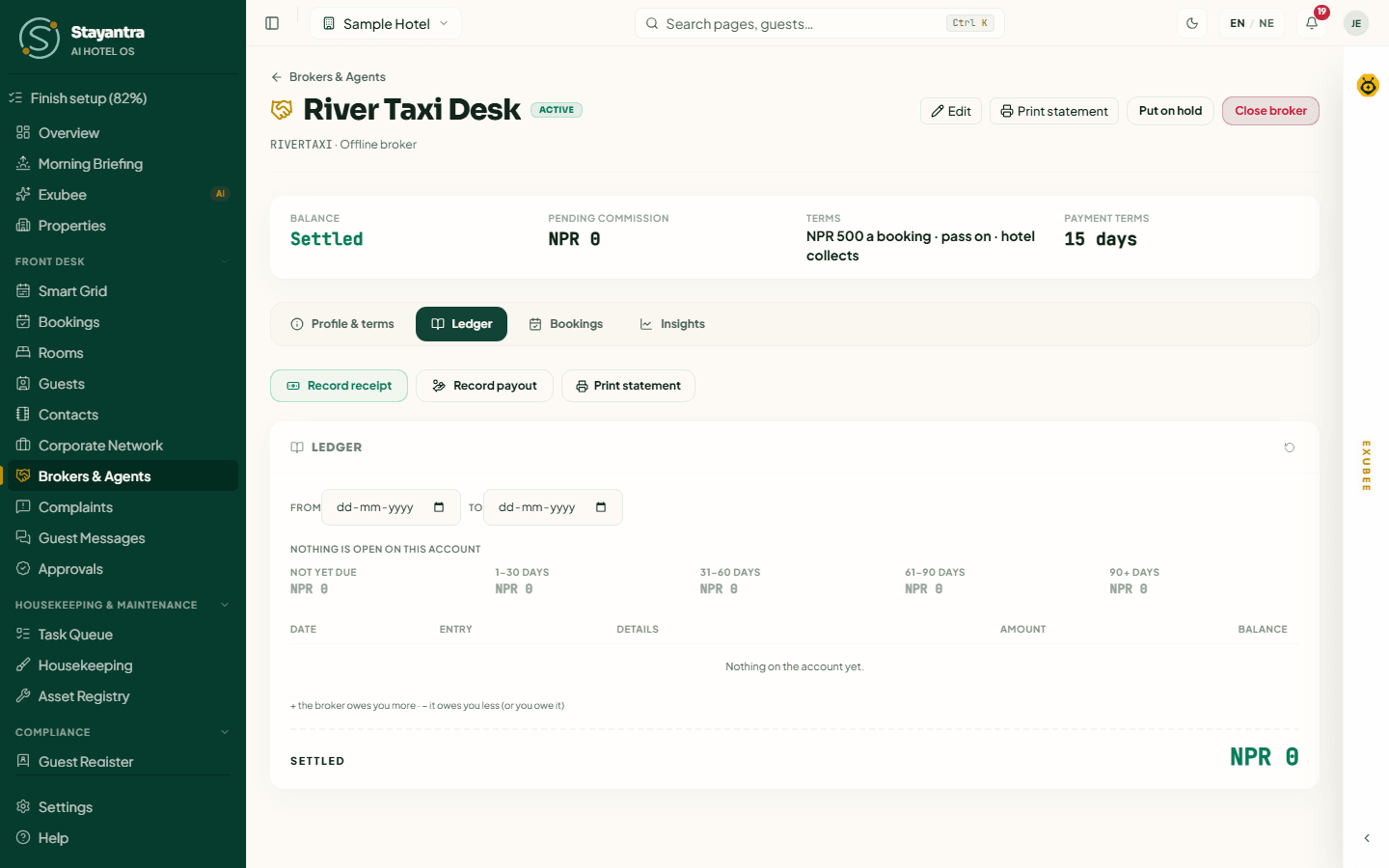
The ledger lists every entry with its Date, Entry, Details, Amount and running Balance. A + means the broker owes you more; a − means it owes you less (or you owe it). The ageing strip shows open amounts by how late they are: Not yet due, 1–30, 31–60, 61–90 and 90+ days. Filter by From and To dates, and Print statement for those dates.
| Entry | Meaning |
|---|---|
| Collection | The broker collected a guest's money, which it now owes you. |
| Payment received | The broker paid you. |
| Commission | Commission earned on a checked-out stay, which you owe the broker. |
| Commission paid | You paid the broker its commission. |
| TDS on commission kept | TDS on commission the broker kept out of money it collected. |
| Adjustment | A manual correction by the owner. |
| Reversal | An entry undone by the owner. |
Entries are never edited or deleted.
Record money from the broker
Click Record receipt.
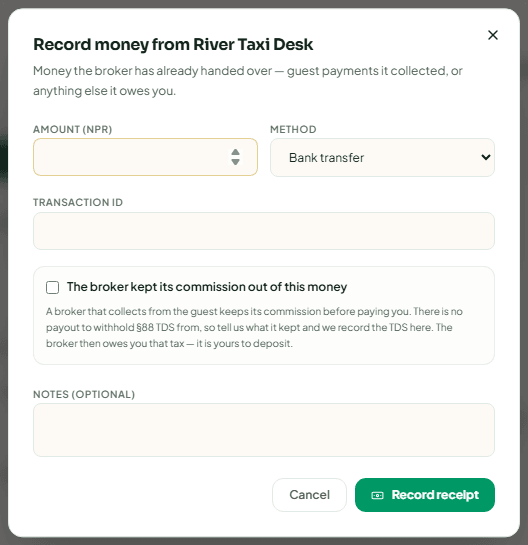
Enter the Amount (NPR) (it starts at what the broker owes), the Method (Cash, Cheque, Bank transfer, eSewa, Khalti, Fonepay, Card, Other) and the reference (a cheque number, a transaction ID). Cash is counted in your open cashier drawer.
If the broker kept its commission out of the money, tick The broker kept its commission out of this money and enter the Commission it kept. Stayantra records the TDS on it, which the broker then owes you — it is yours to deposit.
Pay the broker its commission
Click Record payout. Enter the Amount settled (NPR); the TDS withheld is filled in at the broker's rate (Use 15% resets it). The dialog shows the Cash paid to the broker — the amount less TDS — then Record payout.
Each month's TDS appears in Finance in Broker TDS withheld, to deposit with IRD, which you can download as a CSV for your accountant. See Finance.
Adjust or reverse (owner)
- Adjust — Which way (In the broker's favour or In your favour), the amount and a Reason, then Record adjustment.
- Reverse — the undo button on a receipt, payout or adjustment. Give a reason, then Reverse entry. The original stays in the ledger with its reversal.
Put a broker on hold or close it
- Put on hold — no new bookings through the broker; money can still be recorded. Reactivate lifts it.
- Close broker — only when nothing is owed either way and no commission is pending. Otherwise the dialog says what is still open ("{broker} still owes you … — record a receipt when it pays"). Reopen brings a closed broker back.
Who can do what
| Action | Owner | Manager | Front desk |
|---|---|---|---|
| See brokers and their accounts, book through a broker | Yes | Yes | Yes |
| Add a broker, change terms, net rates, hold or close | Yes | Yes | No |
| Record receipts and payouts | Yes | Yes | No |
| Adjust or reverse entries | Yes | No | No |
When something goes wrong
| What you see | What to do |
|---|---|
| "That broker code is already in use." | Choose another code. |
| "A broker with this PAN is already registered." | Open the existing broker instead. |
| "There is already a broker for Booking.com." | Open it from the OTAs tab — reopen it if it was closed. |
| "The TDS must be less than the amount settled." | Check the two amounts. |
| A booking through a net-rate broker is refused | Add a net rate that covers every night of the stay. |
| The page shows an error about your plan | Brokers & Agents is in the Sales & Partners module. See Plans and billing. |
Corporate Network
Bill company stays through the Stayantra Corporate Network — your corporate rate and group terms, billing a stay to a company at the desk, payables, payouts and corrections.
Complaints
Guest complaints in one queue — how serious each one is, Exubee's triage recommendation, who follows up, and how to resolve it.