
Fill in your hotel profile
The hotel profile is how Stayantra describes, locates, taxes and lists your hotel. The setup wizard filled in the basics; this page walks you through the rest. What you enter here appears on your marketplace listing, in guest emails and on bills, and it sets the rules guests agree to when they book.
Where to find it: click Settings at the bottom of the sidebar. Hotel profile opens first, with its sections listed on the left: General, Location, Contact & branding, Stay rules, Timezone & currency, Taxes, Payments, Listing & offers, Photo evidence. Who can use it: the owner and managers. Some sections are owner-only; they say "Only the owner can change these." to a manager, or are hidden.
[!TIP] Each section has its own Save Changes button at the bottom, and the line beside it says You have unsaved changes. or All changes saved. A small dot next to a section name on the left means that section has unsaved changes. Cards with their own button (for example Save cancellation terms) save only that card.
The Payments section is covered in Payments and payouts.
General
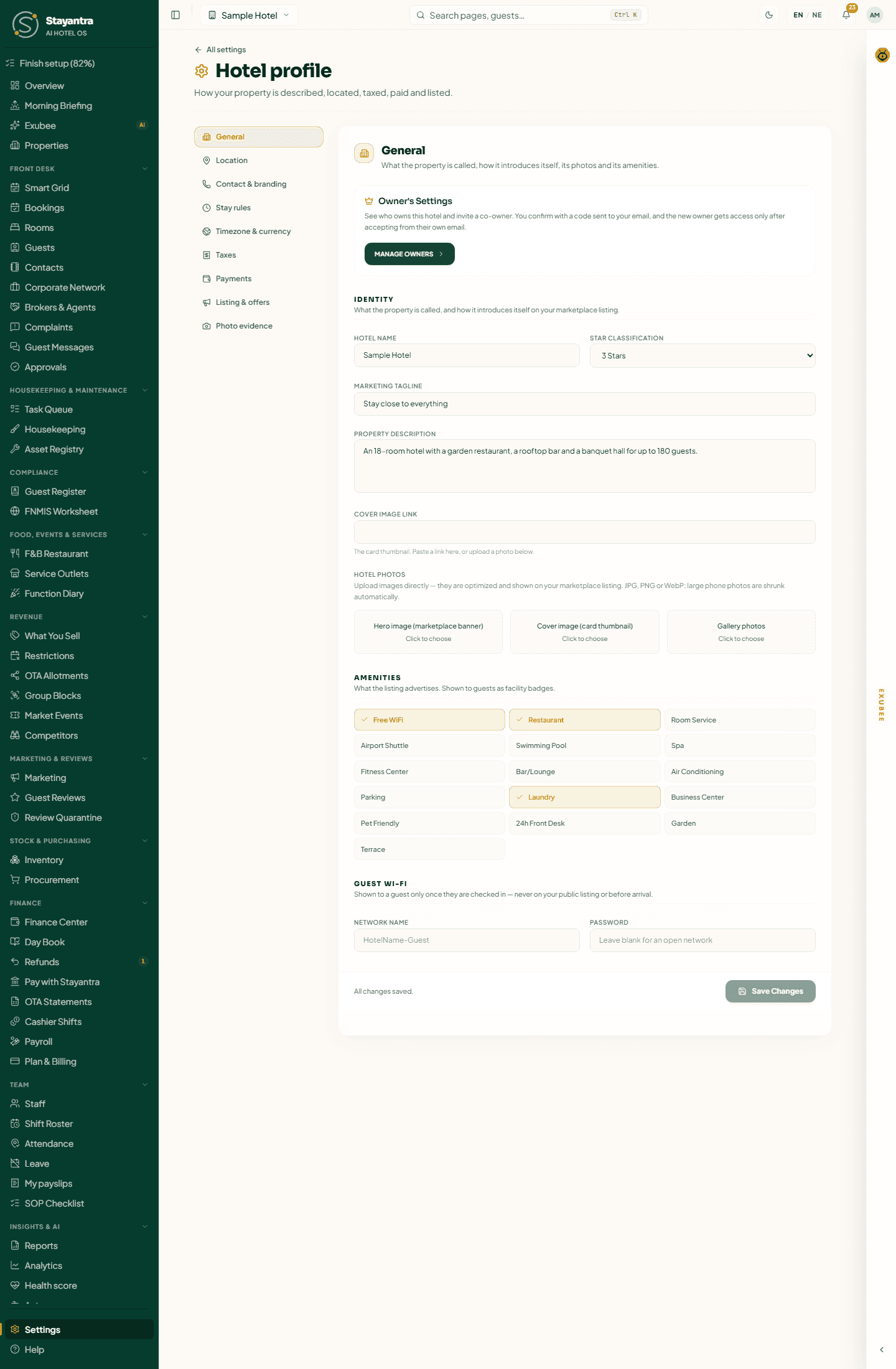
The owner sees an Owner's Settings card at the top with Manage Owners, for adding co-owners (see Staff and owners).
Identity
| Field | Why it matters |
|---|---|
| Hotel Name | Shown on your listing, guest emails and bills. |
| Star Classification | 1 to 5 stars, shown on your listing. |
| Marketing Tagline | The one-line pitch under your name on the listing. |
| Property Description | Up to 5,000 characters. Guests read it on the listing, and Exubee uses it to answer questions. |
| Cover Image Link | The card thumbnail in search results. Paste a link, or upload below. |
Under Hotel Photos, upload three kinds of photo (JPG, PNG or WebP; large phone photos are shrunk automatically):
- Hero image (marketplace banner): the wide picture at the top of your listing.
- Cover image (card thumbnail): the small picture in search results.
- Gallery photos: as many as you like. Hover a photo and click the bin to remove it.
[!IMPORTANT] The setup checklist counts Hotel details and photos as done only when the hotel has a name, address, city and at least one gallery photo.
Amenities
Tick what the hotel offers: Free WiFi, Restaurant, Room Service, Airport Shuttle, Swimming Pool, Spa, Fitness Center, Bar/Lounge, Air Conditioning, Parking, Laundry, Business Center, Pet Friendly, 24h Front Desk, Garden, Terrace. Guests see them as badges on your listing.
Guest Wi-Fi
Network name and Password (leave the password blank for an open network). A guest sees them only once checked in, never on your public listing or before arrival.
Location
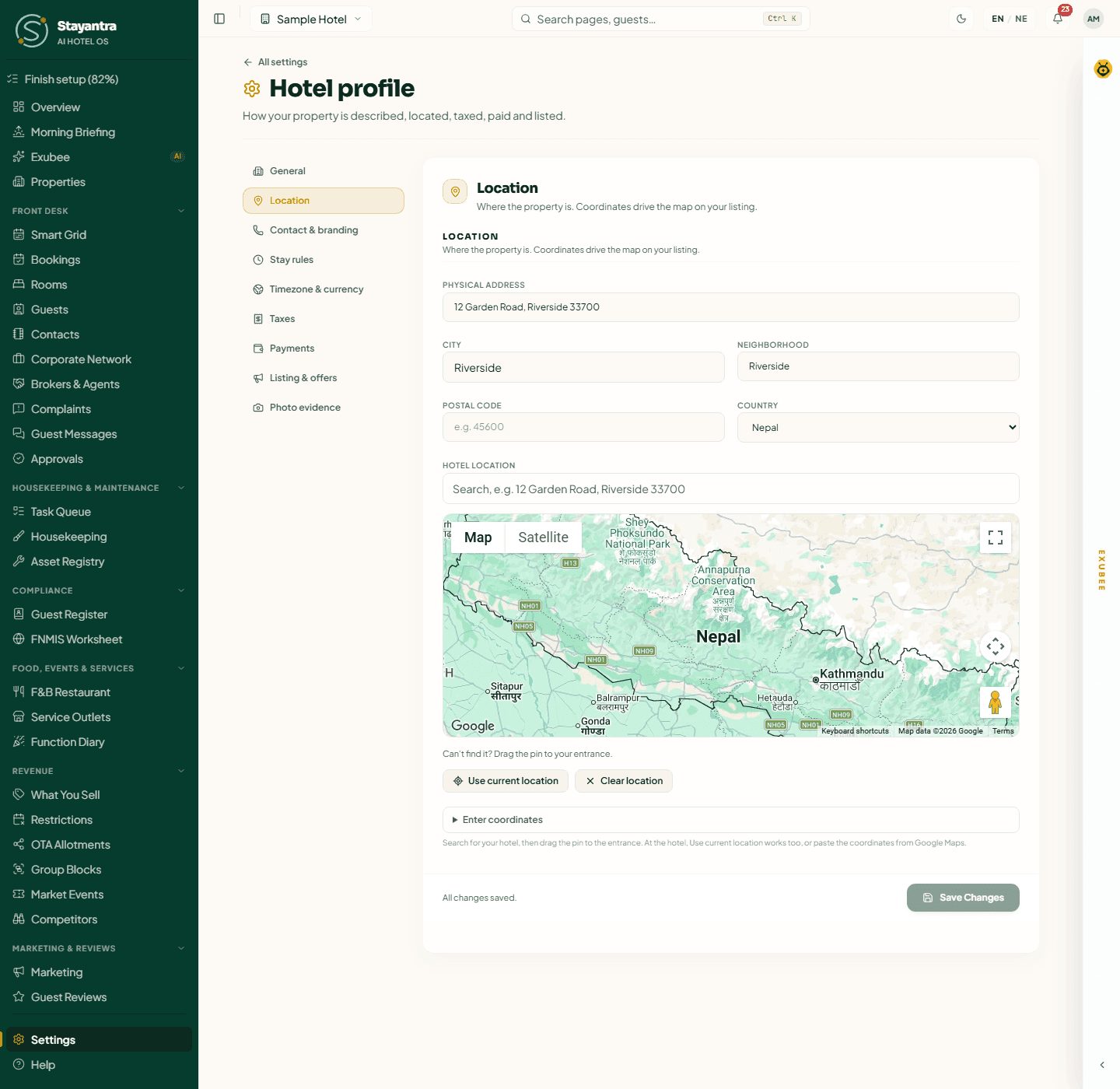
| Field | Why it matters |
|---|---|
| Physical Address | Shown to guests on the listing and confirmation. |
| City | Used for search: guests find you by city. Pick it from the suggestions as you type. |
| Neighborhood | For example "Lakeside". |
| Postal Code | Optional. |
| Country | Decides your business-verification documents and default tax rules. |
| Hotel Location | The pin on your listing's map. Search for the hotel and drag the pin to the entrance; at the hotel, click Use current location; or open Google Maps, right-click your hotel, click the coordinates to copy them and paste them with Enter coordinates. |
Contact & branding
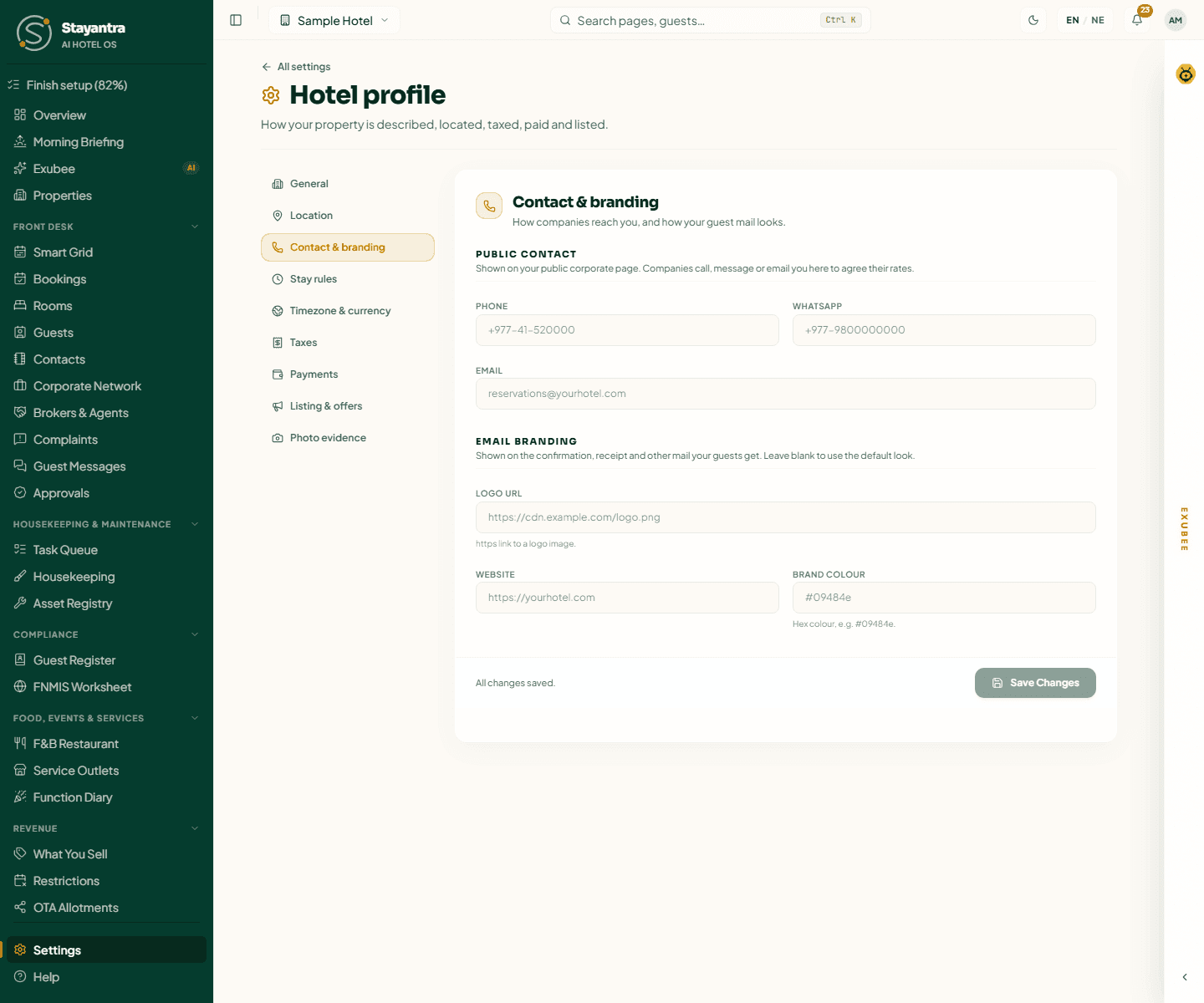
Public contact is shown on your public corporate page, where companies reach you to agree their rates:
- Phone, for example
+977-41-520000 - WhatsApp, for example
+977-9800000000 - Email, for example
reservations@yourhotel.com
Email branding changes how your guests' confirmation, receipt and other emails look. Leave it blank to use the default look.
- Logo URL: an
https://link to your logo image. - Website: your own website, if you have one.
- Brand colour: a hex colour such as
#09484e.
Stay rules
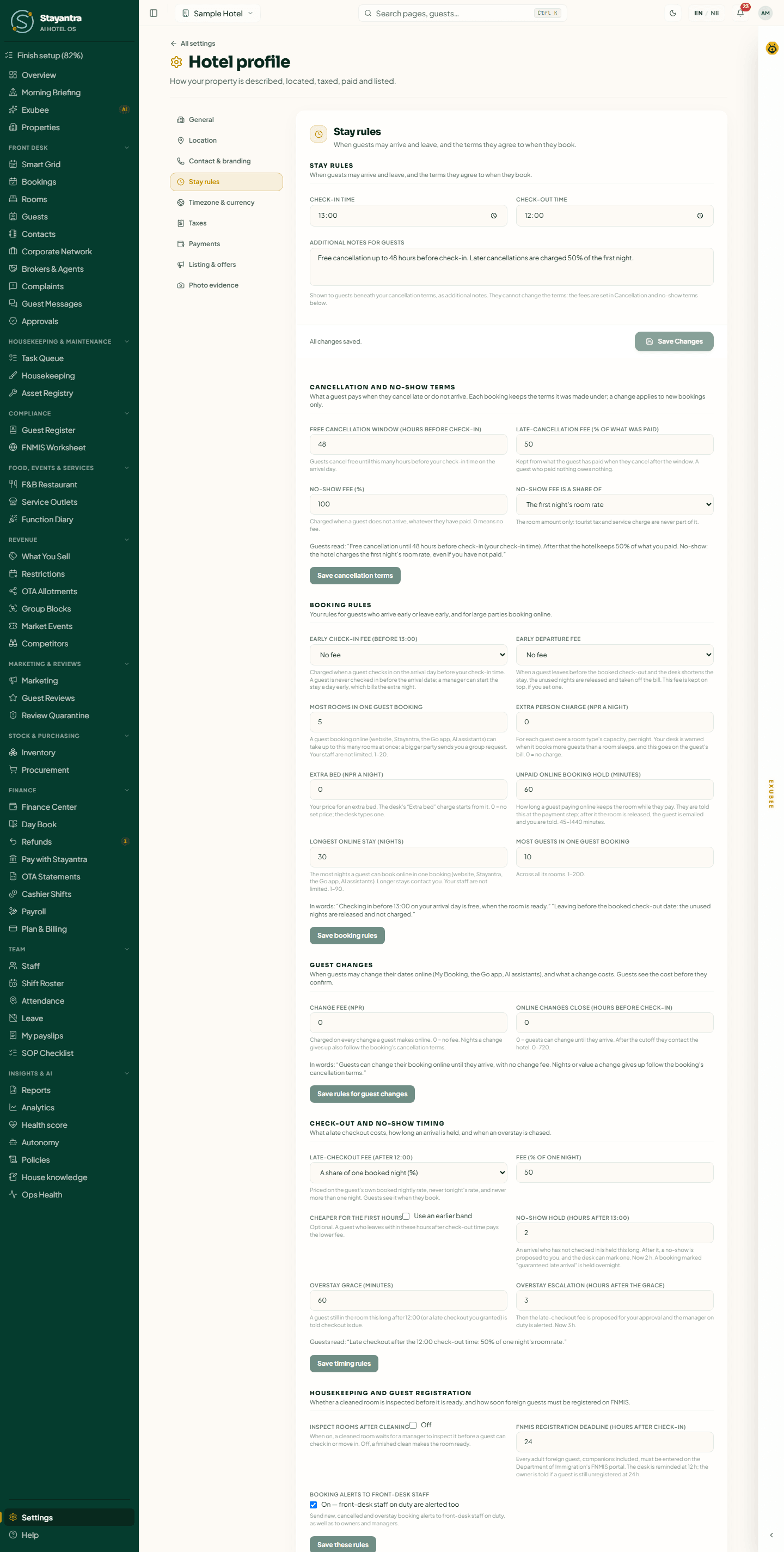
This section sets the rules guests agree to when they book. Under most cards, a line starting "Guests read:" or "In words:" shows the exact sentence guests see. The cards below the first are owner-only: a manager sees them read-only. Each saves on its own, and every owner is told when one changes ("Saved. Every owner has been told.").
Check-in and check-out
Check-in Time and Check-out Time (defaults 14:00 and 12:00). Additional notes for guests appear under your cancellation terms; they cannot change the fees, which are set in the next card. Click Save Changes.
Cancellation and no-show terms
| Field | What it does |
|---|---|
| Free cancellation window (hours before check-in) | Guests cancel free until this many hours before your check-in time on the arrival day. |
| Late-cancellation fee (% of what was paid) | Kept from what the guest has paid when they cancel after the window. A guest who paid nothing owes nothing. |
| No-show fee (%) | Charged when a guest does not arrive, whatever they have paid. 0 means no fee. |
| No-show fee is a share of | The first night's room rate or The room rate for the whole stay. Taxes and service charge are never part of it. |
Each booking keeps the terms it was made under; a change applies to new bookings only. Until you save, the card says "These are Stayantra's defaults." Click Save cancellation terms. A rate plan can carry its own terms (see Rooms and rates); every other plan sells under these.
Booking rules
| Field | What it does |
|---|---|
| Early check-in fee | No fee, A fixed amount, or A share of one night's room rate (%), for a guest checking in on the arrival day before your check-in time. |
| Early departure fee | What you keep when a guest leaves early; the unused nights are taken off the bill. |
| Most rooms in one guest booking | Online bookings above this become a group request to you (1 to 20). Your staff are not limited. |
| Extra person charge (NPR a night) | For each guest over a room type's capacity. 0 = no charge. |
| Extra bed (NPR a night) | Your price for an extra bed. |
| Unpaid online booking hold (minutes) | How long a guest paying online keeps the room while they pay (default 60). |
| Longest online stay (nights) | The most nights in one online booking (default 30, up to 90). |
| Most guests in one guest booking | Across all its rooms. |
Click Save booking rules.
Guest changes
Change fee (NPR) is charged on every change a guest makes online (0 = no fee). Online changes close (hours before check-in): after this, guests must contact you (0 = they can change until they arrive). Click Save rules for guest changes.
Check-out and no-show timing
| Field | What it does |
|---|---|
| Late-checkout fee | A share of one booked night (default 50%) or a fixed amount, never more than one night. Cheaper for the first hours adds a lower fee for guests who leave soon after check-out time. |
| No-show hold (hours after check-in time) | How long an arrival is held before a no-show is proposed to you (default 2). |
| Overstay grace (minutes) | How long after check-out before the guest is told checkout is due (default 60). |
| Overstay escalation (hours after the grace) | Then the late-checkout fee is proposed for your approval and the manager on duty is alerted (default 3). |
Click Save timing rules.
Housekeeping and guest registration
- Inspect rooms after cleaning: when on, a cleaned room waits for a manager to inspect it before a guest can check in. Off by default.
- FNMIS registration deadline (hours after check-in): every adult foreign guest must be entered on the Department of Immigration's FNMIS portal. The desk is reminded halfway, and the owner is told when it passes (default 24).
Click Save these rules.
Timezone & currency
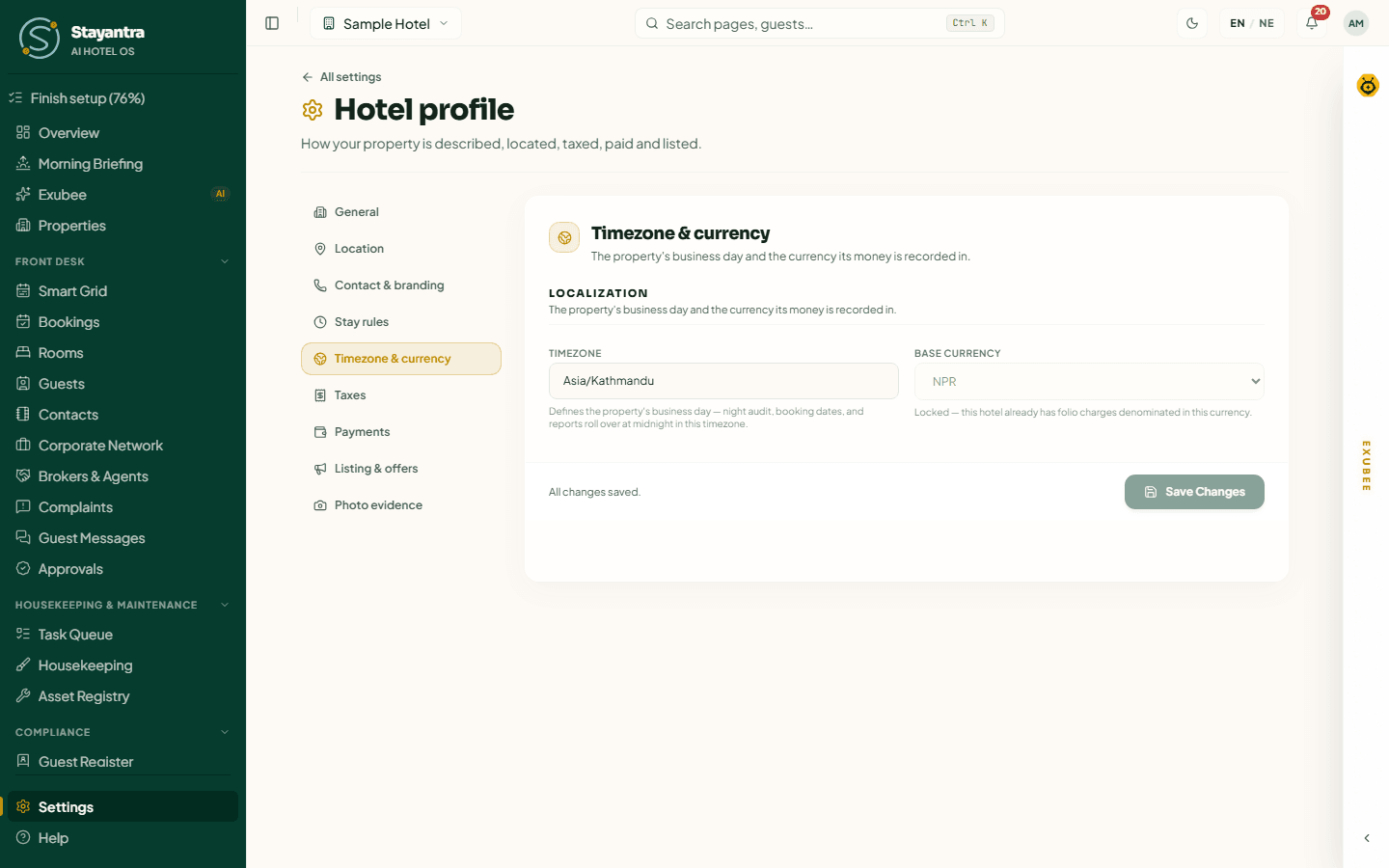
- Timezone defines your business day: night audit, booking dates and reports roll over at midnight in this timezone. For Nepal,
Asia/Kathmandu. - Base Currency is the currency every rate and folio charge is recorded in. It locks permanently once the first charge exists; after that the box is greyed out with "Locked". If it truly must change, open a support ticket.
Taxes
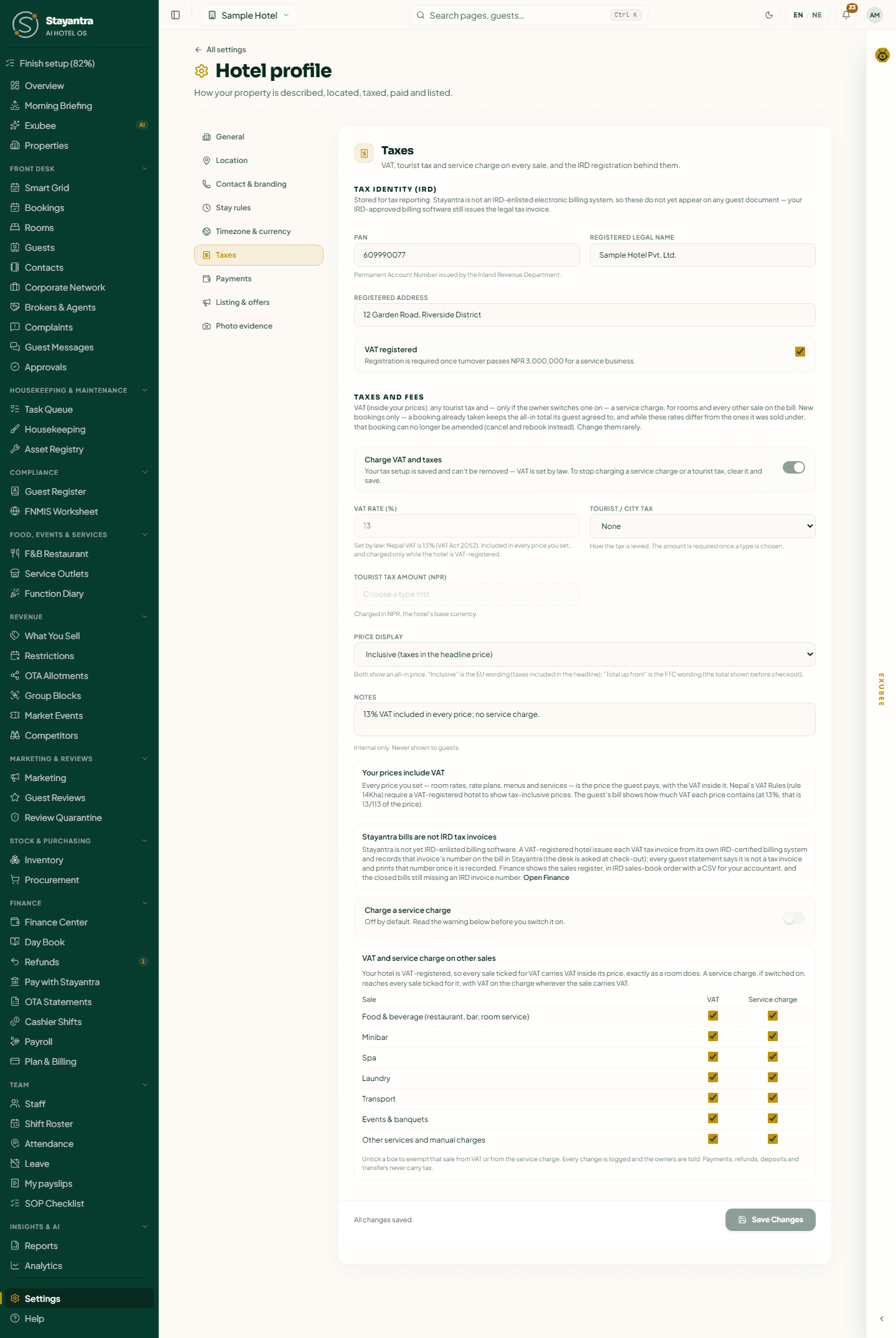
Tax identity (IRD) (owner only)
| Field | Why it matters |
|---|---|
| PAN | Your 9-digit Permanent Account Number from the Inland Revenue Department. |
| Registered Legal Name | Your company's registered name. Changing it on a verified hotel sends business verification back for review. |
| Registered Address | As registered. |
| VAT / Tax Registration Number | Hotels outside Nepal only. EU numbers are checked against VIES when you save. |
| VAT registered | Tick it if the hotel is VAT-registered. Registration is required once turnover passes NPR 3,000,000 for a service business. |
[!NOTE] Stayantra is not yet IRD-enlisted billing software, so a Stayantra bill is not a VAT tax invoice. A VAT-registered hotel issues each tax invoice from its own IRD-certified billing system and records that invoice's number on the bill in Stayantra; the desk is asked for it at check-out. Finance shows the sales register in IRD sales-book order, with a CSV for your accountant.
Taxes and fees
- Switch on Charge VAT and taxes. For a Nepal hotel it starts at 13% VAT, included in your prices, and no service charge. Once saved, it cannot be switched off again (VAT is set by law).
- VAT rate (%): for Nepal it is fixed at 13% by law. VAT is always inside your prices, never added on top: every price you set is what the guest pays, and the bill shows how much VAT it contains (13/113 of the price). VAT is charged only while VAT registered is ticked.
- Tourist / city tax: None, Fixed amount per person, per night, Fixed amount per room, per night, or Percentage of the room total, then its amount.
- Price display: Inclusive (taxes in the headline price) or Total up front. Both show guests an all-in price.
- Notes: internal only.
- Charge a service charge: off by default and owner-only. Read the warning first: in January 2023 Nepal's Supreme Court struck down the law that allowed hotels to add a 10% service charge. Confirm with your accountant before switching it on; you must tick "I have read this warning…" to save it.
- VAT and service charge on other sales: untick a sale type (Food & beverage, Minibar, Spa, Laundry, Transport, Events & banquets, Other services) to exempt it.
Click Save Changes. New rates apply to new bookings only; a booking already taken keeps its total.
Listing & offers
Visibility
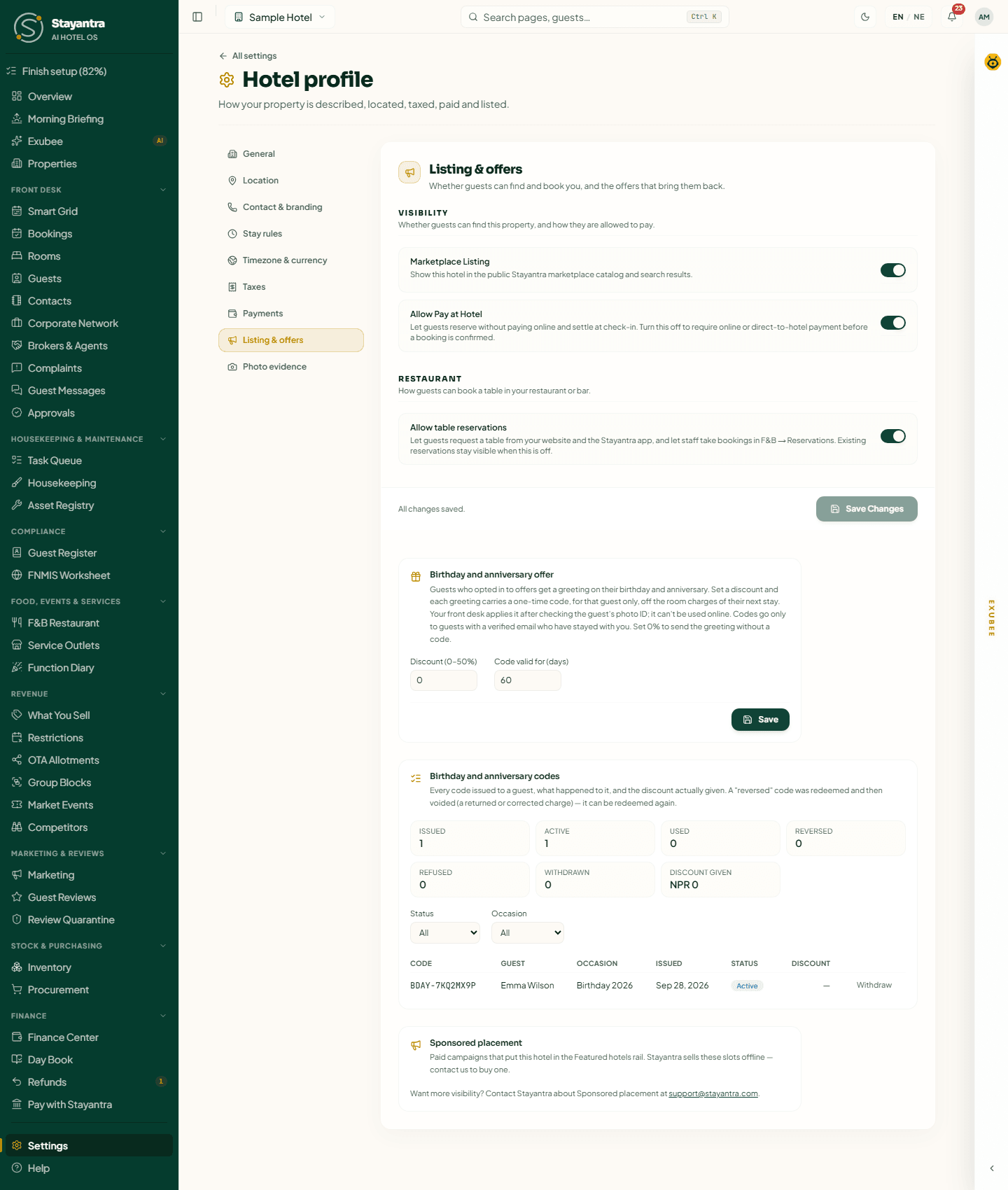
- Marketplace Listing: show the hotel in the Stayantra marketplace and the Go app. Before business verification it says "Will go live once your KYC is verified.": your choice is saved and applied the moment you are verified.
- Allow Pay at Hotel: guests can reserve without paying online and settle at check-in. Turn it off to require an online or direct-to-hotel payment before a booking is confirmed.
Restaurant
Allow table reservations lets guests request a table from your website and the Stayantra app, and staff take bookings in F&B Restaurant → Reservations.
Click Save Changes for these switches.
Birthday and anniversary offer
Guests who opted in to offers get a greeting on their birthday and anniversary. Set Discount (0–50%) and Code valid for (days), then Save, and each greeting carries a one-time code off the room charges of their next stay. The front desk applies it after checking the guest's photo ID; it cannot be used online. Leave 0% to send the greeting without a code. Birthday and anniversary codes below lists every code issued and what happened to it.
Sponsored placement
Paid campaigns that put your hotel in the Featured hotels rail of the marketplace. Stayantra sells them; contact support to buy one. The card shows your campaigns' impressions and clicks.
Photo evidence
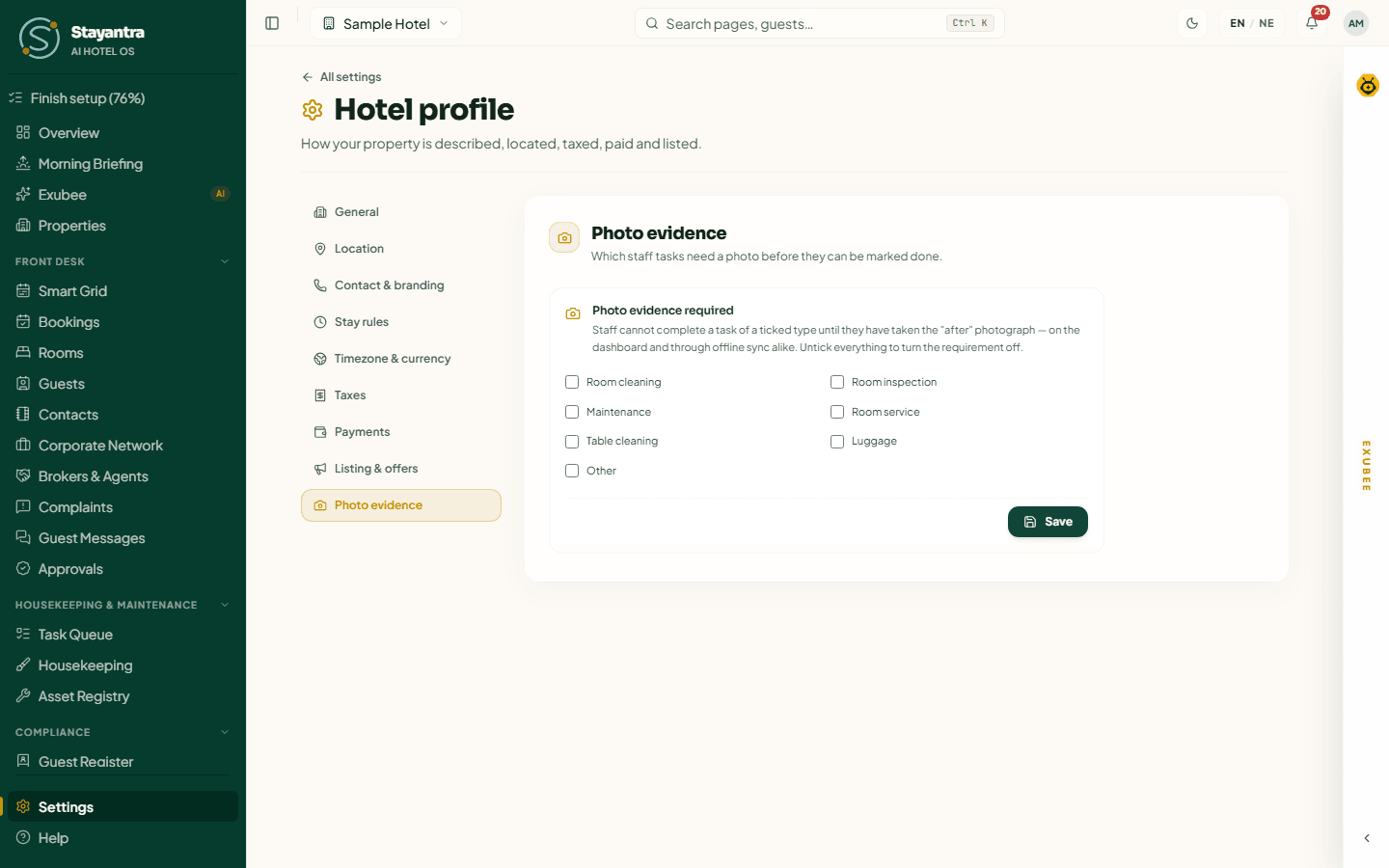
Tick the kinds of staff task that need an "after" photo before they can be marked done: Room cleaning, Room inspection, Maintenance, Room service, Table cleaning, Luggage, Other. Untick everything to turn the requirement off. Click Save.
Next
Set up what you sell: Rooms and rates. For a shorter reference of every settings page, see Settings.