
Guests
Guests is your hotel's guest book. Every person who books or stays gets a profile with their contact details, stays, lifetime spend, tags, notes and Stayantra Rewards points. Use it to recognise a returning guest, remember what they like, and reach them with an offer.
Where to find it: Front Desk → Guests. A guest's profile also opens from a booking (View guest profile) and from the search box. Who can use it: everyone can look guests up. Only managers and owners can add or edit a profile.
Find a guest
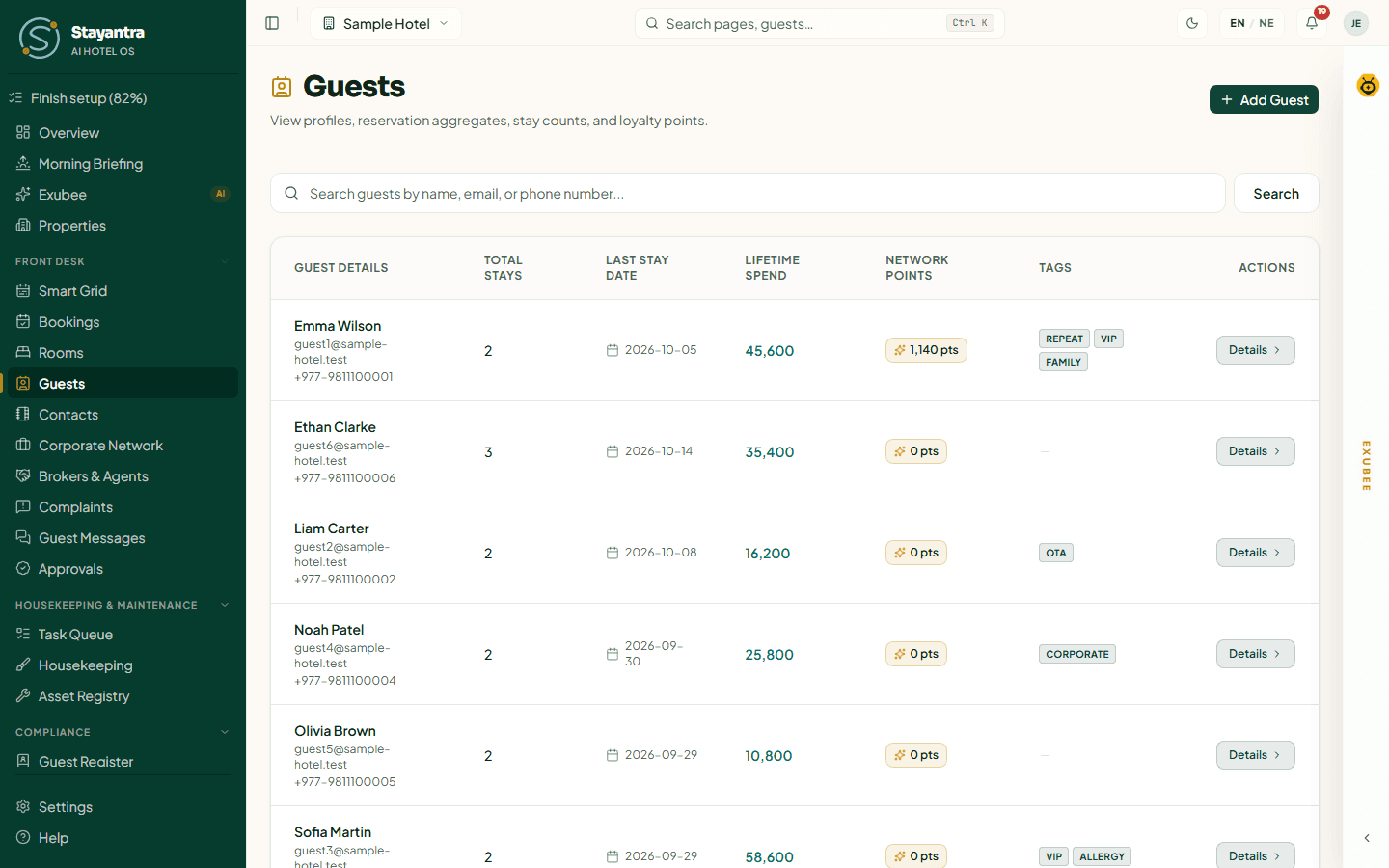
Type a name, email or phone number in Search guests by name, email, or phone number... and click Search. Clear the box to see everyone again. The list is in alphabetical order and shows:
| Column | What it shows |
|---|---|
| Guest Details | Name, email and phone. |
| Total Stays | How many bookings the guest has made with you. |
| Last Stay Date | Their most recent stay, or "Never stayed". |
| Lifetime Spend | Everything they have spent at your hotel. |
| Network points | Stayantra Rewards points the guest can spend at any participating hotel. |
| Tags | Your labels, such as VIP or CORPORATE. |
Click Details to open the profile.
[!TIP] The list shows the first 20 guests in alphabetical order. To find anyone else, search for them.
Add a guest
Guests are added automatically when you make a booking for them. To add someone before they book — a regular who phones ahead, a company contact — click Add Guest (managers and owners).
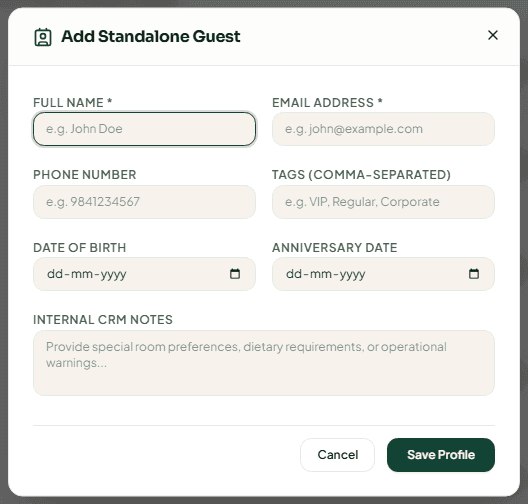
| Field | What to enter |
|---|---|
| Full Name | Required, at least 2 characters. |
| Email Address | Required. It is how Stayantra recognises the guest. |
| Phone Number | Digits only, for example 9841234567. |
| Tags (comma-separated) | For example "VIP, Regular, Corporate". |
| Date of Birth / Anniversary Date | Optional. Used for birthday and anniversary offers. |
| Internal CRM Notes | Room preferences, diet, anything the team should know. Guests never see it. |
Click Save Profile. "Guest Added Successfully" confirms it.
[!WARNING] If a guest with that email already has a profile at your hotel, Stayantra reuses it and replaces its notes and tags with what you typed. Search first, and edit the existing profile instead.
A guest's profile
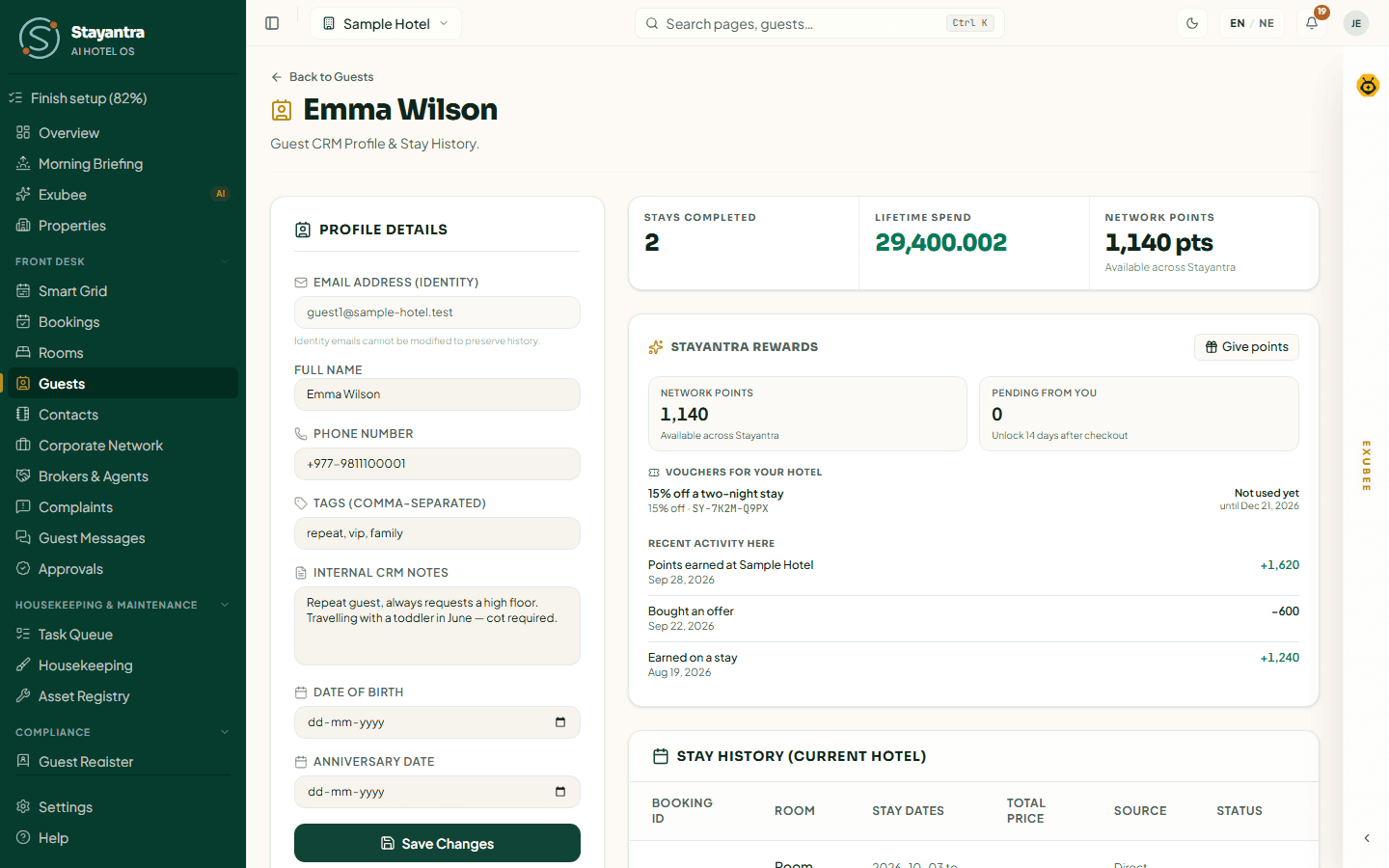
Profile details
- Email Address (Identity) cannot be changed: "Identity emails cannot be modified to preserve history."
- Full Name, Phone Number, Tags (comma-separated), Internal CRM Notes, Date of Birth and Anniversary Date can be edited by managers and owners. Click Save Changes. Everyone else sees them read-only.
- If the guest set a photo on their own Stayantra account, it appears here.
If the guest has their own Stayantra account, a new name or phone you type is kept as your hotel's version; it does not change the guest's own account.
Stays and spend
The row of figures shows Stays Completed, Lifetime Spend and Network points. Stay History (Current Hotel) lists every booking with its room, dates, price, source and status.
Marketing and campaigns
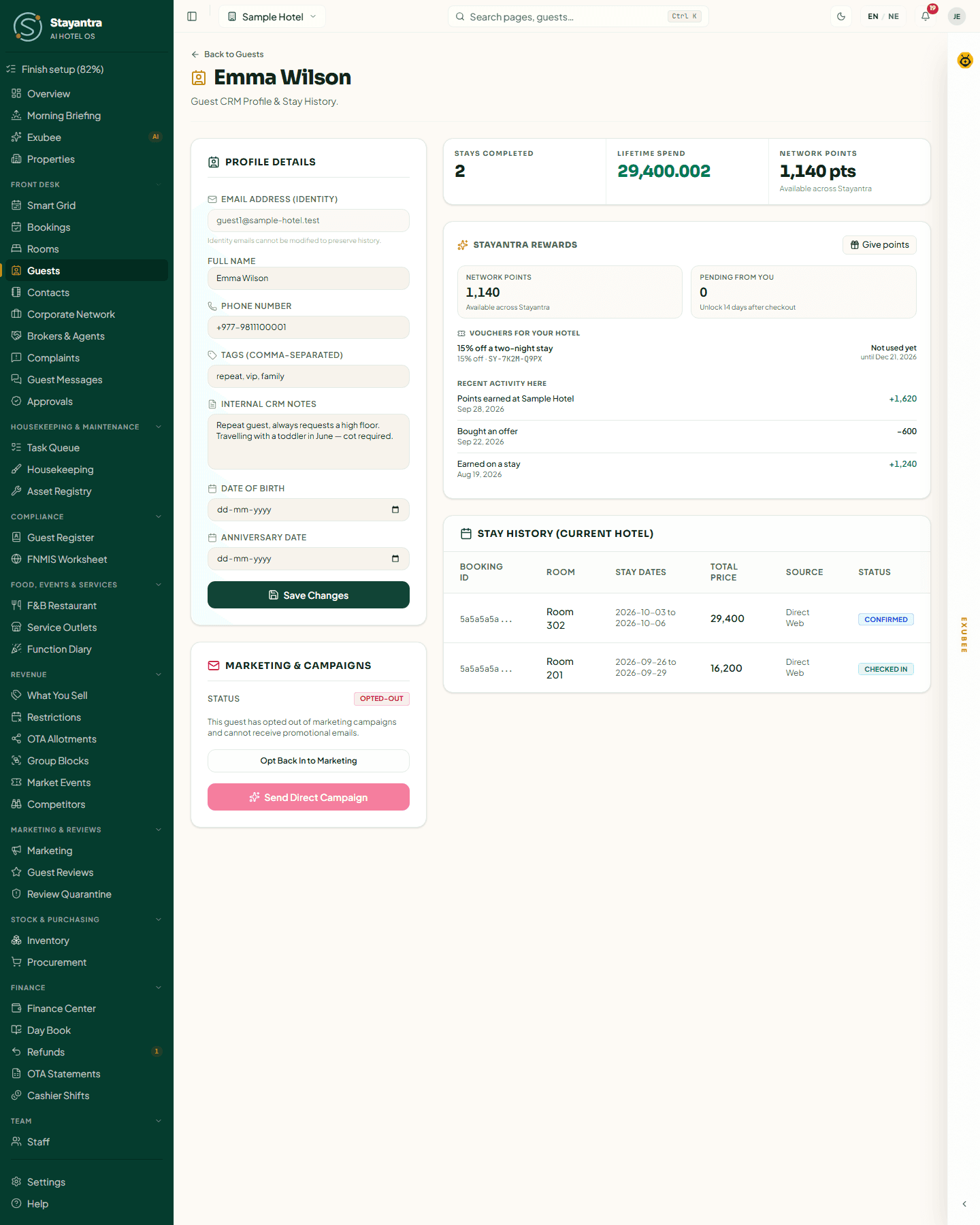
The Marketing & Campaigns card shows whether the guest is Opted-In or Opted-Out of promotional email.
- Managers and owners can switch it with Opt Out of Marketing / Opt Back In to Marketing — do this when the guest asks.
- Send Direct Campaign emails this one guest an offer: Campaign Title (Email Subject), Offer Description, an optional Discount text, CTA URL and CTA Button Text, then Send Campaign. It is greyed out when the guest has opted out.
- Campaign emails sent lists every offer sent, and whether it went.
A guest gets at most one marketing email from your hotel every 7 days. Direct campaigns are part of the Reviews & Marketing module. See Marketing.
Stayantra Rewards
When your hotel is in Stayantra Rewards, the Stayantra Rewards section shows:
- Network points — points the guest can spend at any participating hotel;
- Pending from you — points earned at your hotel that unlock 14 days after check-out;
- Vouchers for your hotel and their state (Not used yet, Held for a booking, Used, Cancelled, Expired);
- Recent activity here.
Give points (managers and owners) sends the guest points from your Rewards wallet as a thank-you or an apology. Enter the Points and Why, then confirm. The points reach the guest after 14 days. You can give up to 5,000 points at a time and 10,000 to one guest in any 30 days, and only to guests who have stayed with you.
If your hotel has not joined, the section says "Rewards not enabled for this hotel." To join, open Revenue → What You Sell and the Stayantra Rewards tab.
The guest panel on a booking
On a booking page, View guest profile opens a side panel with three tabs:
- Overview — stays, lifetime spend, loyalty points, open complaints or cancellations, a Repeat guest or No-shows chip, contact details, tags, notes and the last 8 stays.
- Documents — the guest's ID documents. Add one with Upload file (JPG, PNG, WebP or PDF, up to 10 MB) or Capture with phone, which asks a colleague's Stayantra Connect app to take the photo. Stayantra reads the name, number, dates and nationality from the image. A guest must have an ID on file before check-in — see Check a guest in.
- Web — a short public-web summary of the guest (occupation, employer, public role) with its sources. It is marked Unverified — confirm it before you act on it. It runs once per guest and counts against your hotel's monthly AI allowance.
Open full guest CRM profile opens the full profile page.
Privacy and legal records
Registering foreign guests for the Department of Immigration (FNMIS), the guest register, the emergency guest list and a guest's request to erase their data are all covered in Compliance. Guest reviews and replies are in Reviews.
Who can do what
| Action | Owner | Manager | Staff |
|---|---|---|---|
| Search guests and open a profile | Yes | Yes | Yes |
| Add a guest, edit a profile, change marketing consent | Yes | Yes | No |
| Send a direct campaign | Yes | Yes | No |
| Give Rewards points | Yes | Yes | No |
| Add an ID document | Yes | Yes | Yes |
When something goes wrong
| What you see | What to do |
|---|---|
| "No results found" | Check the spelling, or search by phone or email instead. |
| "Guest not found" | The profile belongs to another of your hotels. Switch hotel from the top bar. |
| "Cannot send campaign: this guest already received a marketing email from this hotel in the last 7 days." | Wait a few days. |
| "Guest campaigns are part of the Reviews & Marketing module." | Add the module in Plans and billing. |
| "This hotel has used its AI allowance for the month." (Web tab) | The web summary is paused until next month. |