
Split a bill
When friends or family stay together, one person books and the others can pay their share themselves. Each person gets a link by email and pays online. The booking is confirmed once every share is paid.
Who starts it: the guest who made the booking, from the Split the stay screen in the Stayantra Go app. It splits the stay equally between you and the co-travellers you add. Who pays: each person on the split, from the link in their email. They do not need a Stayantra account.
Set up a split
In the Go app, open your booking and choose Split the stay. Add each co-traveller who will pay, with their name and email. Stayantra divides the total into equal shares and sends each person a payment link. You can follow who has paid on the Group payment screen. The split must follow these rules:
- 1 to 20 payers.
- The shares must add up to the booking's total.
- The booking must be pending or confirmed.
- A booking billed partly to a company cannot be split. You see: "Part of this booking is billed to your company, so it cannot be split between payers. Please ask the front desk."
- Once anyone has paid, or has a payment in progress, the split cannot be changed.
Each payer receives an email: "[your name] asked you to pay your share (amount) for hotel", with a Pay my share button. The email tells them the booking is confirmed once every share is paid.
Pay your share
Open the link
Click Pay my share in the email. The page Pay your share opens, saying you have been invited to pay part of the stay.
Check your share
Your share shows the amount, its status, the hotel and room, the dates and number of nights, and the stay's total.
Choose how to pay
Under Pay with, choose one of the methods the hotel offers: eSewa, Khalti, or Card (if the hotel takes cards). Paying at the hotel is not offered for a split share.
Pay
Click Pay and the amount. You go to the payment provider, then back to Stayantra, which shows Confirming your payment… and then that your share is paid.
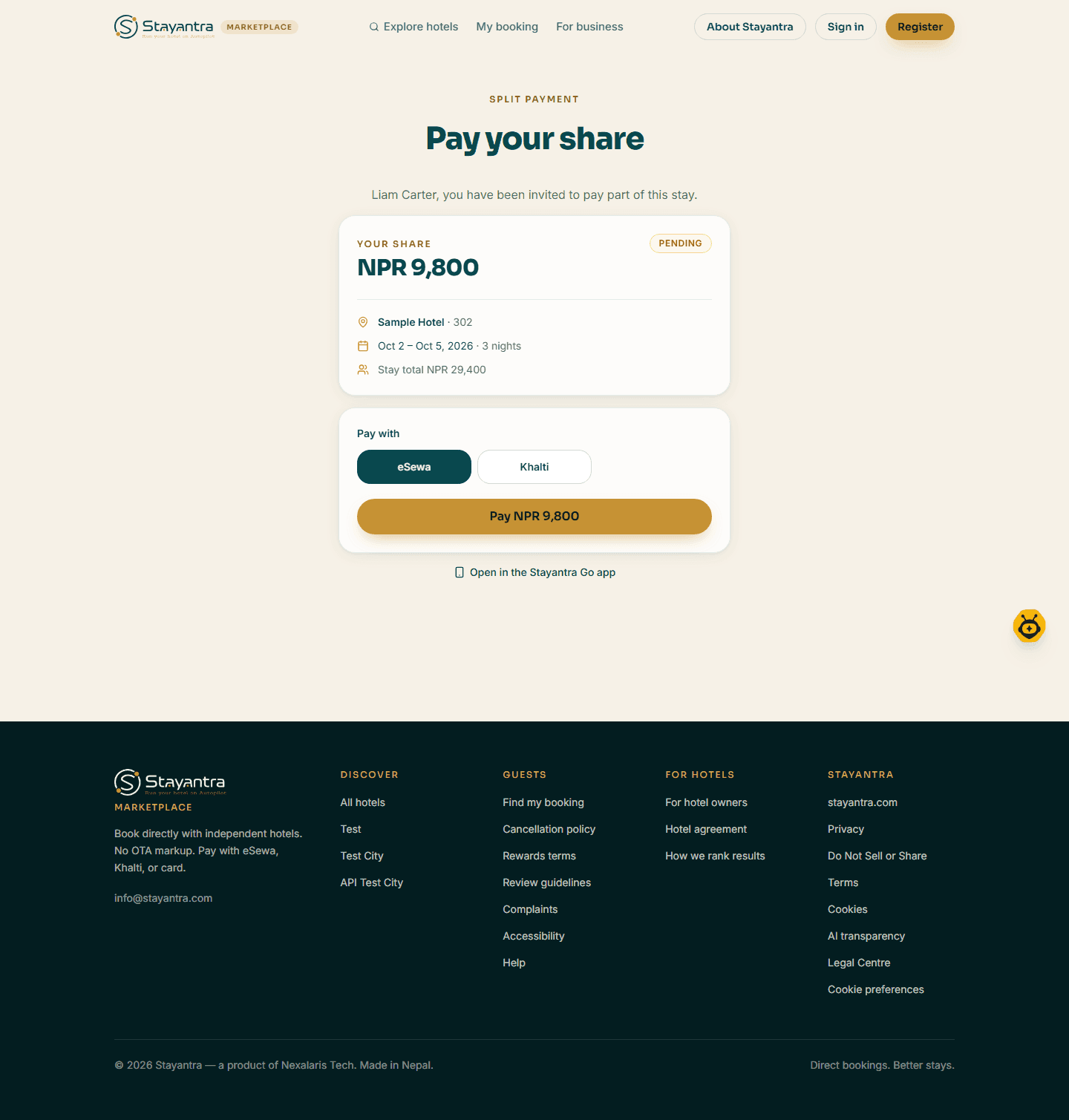
You can also open the share in the Go app with Open in the Stayantra Go app.
What each status means
| Status | What the payer sees |
|---|---|
| Pending | The share is waiting to be paid. |
| Paid | "Your share is paid. Nothing further is needed from you." |
| Refunded | The share was refunded. |
| Cancelled | "This booking was cancelled, so there is nothing to pay." |
When the paid shares add up to the booking total, a pending booking becomes confirmed.
If something goes wrong
| Message | What to do |
|---|---|
| This link has expired / "This payment link is not valid any more." | Ask the person who booked to send it again. |
| "This hotel is not accepting online payments right now…" | Contact the hotel, or ask the person who booked to pay your share. |
| A payment failed | Try again from the same link, or choose another method. |